
Affiliate disclosure: This comparison contains affiliate links for selected products. If you purchase through a qualifying link, Web Choice Desk may earn a commission at no additional cost to you. This does not affect the ranking criteria, limitations, or recommendations.
Quick verdict: Elementor is the best starting point for most beginners and small website owners because it has a practical free version and a broad ecosystem. Divi offers stronger licensing value for freelancers and agencies managing many websites. Bricks is the strongest option here for developers who want structured design systems and dynamic content, while Breakdance provides one of the most complete all-in-one visual toolsets.
There is no single best WordPress page builder for every website. A beginner building one business site has different priorities from an agency managing 50 client installations, a developer creating dynamic directories, or a marketer producing landing pages.
This guide recommends builders by use case rather than declaring a universal winner.
Prices, plans, license limits, and policies were checked on August 6, 2026, for customers in the United States. Prices are in USD unless stated otherwise. Taxes, promotions, renewal costs, and included features can change.
| Use case | Recommended option | Main reason |
|---|---|---|
| Best starting point for most users | Elementor | Practical free version and large ecosystem |
| Best licensing value for many websites | Divi | Unlimited sites and a Lifetime core license |
| Best for developers and dynamic websites | Bricks | Structured workflow, dynamic data, queries, and reusable systems |
| Best all-in-one visual toolkit | Breakdance | Forms, popups, WooCommerce, dynamic data, and code tools |
| Best for established agency workflows | Beaver Builder | Conservative workflow, client controls, Theme Builder, and white labeling |
| Best for landing pages and launch campaigns | SeedProd | Landing pages, coming-soon pages, access controls, and marketing integrations |
| Best free native WordPress option | WordPress Site Editor | No separate builder license and closer integration with WordPress core |
Elementor is the safest first builder to evaluate because you can test the central editing workflow before paying. Build a representative page with the free plugin before deciding whether Pro features are necessary.
On this page
- Quick comparison
- How the builders were selected
- Elementor: best starting point for most users
- Divi: best licensing value for freelancers and agencies
- Bricks: best for developers and structured dynamic websites
- Breakdance: best all-in-one visual toolkit
- Beaver Builder: best for established agency workflows
- SeedProd: best for landing pages and launch campaigns
- WordPress Site Editor: best free native option
- Other WordPress page builders considered
- Free versus paid WordPress page builders
- Performance and page speed
- Builder dependency and migration
- How to choose the right WordPress page builder
- Final recommendations
Quick comparison
| Builder | Free option | Paid entry point | Multi-site value | Best fit |
|---|---|---|---|---|
| Elementor | Yes | From $60/year for one site | Tiered by site count | Beginners, designers, marketers, and WooCommerce stores |
| Divi | No permanent free version | $89/year | Unlimited sites; $249 Lifetime option | Freelancers, agencies, and long-term users |
| Bricks | Online trial only | $79/year for one site | $249/year or $599 Lifetime for unlimited sites | Developers and structured dynamic websites |
| Breakdance | Yes, for unlimited sites | $99.99/year for one site | $199.99/year for unlimited sites | Users wanting many built-in professional features |
| Beaver Builder | Lite version | $89/year for one site | Plans for 3, 50, or unlimited sites | Agencies, client websites, and conservative workflows |
| SeedProd | Lite version | Basic normally $79/year | Plans support up to 100 sites | Landing pages, launches, and marketing campaigns |
| WordPress Site Editor | Included with WordPress | $0 builder license | No per-site builder fee | Native WordPress websites and lower-dependency stacks |
The lowest advertised price is not always the lowest total cost.
A builder may require separate plugins for forms, popups, dynamic content, templates, WooCommerce customization, collaboration, or client controls. Another builder may include those capabilities but cost more initially.
Training, maintenance, add-ons, migration work, and the number of active websites can matter more than a small difference in annual price.
How the builders were selected
This ranking evaluates each builder using criteria that affect a real purchasing decision:
- availability of a free version or trial;
- annual and Lifetime licensing;
- number of supported websites;
- Theme Builder capabilities;
- dynamic content and query tools;
- forms and popups;
- WooCommerce support;
- client and agency workflows;
- third-party ecosystem;
- refund and renewal conditions;
- switching costs and builder dependency.
Web Choice Desk did not perform a controlled laboratory speed test for this ranking. No loading time, Core Web Vitals result, DOM count, or benchmark score is presented as an original measurement.
Performance conclusions are therefore limited to architecture, workflow, feature scope, and the practical factors that can make any builder installation faster or slower.
The order of the list is not a universal score. Each option is recommended for a specific type of user.
Elementor: best starting point for most users
Elementor is the easiest builder on this list to recommend as a starting point because its free plugin provides a genuine visual editing experience without requiring an initial purchase.
The editor traditionally uses a persistent sidebar for elements and settings while the page remains visible on the canvas. This structure is familiar to many users coming from design applications and other visual builders.
Elementor is particularly strong when a project benefits from:
- a large template and add-on ecosystem;
- Theme Builder templates;
- custom fields and dynamic content;
- forms and stored submissions;
- Popup Builder;
- WooCommerce customization;
- integrations with marketing and automation tools.
Elementor 4 adds a newer Atomic workflow based on smaller elements, reusable classes, variables, and components. Existing websites are not automatically converted, and the Atomic system can coexist with legacy Elementor widgets.
Elementor pricing
Elementor Free can be installed without a paid license. Paid Editor Pro plans currently begin with Essential for one website.
| Plan | Websites | Current annual price | Important limitation or benefit |
|---|---|---|---|
| Free | Unlimited free installations | $0 | Core editor without the full Pro toolset |
| Essential | 1 | $60 | No Popup Builder, custom code, custom CSS, or ecommerce features |
| Advanced Solo | 1 | $84 | More complete Pro feature set for one site |
| Advanced | 3 | $108 | Lower effective cost when all three licenses are used |
Elementor also offers larger multi-site plans and Elementor One subscriptions that combine the editor with shared credits and connected services.
The main pricing drawback is the absence of a Lifetime license. Pro access, updates, support, and paid editing capabilities depend on an active subscription.
Who should choose Elementor?
- beginners who want to test a builder for free;
- designers and marketers who prefer a sidebar workflow;
- owners of one advanced business website;
- WooCommerce stores needing visual template control;
- teams that depend on Elementor-specific integrations.
Who should avoid Elementor?
- users who want a one-time license;
- agencies prioritizing the lowest licensing cost for many sites;
- projects that only need simple native WordPress layouts;
- users unwilling to manage add-ons and performance.
Read our complete Elementor review for a deeper analysis of Elementor 4, Free versus Pro, pricing, WooCommerce tools, performance considerations, and migration risks.
Divi: best licensing value for freelancers and agencies
Divi’s strongest advantage is not that it automatically produces a better website. Its advantage is the licensing model.
The standard annual membership and the Lifetime plan both cover unlimited websites. That can reduce the effective license cost substantially for freelancers and agencies managing several client projects.
The core membership includes:
- Divi Theme and Divi Builder;
- Theme Builder;
- WooCommerce modules and templates;
- Divi Dash;
- Extra, Bloom, and Monarch;
- use on unlimited websites.
Divi pricing
| Plan | Websites | Current price | Billing |
|---|---|---|---|
| Divi Yearly | Unlimited | $89 | Renews annually |
| Divi Lifetime | Unlimited | $249 | One-time payment for the core products |
| Divi Pro | Unlimited | $277/year | Includes recurring Pro services |
| Lifetime + Pro | Unlimited | $297 initially | Core Divi is Lifetime; Pro services renew separately |
Divi Lifetime does not make every service permanent. Divi AI, Cloud, Teams, and VIP remain recurring when included through a Pro bundle.
Divi does not currently offer a permanent free version comparable to Elementor Free or Breakdance Free. A purchase is required to install the complete product, although eligible purchases currently have a 30-day refund period.
Who should choose Divi?
- freelancers building several websites;
- agencies standardizing on one builder;
- users who expect to keep the builder for several years;
- buyers who prefer a Lifetime core license;
- teams already comfortable with Divi’s visual workflow.
Who should avoid Divi?
- beginners who want to test a complete local version without paying;
- users who strongly prefer a persistent sidebar editor;
- projects that already depend on Elementor-specific tools;
- buyers who assume the Lifetime plan includes every future cloud service.
Divi is most compelling when the unlimited-site license will actually be used. Compare the annual and Lifetime options before choosing the higher upfront payment.
See our complete Divi review and the detailed Elementor versus Divi comparison.
Bricks: best for developers and structured dynamic websites
Bricks is a WordPress theme with an integrated visual builder rather than a conventional page-builder plugin that can be activated alongside any theme. For a deeper look at its licensing, components, Query Loops, WooCommerce tools, and limitations, read our full Bricks Builder review.
Its workflow is particularly attractive to users who want visual editing without giving up structured CSS, reusable classes, dynamic data, query loops, conditions, and developer-oriented controls.
All current Bricks plans include the full feature set. The plans mainly differ by the number of licensed websites and whether the license renews annually or lasts for the lifetime of the product.
| Plan | Websites | Current price |
|---|---|---|
| Starter | 1 | $79/year |
| Business | 3 | $149/year |
| Agency | Unlimited | $249/year |
| Ultimate Lifetime | Unlimited | $599 once |
Local and staging websites do not count against the license limit. Bricks also currently provides a 60-day refund period for eligible initial purchases.
Important built-in capabilities include:
- Query Loop Builder;
- dynamic data;
- conditions and interactions;
- Popup Builder;
- WooCommerce Builder;
- forms;
- menu building;
- reusable classes and global design controls.
Bricks does not offer a downloadable permanent free version. Prospective users can evaluate it through an online trial.
Who should choose Bricks?
- developers who understand HTML and CSS concepts;
- agencies building dynamic or data-driven websites;
- users who want reusable class-based design systems;
- buyers who want an unlimited Lifetime option;
- projects that need query loops and conditional output.
Who should avoid Bricks?
- complete beginners who want the simplest possible interface;
- users who need to retain an existing third-party WordPress theme;
- buyers who require a permanent free local version;
- teams unwilling to establish naming and CSS conventions.
Review the current Bricks plans and license terms.
Breakdance: best all-in-one visual toolkit
Breakdance is designed to include many capabilities that Elementor users might otherwise obtain through Pro features or separate add-ons.
Its paid version combines the visual builder with:
- Theme Builder functionality;
- dynamic data and conditions;
- forms with advanced fields;
- popups;
- WooCommerce tools;
- client mode;
- class management and element presets;
- PHP, HTML, CSS, and developer tools.
Breakdance Free can be used on unlimited websites. It includes a limited design library and basic versions of WooCommerce, forms, popups, and dynamic data.
| Plan | Websites | Current price |
|---|---|---|
| Free | Unlimited | $0 |
| Pro | 1 | $99.99/year |
| Pro Unlimited | Unlimited | $199.99/year |
| Agency | Unlimited | $799.99/year |
Breakdance currently states that the price paid when subscribing remains the renewal price for that subscription. New-customer pricing may increase later.
If a paid subscription is not renewed, existing Pro functionality on websites already built does not immediately stop working. Updates, support, and access to the design library are the main continuing subscription benefits.
Who should choose Breakdance?
- users who want forms, popups, WooCommerce, and dynamic content in one product;
- freelancers wanting an unlimited-site annual license;
- developers who want integrated code tools;
- Elementor users who want a similar visual concept with a different feature model;
- buyers who want a capable free version.
Who should avoid Breakdance?
- users who require a Lifetime license;
- teams deeply dependent on Elementor-specific extensions;
- buyers assuming every cloud or AI service is included;
- agencies that do not need the additional Agency-specific license terms.
Compare the current Breakdance Free, Pro, and Agency plans.
Beaver Builder: best for established agency workflows
Beaver Builder is an established WordPress builder with a more restrained approach than products that compete by adding a very large number of effects and widgets.
Its appeal is strongest for freelancers and agencies that value predictable editing, client controls, multisite support, white labeling, and a long-established product ecosystem.
Current paid plans include the page-builder plugin, Beaver Builder Theme, Beaver Themer, Loop Builder, and WooCommerce support.
| Plan | Live websites | Current price |
|---|---|---|
| Starter | 1 | $89/year |
| Plus | 3 | $179/year |
| Professional | 50 | $299/year |
| Unlimited | Unlimited | $546/year |
Development and staging sites do not count toward the production-site limit. Paid subscriptions renew annually at the standard price unless auto-renewal is disabled.
A free Lite version is available through WordPress.org, and Beaver Builder also provides a browser-based demonstration of its paid features.
Who should choose Beaver Builder?
- agencies maintaining established Beaver Builder workflows;
- developers creating custom modules;
- teams needing white labeling and multisite support;
- client websites where predictable editing is more important than novelty;
- ACF users creating reusable content blocks.
Who should avoid Beaver Builder?
- buyers prioritizing the lowest unlimited-site price;
- users looking for a Lifetime license;
- marketers wanting the largest collection of built-in conversion widgets;
- beginners choosing mainly by template volume.
Review the current Beaver Builder plans.
SeedProd: best for landing pages and launch campaigns
SeedProd began as a tool for coming-soon and maintenance pages and has expanded into a broader WordPress page and theme builder.
It remains particularly well suited to marketing-focused pages such as:
- coming-soon pages;
- maintenance pages;
- sales pages;
- lead-capture pages;
- webinar pages;
- thank-you pages;
- custom login and 404 pages.
Its plans combine templates, page blocks, access controls, subscriber management, and email-marketing integrations.
SeedProd’s pricing page uses introductory offers. The prices displayed during a promotion may be lower than the normal annual price, and renewals are charged at the full rate.
| Plan | Websites | Normal annual price | Primary scope |
|---|---|---|---|
| Basic | 1 | $79 | Landing-page essentials |
| Plus | 3 | $199 | Landing pages, kits, and marketing integrations |
| Pro | 5 | $399 | Full website and Theme Builder features |
| Elite | 100 | $599 | WooCommerce and larger multi-site use |
Theme Builder is available on Pro and higher plans. WooCommerce support is positioned in the Elite plan.
Eligible purchases currently have a 14-day refund period.
Who should choose SeedProd?
- marketers building campaign-specific pages;
- businesses launching a website or product;
- users needing coming-soon and maintenance controls;
- teams that value email-marketing integrations;
- users focused more on conversion pages than complex dynamic websites.
Who should avoid SeedProd?
- buyers expecting the promotional price to remain at renewal;
- developers prioritizing query loops and advanced dynamic systems;
- agencies requiring unlimited-site licensing;
- users who only need the native WordPress editor.
Check SeedProd’s current introductory and renewal pricing.
WordPress Site Editor: best free native option
The WordPress block editor and Site Editor are not third-party page builders, but they should be considered before adding another visual system.
With a compatible block theme, WordPress can visually edit:
- pages and posts;
- headers and footers;
- templates and template parts;
- global styles;
- navigation;
- archive and single-post layouts.
The main advantage is architectural simplicity. There is no separate page-builder subscription, and the content remains closer to WordPress core.
The tradeoff is that some users find the native editing workflow less convenient for highly customized marketing pages. Advanced forms, popups, animations, dynamic-query interfaces, and specialized ecommerce templates may still require plugins or custom development.
Who should choose the Site Editor?
- users who want to minimize third-party dependencies;
- blogs and editorial websites;
- simple business websites;
- projects with developers capable of extending block themes;
- users who want to avoid a recurring builder license.
Who should choose a third-party builder instead?
- marketers producing many visually complex landing pages;
- teams that need advanced dynamic content without custom code;
- stores requiring extensive visual WooCommerce customization;
- designers who prefer a more mature visual workflow;
- agencies relying on reusable cloud templates and client controls.
Other WordPress page builders considered
This ranking does not attempt to list every WordPress builder available. Products were prioritized when their licensing, workflow, feature scope, or ideal user created a clear distinction within the comparison.
Other established tools may be added after their current plans, workflows, support policies, migration requirements, and practical use cases have been reviewed to the same standard. Their absence from this version should not be interpreted as a negative recommendation.
Free versus paid WordPress page builders
A free builder can be sufficient when the project only needs basic pages, responsive layouts, standard content elements, and a simple visual workflow.
The strongest free starting points in this list are:
- Elementor Free for a familiar sidebar editor and broad ecosystem;
- Breakdance Free for unlimited installations and basic versions of several professional tools;
- Beaver Builder Lite for evaluating the Beaver workflow;
- SeedProd Lite for basic landing and launch pages;
- WordPress Site Editor for the native, license-free approach.
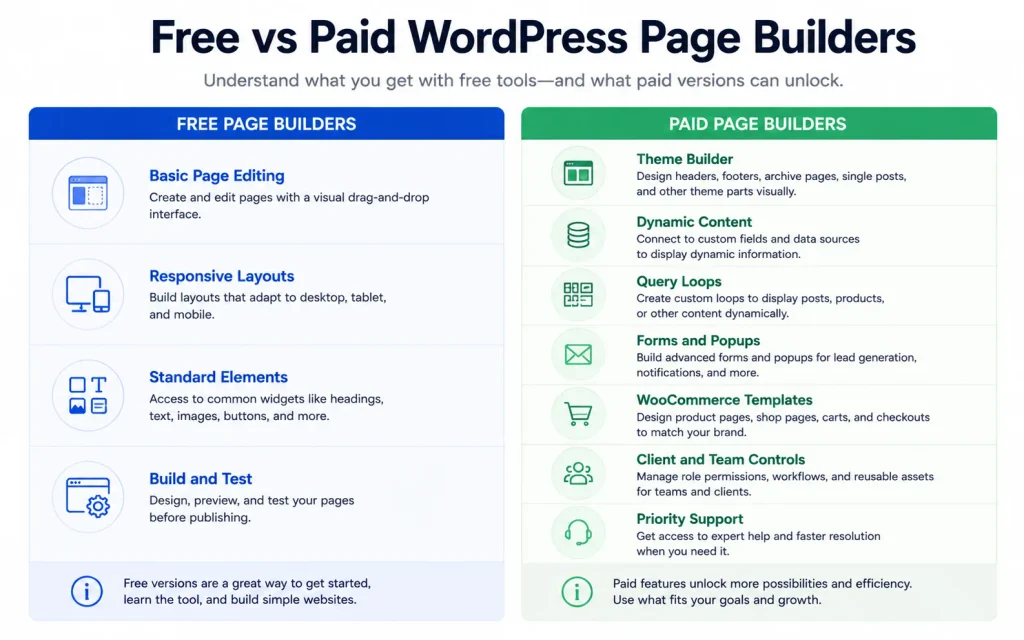
A paid builder becomes easier to justify when it replaces several separate plugins or saves substantial development time.
Common paid capabilities include:
- Theme Builder templates;
- custom fields and dynamic data;
- query loops;
- forms and stored submissions;
- popups and display conditions;
- WooCommerce templates;
- custom code and CSS;
- professional support;
- client and agency controls.
Do not upgrade only because a pricing table contains more checkmarks. Upgrade when the missing capability has a clear role in the website.
Performance and page speed
No builder is automatically the fastest in every implementation.
A responsible speed comparison would require:
- the same hosting;
- the same WordPress and PHP versions;
- equivalent page layouts;
- matching images and fonts;
- the same analytics and third-party scripts;
- identical cache and CDN settings;
- repeated desktop and mobile measurements;
- documented test dates and conditions.
This article did not perform that benchmark.
Any of these builders can produce a slow website when the implementation uses:
- large uncompressed images;
- several widget add-ons;
- background videos;
- multiple font families;
- excessive animation;
- deeply nested layouts;
- several marketing and tracking scripts;
- poor hosting and caching.
A disciplined page built with Elementor or Divi can outperform a badly implemented page built with a more developer-oriented product. The builder name alone does not determine the final result.
Builder dependency and migration
A page builder is not only a design purchase. It is a long-term content and maintenance decision.
A website can become dependent on:
- builder-specific elements;
- theme templates;
- forms and popups;
- dynamic tags and query systems;
- global styles and classes;
- custom CSS tied to generated markup;
- third-party add-ons.
Changing builders may require rebuilding layouts rather than simply installing a replacement plugin.
Before standardizing on a builder, consider:
- how many pages will depend on it;
- whether normal blog content can remain in native WordPress blocks;
- whether clients need to edit the pages;
- which forms and popups would need replacement;
- whether the site may be sold or transferred;
- whether the team can support the builder several years later.
A practical approach is to use the visual builder where its capabilities provide clear value while keeping ordinary editorial content in native blocks when possible.
How to choose the right WordPress page builder
1. Decide whether you need a builder
Start with the native WordPress editor when the website only needs conventional pages, posts, headers, footers, and a simple design system.
Add a third-party builder when it solves a confirmed design, marketing, ecommerce, dynamic-content, or client-workflow requirement.
2. Count the production websites
Site count can completely change the financial result.
Elementor Advanced Solo may be economical for one advanced website. Divi, Bricks Agency, or Breakdance Unlimited can become more attractive when the same builder is used across many client installations.
3. Compare equivalent features
Do not compare an entry plan that excludes ecommerce, popups, or dynamic fields with a complete plan from another builder.
List the exact features your website requires and compare plans that provide equivalent capabilities.
4. Calculate the full annual stack
Include the cost of:
- the builder license;
- forms;
- popups;
- dynamic-content add-ons;
- template libraries;
- WooCommerce extensions;
- AI or cloud services;
- maintenance and support.
5. Build a representative test page
Do not evaluate a builder using only a blank canvas or a promotional demonstration.
Create a page containing the type of sections, responsive behavior, forms, templates, and dynamic data the real project will use.
6. Consider the exit plan
Estimate what would need to be rebuilt if the builder were discontinued, became too expensive, or no longer matched the project.
Final recommendations
Choose Elementor when you want the safest free starting point, a familiar sidebar interface, and access to the broadest ecosystem in this group.
Choose Divi when unlimited-site licensing and long-term cost matter more than having a permanent free version.
Choose Bricks when you understand structured CSS and need dynamic data, queries, conditions, and reusable design systems.
Choose Breakdance when you want forms, popups, WooCommerce, dynamic content, and developer tools integrated into one visual builder.
Choose Beaver Builder when you value an established agency workflow, white labeling, multisite support, and predictable client editing.
Choose SeedProd when the main requirement is building landing pages, launch pages, lead-generation campaigns, or maintenance experiences.
Choose the WordPress Site Editor when you want to minimize dependencies and your design requirements can be satisfied by a block theme and native WordPress tools.
The best WordPress page builder is the one that satisfies the project’s real requirements without adding unnecessary licensing, maintenance, or migration costs.
For most beginners, the practical first step is to try Elementor Free. For agencies and freelancers managing many websites, compare Elementor’s site-based plans with Divi’s unlimited-site and Lifetime licensing before committing.
Frequently asked questions
Elementor is the safest starting point for most beginners because its free version provides a genuine visual editing workflow without requiring payment. Users who only need simple pages should also test the native WordPress Site Editor before adding a third-party builder.
Elementor Free is the strongest general-purpose starting point for most users. Breakdance Free includes basic versions of several professional tools and can be used on unlimited websites, while the WordPress Site Editor is the best option for users who want a native workflow without a separate builder license.
Divi offers strong raw licensing value because its standard plans cover unlimited websites and its core products have a Lifetime option. Bricks and Breakdance may be better for agencies that prioritize structured development, dynamic data, or a broader set of integrated professional tools.
There is no responsible universal winner without testing equivalent pages on identical hosting with the same images, fonts, scripts, caching, and functionality. Page structure, add-ons, media, hosting, and optimization can affect performance more than the builder name alone.
Elementor is generally the better starting point for users who want a free version, a sidebar editor, and a broad extension ecosystem. Divi generally provides better licensing value for freelancers and agencies managing many websites.
Bricks is a strong option for developers who understand HTML and CSS concepts and need reusable classes, dynamic data, query loops, conditions, and structured design systems. Complete beginners may find Elementor or another more conventional visual workflow easier to approach.
Use the WordPress block editor and Site Editor when the project only needs conventional pages, posts, templates, and a simple design system. A third-party builder becomes easier to justify when you need advanced visual layouts, dynamic data, popups, forms, WooCommerce templates, or agency workflows.
Related reading
- Elementor Review 2026: features, pricing, performance, and drawbacks
- Complete Divi and Elegant Themes review
- Elementor vs Divi: pricing, features, performance, and best use cases
- Divi pricing, renewals, Lifetime, and Pro services
- Is Divi Lifetime worth it?
Trademark notice: Elementor, Divi, Bricks, Breakdance, Beaver Builder, SeedProd, WordPress, and WooCommerce are trademarks of their respective owners. Web Choice Desk is not affiliated with or endorsed by these companies.
Prices, plans, license limits, and policies last checked: August 6, 2026.
Affiliate disclosure: This article contains affiliate links. If you purchase a product through one of these links, Web Choice Desk may earn a commission at no additional cost to you. This relationship does not change the prices, limitations, or recommendations presented in this ranking.
Image credits: AI25.Studio