
Divi is worth considering if you build multiple WordPress websites, work with clients, or expect to use the same visual builder for at least three years. Its unlimited-site license and $249 Lifetime option are the strongest reasons to choose it.
Building multiple WordPress sites? Divi is most attractive for freelancers, agencies, and long-term users. Compare the yearly, Lifetime, and Pro plans before you buy.
✓ Unlimited website usage
✓ $89 yearly or $249 one time for core Divi
✓ 30-day money-back guarantee
It is less compelling for someone building one basic website, anyone who needs a permanent free plan, or users who want to minimize their dependence on a proprietary page builder.
This Elegant Themes review covers Divi 5.9, current pricing, Yearly versus Lifetime, Divi Pro, Extra, Bloom, Monarch, Divi Dash, WooCommerce support, cancellation terms, major drawbacks, and the types of users who should consider an alternative.
On this page
- Quick verdict
- How we researched this Divi review
- What is Elegant Themes?
- What is included with an Elegant Themes membership?
- Divi 5.9: the current generation of the builder
- What is the Extra Theme?
- What is Bloom?
- What is Monarch?
- What is Divi Dash?
- What is included with Divi Pro?
- Elegant Themes pricing
- Divi Yearly vs Lifetime: when does Lifetime pay off?
- Is Divi Pro worth 7 per year?
- Can Divi be used on client websites?
- Is Divi easy to use?
- What about Divi performance?
- Is Divi good for SEO?
- What about accessibility?
- Does Divi work with WooCommerce?
- What is the Divi Marketplace?
- Support, cancellation, and refunds
- Divi’s main advantages
- Divi’s main disadvantages
- Who should buy Divi?
- Who should consider an alternative?
- Divi vs Elementor: the short answer
- Alternatives to Divi
- Is Elegant Themes legitimate?
- Final verdict: is Divi worth it in 2026?
- Frequently asked questions
Quick verdict
| Question | Web Choice Desk assessment |
|---|---|
| Overall verdict | Recommended with important caveats |
| Best for | Freelancers, agencies, web designers, and multi-site owners |
| Main advantage | Unlimited website usage and a genuine one-time Lifetime option for core Divi products |
| Main drawback | Divi Pro services remain recurring, even when the core Divi license is Lifetime |
| Best entry plan | Divi Yearly at $89 per year |
| Best long-term plan | Divi Lifetime at $249 one time |
| Best plan for teams | Divi Pro or Lifetime + Pro, but only when the extra services will be used |
| Permanent free version | No full permanent free plan |
| Refund period | 30 days from purchase |
| Current version reviewed | Divi 5.9, released in July 2026 |
| Evidence status | Official pricing, documentation, release notes, and market research. |
Bottom line: Divi provides unusually strong licensing value for people who build several WordPress websites. At current prices, the Lifetime plan becomes cheaper than renewing the annual plan during the third year.
The trade-off is a long-term commitment to the Divi workflow. You must also continue paying annually if you want the Pro services, including unlimited Divi AI usage, unlimited Cloud storage, Teams, and VIP support. Elegant Themes currently charges $89 annually for Divi, $249 once for Divi Lifetime, $277 annually for Divi Pro, or $297 initially plus $212 per year for Lifetime + Pro.
Ready to compare the current plans?
Prices, bonuses, taxes, and checkout conditions can change. Confirm the final terms before purchasing.
How we researched this Divi review
This review is based on:
- the current Elegant Themes pricing pages;
- official Divi 5 release notes;
- Elegant Themes help documentation;
- cancellation and refund documentation;
- official information about Divi, Extra, Bloom, Monarch, Divi Dash, and the Pro services;
- an analysis of English-language Divi review and comparison pages.
Pricing and product information were last verified on July 23, 2026.
What is Elegant Themes?
Elegant Themes is the company behind Divi, a WordPress theme and visual page builder.
Its current product ecosystem includes tools for:
- visual website building;
- WordPress site management;
- reusable design storage;
- artificial intelligence;
- team collaboration;
- email opt-ins;
- social sharing;
- WooCommerce design.
The core product family includes:
- Divi Theme and Visual Builder;
- Divi 5;
- Divi Builder Plugin;
- Extra Theme;
- Bloom;
- Monarch;
- Divi Dash;
- Divi AI;
- Divi Cloud;
- Divi Teams;
- Divi VIP;
- Divi Marketplace.
Elegant Themes currently advertises more than 200 design elements and more than 2,000 premade layouts. It positions Divi as both a theme and a visual builder, while Extra, Bloom, Monarch, and Divi Dash add publishing, marketing, and site-management functionality.
Are Elegant Themes and Divi the same thing?
No.
Elegant Themes is the company and membership ecosystem. Divi is its flagship WordPress theme and builder.
Most people join Elegant Themes because they want Divi. Extra, Bloom, Monarch, and Divi Dash add value, but they are usually not the primary reason for purchasing the membership.
A simple way to separate the offers is:
- Divi: the theme, visual builder, layouts, design tools, and unlimited-site license;
- Divi Pro: Divi plus recurring AI, Cloud, Teams, and VIP services;
- Divi Marketplace: separately purchased extensions, layouts, and child themes;
- Divi Hosting: WordPress hosting offered through partners rather than the core builder license.
What is included with an Elegant Themes membership?
Divi Theme and Visual Builder
Divi combines a WordPress theme with a front-end visual editing system.
It can be used to create and customize:
- homepages;
- landing pages;
- service pages;
- portfolio pages;
- blog layouts;
- headers and footers;
- post templates;
- category and archive templates;
- search templates;
- 404 pages;
- WooCommerce product layouts;
- reusable design components.
The large layout library can reduce the time needed to create an initial draft.
It does not eliminate the need to:
- replace placeholder content;
- optimize images;
- check mobile layouts;
- review heading structure;
- improve accessibility;
- configure SEO;
- test forms;
- adapt the design to the brand.
A premade layout should be treated as a starting point, not a finished business website.
Divi 5.9: the current generation of the builder
Divi 5 is the current generation of the builder. The beta phases have ended, and Elegant Themes released Divi 5.9 on July 13, 2026. The company has continued publishing frequent feature and maintenance updates after the official release.
Recent Divi 5 developments include:
- CSS Grid editing;
- Flexbox layout controls;
- design variables;
- reusable presets;
- responsive controls;
- customizable workspaces;
- typography improvements;
- native breadcrumbs;
- additional visual modules;
- ongoing stability and compatibility fixes.
For example, the official Divi blog lists a visual CSS Grid Editor, a native Breadcrumbs module, improved typography tools, and frequent Divi 5 release updates during June and July 2026.
Should an existing Divi 4 site move immediately?
Not without testing.
A safer migration process is:
- Create a complete website backup.
- Clone the website to a staging environment.
- Confirm compatibility with third-party plugins and Divi modules.
- Review global headers and footers.
- Test forms and dynamic content.
- Check WooCommerce pages, if applicable.
- Review desktop, tablet, and mobile layouts.
- Verify Analytics, Meta Pixel, and other conversion events.
- Move the production website only after validation.
A new Divi website has fewer migration concerns. An established client site with custom modules and integrations requires more caution.
What is the Extra Theme?
Extra is Elegant Themes’ publication-focused WordPress theme.
It is designed for:
- blogs;
- online magazines;
- news-style websites;
- content-heavy publications;
- websites organized around categories and reviews.
Extra uses the Divi Builder and adds layouts intended for editorial content.
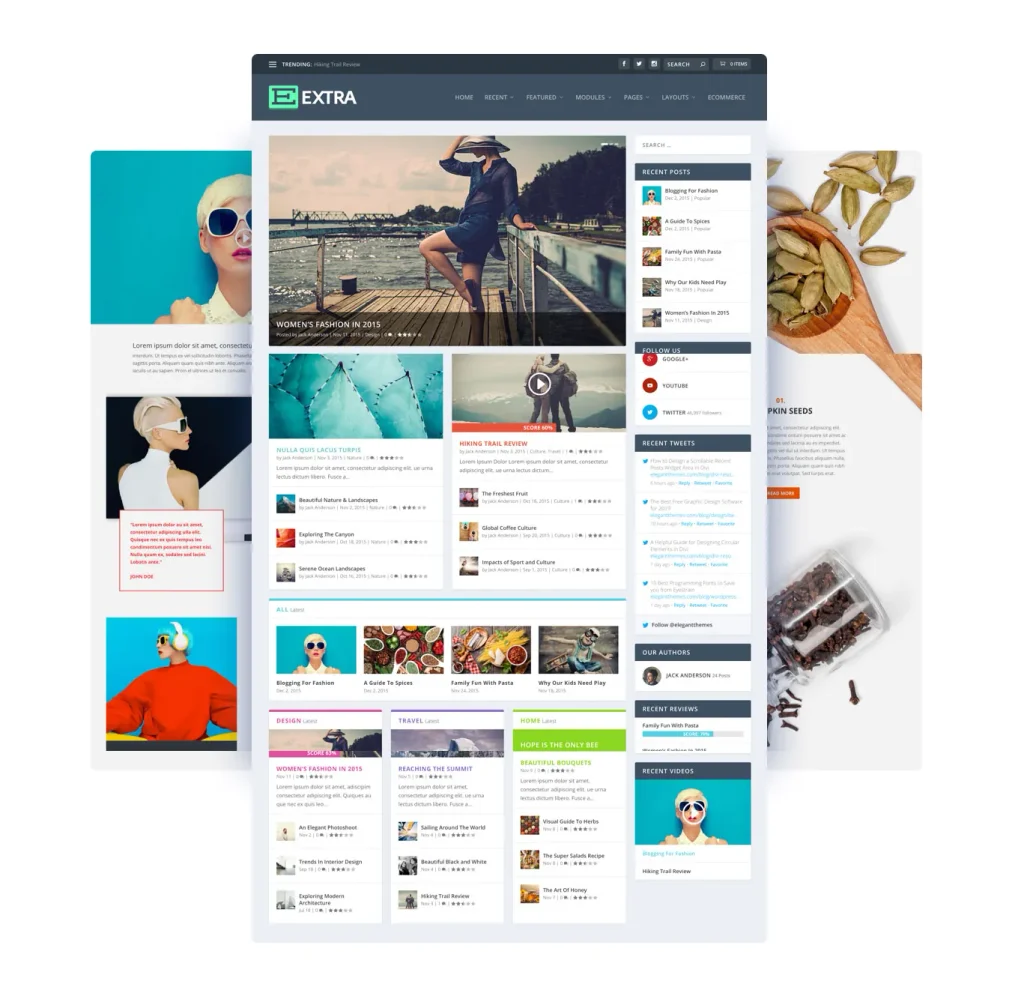
It can be useful for publishers, but it is unlikely to justify the entire Elegant Themes membership on its own. For most buyers, Extra is an additional benefit attached to the Divi license.
What is Bloom?
Bloom is an email opt-in plugin.
It can be used to create:
- pop-ups;
- fly-ins;
- inline signup forms;
- forms placed below articles;
- widget forms;
- locked-content forms.
Bloom can reduce the need for a separate basic lead-generation plugin.
However, website owners should still evaluate:
- compatibility with their email service;
- cookie and consent requirements;
- mobile usability;
- accessibility;
- performance impact;
- the targeting and segmentation features they need.
Bloom adds value when you would genuinely use it. It should not be counted as a saving if it remains disabled.
What is Monarch?
Monarch is a social sharing and social follow plugin.
It supports placements such as:
- floating sidebars;
- inline sharing buttons;
- pop-ups;
- fly-ins;
- overlays on images and other media.
Monarch is convenient for websites that actively use social sharing.
It adds less value when you prefer a lightweight free plugin, use native sharing links, or do not need social buttons at all.
What is Divi Dash?
Divi Dash is a centralized WordPress management tool included with current Divi plans.
Elegant Themes says Divi Dash can manage unlimited WordPress websites, including sites that do not use the Divi Theme. Current pricing pages list it as part of both the annual and Lifetime core plans.
It can help with tasks such as:
- plugin updates;
- theme updates;
- WordPress core updates;
- user management;
- client organization;
- oversight of multiple websites.
This feature has considerably more value for a freelancer or agency than for someone managing one personal website.
What is included with Divi Pro?
Divi Pro adds recurring services to the core Divi membership.
The current offer includes:
- Divi AI;
- unlimited Divi Cloud storage;
- Divi Teams;
- Divi VIP;
- four team members;
- priority support;
- a Marketplace discount.
Elegant Themes currently advertises unlimited AI use, unlimited Cloud storage, four team members, and VIP responses in 30 minutes or less as Pro benefits. These are vendor commitments, not performance measurements independently verified by Web Choice Desk.
Divi AI
Divi AI is integrated into the builder and is positioned as an assistant for generating:
- written content;
- images;
- code;
- sections;
- layouts;
- complete pages.
Its financial value depends on how often it is used.
If your team already pays for other AI tools or only generates occasional content, Divi AI may not justify the higher annual price.
Divi Cloud
Divi Cloud stores reusable layouts, templates, and code snippets for access across multiple websites.
It is potentially useful for agencies that reuse:
- headers;
- footers;
- calls to action;
- pricing sections;
- page templates;
- design systems.
Divi Teams
Divi Teams allows collaborators and clients to use separate accounts instead of sharing one master login.
That is more relevant for agencies and distributed teams than for individual website owners.
Divi VIP
Divi VIP adds priority support and Marketplace benefits.
The provider currently promises responses in 30 minutes or less for VIP users.
Elegant Themes pricing
The prices below were verified on July 23, 2026 and are shown in U.S. dollars.
| Plan | Current price | Billing model | Main inclusions | Best suited to |
|---|---|---|---|---|
| Divi Yearly | $89 | Billed annually | Divi, Extra, Bloom, Monarch, Divi Dash, unlimited websites, updates, and support | New users and buyers validating the workflow |
| Divi Pro | $277 | Billed annually | Divi plus AI, unlimited Cloud, Teams, VIP, and current Pro benefits | Agencies and teams using the recurring services |
| Divi Lifetime | $249 | One-time payment | Divi, Extra, Bloom, Monarch, Divi Dash, unlimited websites, lifetime updates, and support for core products | Long-term users and multi-site professionals |
| Lifetime + Pro | $297 initially, then $212 per year | One-time core license plus recurring Pro services | Lifetime Divi and Dash plus recurring AI, Cloud, Teams, and VIP | Professionals wanting permanent Divi access and active Pro services |
The current plans include unlimited website usage for Divi and a 30-day money-back guarantee.
The displayed monthly price is not monthly billing
Elegant Themes displays the $89 annual plan as the equivalent of $7.42 per month.
The actual charge is:
$89 billed annually
It is not a $7.42 month-to-month subscription.
The same principle applies to Divi Pro. A displayed monthly equivalent does not change the annual upfront charge.
Pricing outside the United States
Elegant Themes lists its primary prices in U.S. dollars.
Buyers in the United Kingdom, Canada, Australia, New Zealand, Ireland, and other countries should verify:
- the final currency shown at checkout;
- applicable VAT, GST, sales tax, or other local taxes;
- credit-card or PayPal conversion rates;
- foreign-transaction fees;
- the future renewal price.
Do not rely on a fixed currency conversion published in an article. Exchange rates and payment-provider fees change.
Divi Yearly vs Lifetime: when does Lifetime pay off?
At the current list prices:
| Usage period | Divi Yearly cumulative cost | Divi Lifetime |
|---|---|---|
| 1 year | $89 | $249 |
| 2 years | $178 | $249 |
| 3 years | $267 | $249 |
| 5 years | $445 | $249 |
The basic calculation is:
$249 ÷ $89 = approximately 2.8 years
This means the Lifetime plan becomes cheaper than annual renewals during the third year, assuming the current prices remain unchanged.
Choose Divi Yearly when:
- you have never used Divi;
- you are building one project;
- you want a smaller initial commitment;
- you are still comparing page builders;
- you are unsure whether the workflow will suit you or your clients.
Choose Divi Lifetime when:
- you expect to use Divi for three years or longer;
- you build multiple websites;
- you create websites for clients;
- you want to reduce recurring software expenses;
- you do not need the Pro services every year.
Our assessment
For a freelancer or small agency building several Divi websites, Lifetime has a strong financial case.
For a beginner creating one website without prior Divi experience, paying $249 immediately may be premature.
The annual plan offers a lower-cost way to validate the product before making a long-term commitment.
Is Divi Pro worth $277 per year?
The current price difference between Divi Yearly and Divi Pro is:
$277 − $89 = $188 per year
To justify that extra cost, the Pro services should either replace other paid tools or save enough production time to matter financially.
Ask yourself:
- Will the team regularly reuse assets through Divi Cloud?
- Do collaborators need separate accounts?
- Will Divi AI be used every week?
- Does priority support reduce a meaningful business risk?
- Will the Marketplace discount offset part of the price?
- Do you manage enough websites for the workflow tools to matter?
If the answer is “no” to most of these questions, Divi Yearly or Divi Lifetime is probably the better value.
Lifetime + Pro is not completely lifetime
The Lifetime + Pro plan combines two payment models:
- Divi and Divi Dash are purchased once;
- AI, Cloud, Teams, and VIP renew annually.
The current offer charges $297 initially and $212 per year for the Pro services. Those recurring services can be canceled while the Lifetime Divi license remains active.
Do not interpret—or advertise—Lifetime + Pro as permanent access to every Pro service.
Compare the current Divi pricing
Verify the final price, included bonuses, taxes, renewal conditions, and refund policy at checkout.
Can Divi be used on client websites?
Yes.
The current Divi plans allow unlimited website usage. Elegant Themes also states that its products can be used to build websites for clients.
This makes Divi particularly attractive to:
- freelance web designers;
- small agencies;
- WordPress maintenance providers;
- consultants managing multiple websites;
- businesses operating several WordPress properties.
Unlimited-site usage does not mean that you can resell copies of the software or distribute the product files as your own.
It means that you can use the licensed product on the websites you build and manage, subject to the provider’s terms.
Is Divi easy to use?
Divi’s visual interface removes the need to hand-code every page.
That does not mean the builder has no learning curve.
A new user must still understand:
- sections and layout containers;
- columns;
- modules;
- margins and padding;
- mobile breakpoints;
- responsive settings;
- global templates;
- Theme Builder conditions;
- presets and variables;
- reusable components;
- the distinction between local and global changes.
A visual learner may find Divi more approachable than editing theme files or writing custom CSS.
A user who wants to publish a simple blog post may find the full design interface unnecessarily complex for that particular task.
The fairest conclusion is:
Divi can be approachable for visual learners, but its depth means it is not a zero-learning-curve website builder.
What about Divi performance?
Elegant Themes rebuilt Divi 5 and continues releasing performance and stability updates. That is encouraging, but vendor release notes are not a substitute for an independent, controlled test.
Real-world performance depends on:
- hosting quality;
- server location;
- PHP and database configuration;
- page complexity;
- image size;
- font loading;
- third-party plugins;
- cache configuration;
- CDN configuration;
- analytics and advertising scripts;
- how the builder is used.
A simple Divi landing page and a complex WooCommerce store cannot be evaluated under the same conditions.
Is Divi good for SEO?
Divi can be used to create an SEO-friendly website, but the builder does not perform SEO automatically.
The final result still depends on:
- useful content;
- correct title tags;
- meta descriptions;
- heading hierarchy;
- internal links;
- image optimization;
- structured data;
- mobile usability;
- Core Web Vitals;
- crawlability;
- canonical and multilingual settings.
Recent Divi 5 releases include features such as a native Breadcrumbs module and modern Grid and Flexbox controls. These can support better structure and design, but the website owner remains responsible for implementation.
The builder provides tools. It does not replace an SEO strategy.
What about accessibility?
A website built with Divi is not automatically accessible or inaccessible.
Accessibility depends on decisions such as:
- color contrast;
- keyboard navigation;
- focus states;
- heading order;
- link descriptions;
- form labels;
- alternative text;
- semantic HTML;
- animation controls;
- responsive behavior.
A visual builder can make some design tasks easier, but every template must still be reviewed with real content and different interaction methods.
Does Divi work with WooCommerce?
Yes.
Divi includes dedicated WooCommerce modules that can be used to edit and style product information and store layouts.
Official documentation describes modules for elements such as:
- product titles;
- product images and galleries;
- pricing;
- ratings;
- descriptions;
- add-to-cart controls;
- stock;
- metadata;
- tabs;
- related products;
- upsells;
- reviews.
WooCommerce information can also be used as dynamic content inside other Divi modules.
This gives store owners more design control than the default WooCommerce templates.
It does not remove the need to evaluate:
- hosting;
- database performance;
- payment gateways;
- tax configuration;
- shipping extensions;
- security;
- backups;
- checkout testing;
- mobile performance.
A large store has very different requirements from a small company website.
What is the Divi Marketplace?
The Divi Marketplace sells extensions, child themes, layouts, and other products separately from the core Elegant Themes membership.
The current Divi Pro offer includes a Marketplace credit and a discount, which confirms that Marketplace products are distinct from the standard Divi license.
This matters when calculating total cost.
A website that depends on several third-party extensions may still have recurring expenses even when its core Divi license is Lifetime.
Before purchasing a Marketplace product, check:
- who created it;
- which Divi version it supports;
- how updates work;
- who provides support;
- whether renewal is required;
- whether the feature is already available in Divi 5.
Support, cancellation, and refunds
Customer support
The current Divi Yearly and Lifetime plans advertise 24/7 customer support.
Divi VIP advertises responses in 30 minutes or less. That is a vendor promise for the VIP service.
An active membership is required for official technical support.
Cancellation
An annual subscription can be canceled from the Elegant Themes member area.
The account remains active through the period that has already been paid. After the subscription expires, the user loses access to new downloads, updates, technical support, and the member area.
Elegant Themes states that previously downloaded themes can continue to be used after expiration.
Keeping old premium software without updates is not ideal for an important website. Future WordPress, PHP, browser, and plugin changes may eventually create compatibility issues.
Refunds
Elegant Themes currently offers a 30-day money-back guarantee.
Canceling a subscription does not automatically request a refund. The refund must be requested separately through support.
The 30-day guarantee is not a free trial without payment.
You pay first and request a refund if the product is not suitable.
Divi’s main advantages
Unlimited website usage
This is one of Divi’s strongest advantages for freelancers and agencies.
The cost per project decreases as you build more websites.
A genuine Lifetime option
The $249 core Lifetime plan eliminates annual renewals for Divi, Extra, Bloom, Monarch, and Divi Dash under the current offer.
Strong multi-site value
Unlimited-site licensing and Divi Dash can provide useful economies of scale for professionals managing several websites.
A broad ecosystem
The membership combines:
- a theme;
- a visual builder;
- an editorial theme;
- an email opt-in plugin;
- a social-sharing plugin;
- a site-management tool.
Active Divi 5 development
Divi 5 has received frequent feature and maintenance releases, including version 5.9 in July 2026.
WooCommerce design controls
Dedicated WooCommerce modules provide visual control over product and store templates.
A 30-day refund period
The refund policy reduces the initial financial risk, provided that the request is made within the stated period.
Divi’s main disadvantages
No full permanent free version
You must purchase a membership before using the complete Divi builder.
The Lifetime plan requires a larger upfront payment
Although $249 may be economical over several years, it is a larger initial commitment than the $89 annual plan.
Pro services are still recurring
AI, unlimited Cloud storage, Teams, and VIP do not become lifetime services with the core Lifetime license.
The interface has a learning curve
A large feature set creates flexibility but also adds complexity.
Moving to another builder may require reconstruction
Global templates, reusable components, responsive settings, forms, and page layouts may need to be rebuilt if you move to Gutenberg, Elementor, Bricks, or another system.
This is not unique to Divi. It is a general risk of committing to a proprietary visual-builder workflow.
Third-party compatibility needs to be checked
An established site using extensions or custom modules should be tested in staging before a major Divi migration.
Marketplace products may add more costs
A Lifetime Divi license does not mean that every third-party extension is included forever.
Who should buy Divi?
Divi is a strong fit for:
- freelancers building multiple WordPress websites;
- small web design agencies;
- visual designers who prefer front-end editing;
- businesses operating several websites;
- professionals expecting to use one builder for years;
- buyers who can benefit from the Lifetime plan;
- WooCommerce users wanting visual control over store templates;
- teams that will actively use Divi Pro services.
Who should consider an alternative?
Consider another option if:
- you require a full permanent free plan;
- you are creating one very simple website;
- you prefer the native WordPress block editor;
- minimizing builder dependency is a priority;
- you expect to change builders soon;
- your team is already productive in another ecosystem;
- a required extension is not compatible;
- the Pro services would remain largely unused.
Divi vs Elementor: the short answer
Divi’s strongest advantages are:
- unlimited website usage;
- the $249 Lifetime option;
- the bundled Elegant Themes ecosystem;
- Divi Dash for managing multiple websites.
Elementor may be more attractive when:
- a free entry point is important;
- your team already knows the Elementor workflow;
- required templates or add-ons are based on Elementor;
- migrating existing sites would be expensive.
There is no universal winner.
A useful comparison must evaluate equivalent plans, current prices, number of supported websites, design workflow, performance, WooCommerce tools, support, and migration costs.
That deserves its own detailed article rather than a superficial winner declaration inside this review.
Alternatives to Divi
WordPress block editor
A strong option for users who want to stay closer to WordPress core and reduce dependence on a third-party page builder.
Elementor
Elementor is the clearest alternative for users who want a permanent free version, a sidebar-based editor, and a broader extension ecosystem. Read our complete Elementor review before comparing the paid plans.
Bricks and other visual builders
Potentially relevant to technically oriented designers looking for different output, workflows, or licensing models.
Lightweight themes with block plugins
Themes such as GeneratePress, Astra, or Kadence can be combined with block tools for users who prioritize a more native WordPress workflow.
No alternative is universally better.
The correct choice depends on:
- project type;
- team experience;
- number of websites;
- licensing cost;
- required integrations;
- acceptable migration risk.
Is Elegant Themes legitimate?
Elegant Themes operates a mature commercial ecosystem with:
- public pricing;
- product documentation;
- release notes;
- account management;
- support;
- cancellation documentation;
- refund terms;
- an active product marketplace.
These factors support the conclusion that Elegant Themes is a legitimate commercial vendor.
Legitimacy does not mean Divi is the right product for every project.
Before buying, confirm:
- the final checkout price;
- the exact billing model;
- required integrations;
- plugin compatibility;
- the refund deadline;
- whether your workflow genuinely benefits from Divi.
Final verdict: is Divi worth it in 2026?
Yes—Divi is worth considering for freelancers, agencies, and users who expect to build several WordPress websites.
The unlimited-site license and $249 Lifetime plan are its strongest selling points.
Choose Divi Yearly when:
- you are new to Divi;
- you want a lower initial commitment;
- you are validating the workflow;
- you are creating one project.
Choose Divi Lifetime when:
- you expect to use Divi for at least three years;
- you build client websites;
- you manage several WordPress properties;
- you want to reduce annual software renewals.
Choose Divi Pro only when:
- AI will be used regularly;
- Cloud libraries will support a real workflow;
- separate team accounts are necessary;
- priority support has measurable business value.
The main caveat is workflow dependency. Before standardizing all client work on Divi, test it on a real project and confirm that its interface, output, integrations, and maintenance model suit your business.
Web Choice Desk recommendation: Start with Divi Yearly if you have never used the builder. Choose Lifetime when there is a clear intention to use Divi for several years. Add Pro only when its recurring services produce measurable value.
Review the final price, taxes, currency, renewal terms, included products, and refund policy before completing your purchase.
Frequently asked questions
There is no full permanent free version of Divi in the current pricing structure. The complete theme and builder require a paid Elegant Themes membership.
As verified on July 23, 2026, Divi Yearly costs $89 per year, Divi Pro costs $277 per year, Divi Lifetime costs $249 one time, and Lifetime + Pro costs $297 initially plus $212 per year for Pro services. Prices can change.
The core Lifetime license currently provides lifetime access, updates, and support for Divi, Extra, Bloom, Monarch, and Divi Dash. Pro services such as Divi AI, unlimited Cloud, Teams, and VIP remain recurring.
Yes. Current Divi plans allow unlimited website usage, and Elegant Themes states that its products may be used to build client websites.
Elegant Themes states that downloaded themes can continue to be used after the annual membership expires. However, you lose access to updates, new downloads, support, and the member area.
No. Canceling prevents future renewal but does not automatically request a refund. The refund must be requested separately within the applicable 30-day period.
No. The beta phases have ended. Divi 5.9 was released on July 13, 2026.
Yes. Divi includes dedicated WooCommerce modules for product images, titles, prices, descriptions, cart controls, related products, reviews, and other store elements.
There is no universal winner. Divi is particularly competitive for unlimited-site licensing and Lifetime access. Elementor may be more suitable when a free entry point, an existing Elementor workflow, or specific integrations are priorities.
Affiliate disclosure: This article contains affiliate links. If you purchase through these links, Web Choice Desk may earn a commission at no additional cost to you. This does not change our editorial criteria, the drawbacks we report, or the alternatives we recommend.
Trademark notice: Divi is a registered trademark of Elegant Themes, Inc. Web Choice Desk is not affiliated with or endorsed by Elegant Themes.
Last reviewed: July 23, 2026
Pricing last checked: July 23, 2026