
Affiliate disclosure: This comparison contains affiliate links for Elementor and Divi. If you purchase through a qualifying link, Web Choice Desk may earn a commission at no additional cost to you. This does not affect the comparison, prices, limitations, or recommendations.
Elementor is the better starting point for people who want a capable free builder, a familiar sidebar-based editor, or advanced tools for a small number of websites. Divi offers stronger licensing value for freelancers and agencies managing many websites, especially through its $249 Lifetime option. Neither builder is universally better: Elementor is generally easier to test without paying, while Divi becomes more economical as the number of sites and years of use increases.
Prices, plans, and policies were checked on August 3, 2026, for the United States. Taxes, promotional prices, renewal costs, features, and checkout conditions can change.
| User profile | Better starting choice | Main reason |
|---|---|---|
| Beginner who wants to experiment for free | Elementor | A functional free version is available |
| Owner of one advanced website | Elementor Advanced Solo | Advanced features for one site at a lower annual price than Divi |
| Freelancer building several sites | Divi | One membership covers unlimited websites |
| Agency seeking a one-time core license | Divi Lifetime | $249 once for unlimited core usage |
| WooCommerce store owner | Elementor Advanced Solo or higher | Strong WooCommerce template and widget coverage |
| User who dislikes recurring builder fees | Divi Lifetime | No annual core Divi renewal |
| Team wanting an integrated service ecosystem | Compare Elementor One and Divi Pro | Both add recurring services beyond the core builder |
Divi’s unlimited-site license and Lifetime option are its main financial advantages. Check the current plans, included services, and checkout total before comparing them with Elementor.
On this page
- Elementor vs Divi at a glance
- How this comparison was made
- Pricing and long-term cost
- Free version and initial commitment
- Editor and ease of use
- Design features and templates
- Theme building and dynamic content
- WooCommerce
- Performance and page speed
- AI, cloud, and professional services
- Freelancers, agencies, and multiple websites
- Support, cancellation, and refunds
- Builder dependency and migration
- Advantages and disadvantages
- Which builder should you choose?
- Final verdict
- Frequently asked questions
Elementor vs Divi at a glance
Elementor and Divi are both visual WordPress builders, but their pricing and product strategies are increasingly different.
Elementor offers a free plugin, several annual Pro plans, and broader subscriptions that combine the editor with services such as AI, image optimization, accessibility tools, and email delivery.
For a deeper analysis of the editor, Elementor 4, Free versus Pro, WooCommerce tools, performance considerations, and long-term dependency, read our complete Elementor review.
Divi does not offer a permanent free version. Its main advantage is simpler licensing: the standard $89 annual membership and the $249 Lifetime membership both cover unlimited websites.
| Category | Elementor | Divi |
|---|---|---|
| Free version | Yes | No permanent free version |
| Entry paid price | $60/year for Essential | $89/year |
| Advanced single-site price | $84/year for Advanced Solo | $89/year |
| Websites on standard main plan | Depends on plan | Unlimited |
| Lifetime license | No | Yes, $249 |
| Theme Builder | Included in paid plans, with plan-specific limits | Included |
| Popup Builder | Advanced Solo or higher | Divi does not position a separate popup builder as a core equivalent |
| WooCommerce Builder | Advanced Solo or higher | WooCommerce modules and template customization included |
| AI | Separate credits or Elementor One | Divi AI through recurring Pro services |
| Cloud services | Available through Elementor ecosystem | Divi Cloud through Pro |
| Core license model | Annual per-site or tiered | Annual unlimited or Lifetime unlimited |
| Best licensing fit | One or a few sites | Many sites and long-term use |
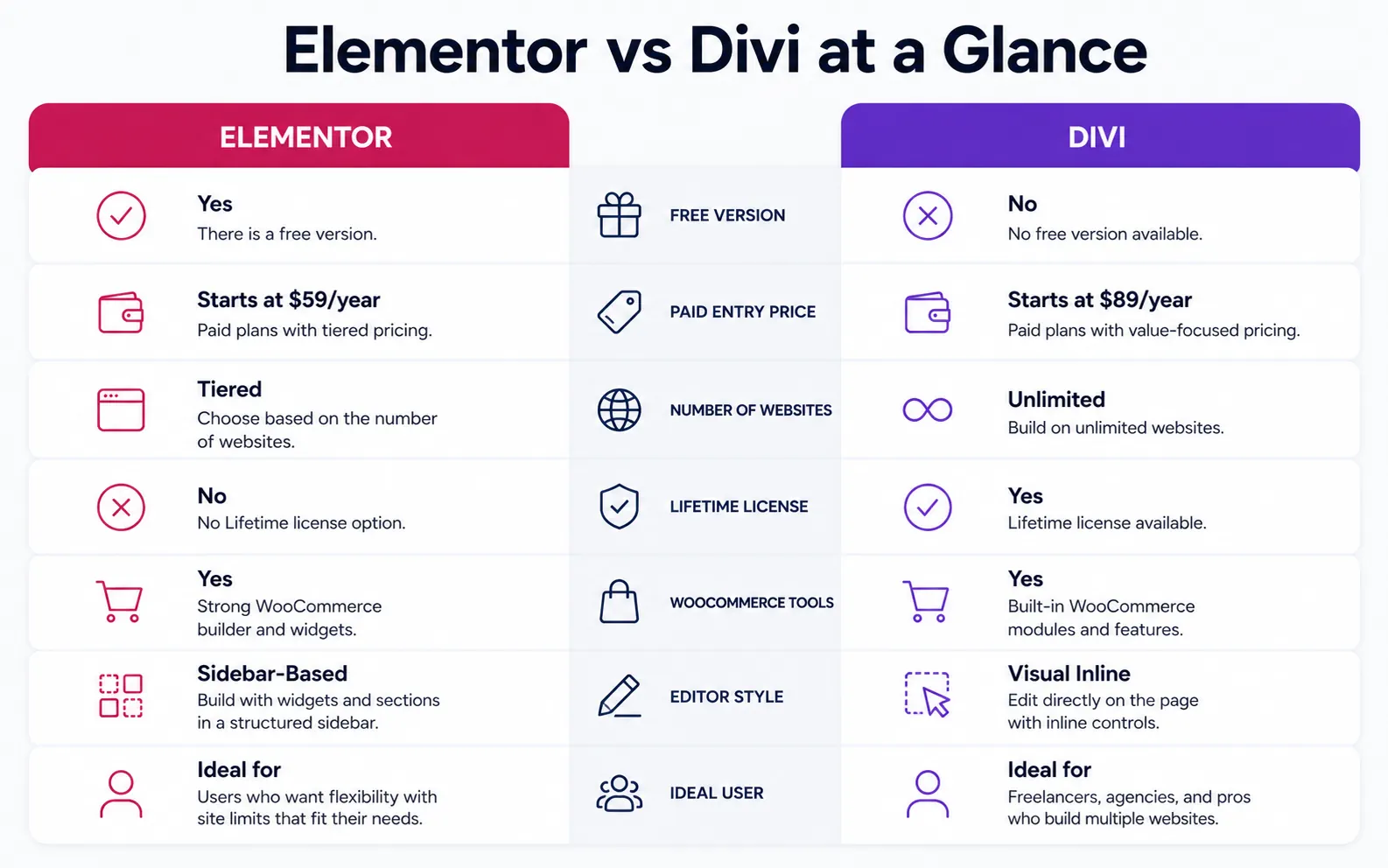
The important distinction is not simply which builder has more features. It is whether you prefer a low-commitment entry path and per-site tiers or an unlimited-site license designed for long-term use.
How this comparison was made
This comparison is based on:
- current official pricing pages;
- official plan documentation;
- official cancellation and refund policies;
- published feature descriptions;
- the licensing terms shown for each plan;
- current search intent and questions associated with Elementor and Divi.
Web Choice Desk did not perform a controlled laboratory speed test for this article. No load-time, Core Web Vitals, DOM-size, or server-response result is presented as an original measurement.
Performance conclusions are therefore limited to architecture, feature usage, optimization responsibilities, and the factors that can reasonably affect a real website.
The fairest paid comparison for a single advanced site is usually:
Elementor Advanced Solo at $84 per year versus Divi Yearly at $89 per year.
Elementor Essential costs less, but it omits features such as the Popup Builder, advanced custom code and CSS, and ecommerce functionality. Comparing Essential with the complete Divi membership would hide those differences.
Pricing and long-term cost
Elementor pricing
At the time of verification, Elementor displayed the following editor plans:
| Elementor plan | Websites | Initial annual charge | Renewal shown |
|---|---|---|---|
| Free | Unlimited installations | $0 | $0 |
| Essential | 1 | $60 | $60/year |
| Advanced Solo | 1 | $84 | $84/year |
| Advanced | 3 | $108 | $108/year |
| One | 1 | $180 promotional charge | $228/year |
| One Agency | Unlimited | $432 promotional charge | $540/year |
The Free plugin can be installed on multiple websites, but paid Pro features require a license for the number of sites covered by the selected plan.
Elementor One and One Agency are broader service bundles. Their prices should not be compared with Divi’s core membership without accounting for the extra Elementor services and credits.
Divi pricing
| Divi plan | Websites | Initial charge | Renewal |
|---|---|---|---|
| Divi Yearly | Unlimited | $89 | $89/year |
| Divi Lifetime | Unlimited | $249 | No core renewal |
| Divi Pro | Unlimited | $277 | $277/year |
| Lifetime + Pro | Unlimited | $297 | $212/year for Pro services |
Divi Lifetime does not make every connected service permanent. Divi AI, Cloud, Teams, and VIP remain recurring services when purchased through a Pro bundle.
Cost for one advanced website
For one website requiring advanced widgets, popups, custom CSS, dynamic content, and WooCommerce tools:
| Period | Elementor Advanced Solo | Divi Yearly | Divi Lifetime |
|---|---|---|---|
| 1 year | $84 | $89 | $249 |
| 2 years | $168 | $178 | $249 |
| 3 years | $252 | $267 | $249 |
| 5 years | $420 | $445 | $249 |
At unchanged prices, Divi Lifetime becomes slightly cheaper than three years of Elementor Advanced Solo and three years of Divi Yearly.
That does not automatically make Lifetime the right purchase. The savings only matter when you continue using Divi.
Cost for three websites
Elementor Advanced currently covers three websites for $108 per year. Divi Yearly covers unlimited websites for $89 per year.
| Period | Elementor Advanced | Divi Yearly | Divi Lifetime |
|---|---|---|---|
| 1 year | $108 | $89 | $249 |
| 3 years | $324 | $267 | $249 |
| 5 years | $540 | $445 | $249 |
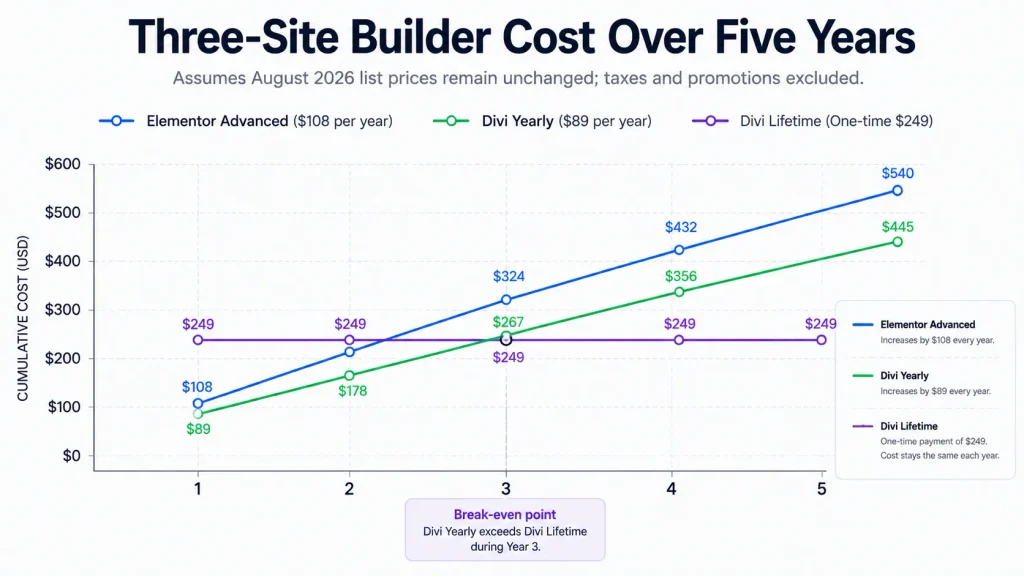
For several websites, Divi’s licensing advantage appears earlier.
The calculation becomes even more favorable to Divi when an agency manages more sites than an Elementor tier supports. Elementor may still justify the higher cost when its interface, integrations, widgets, or ecosystem reduce enough work to offset the license difference.
Divi is normally the less expensive core license for several websites, but promotions and bundles can change. Confirm the current unlimited-site and Lifetime conditions before deciding.
Free version and initial commitment
Elementor wins this category.
Its free plugin provides a real way to evaluate the editor on an existing WordPress installation without purchasing a license. It includes basic widgets, responsive controls, containers, and the central drag-and-drop experience.
The free version does not include the complete Pro toolset. Depending on the project, you may eventually need:
- Theme Builder features beyond the basic workflow;
- advanced dynamic content;
- Popup Builder;
- custom CSS and code;
- form integrations and submissions;
- WooCommerce Builder;
- additional widgets.
Even with those restrictions, the free version reduces purchasing risk. You can determine whether you like the editor before committing to an annual subscription.
Divi offers a 30-day refund period, but obtaining the software still requires an initial payment. That makes Elementor easier to recommend to a user who is experimenting, learning WordPress, or unsure whether a visual builder is necessary.
Winner: Elementor
Editor and ease of use
Elementor uses a persistent sidebar-based workflow. Widgets and settings are generally organized in a panel while the page remains visible on the canvas.
This structure is familiar to users coming from design tools and other WordPress builders. It also provides a predictable place to find content, style, and advanced settings.
Divi emphasizes editing directly on the page. Floating controls, contextual menus, inline text editing, layers, and visual settings appear around the selected element.
Some users find Divi more immersive because the page itself becomes the interface. Others find the floating controls less predictable when layouts become complex.
Elementor is likely easier when you prefer:
- a fixed sidebar;
- a consistent settings location;
- a widget-first workflow;
- a large ecosystem of tutorials and add-ons;
- testing the editor through a free plugin.
Divi is likely easier when you prefer:
- direct inline editing;
- contextual controls close to the selected element;
- visual interaction with sections, rows, columns, and modules;
- one integrated theme-and-builder workflow;
- reusable layouts across many client websites.
Neither interface is objectively easier for every user. Familiarity becomes more important than the initial learning curve after several projects.
Winner: Elementor for a more conventional sidebar workflow; Divi for users who prefer direct on-canvas editing.
Design features and templates
Both builders provide enough visual controls to create custom marketing sites, business pages, blogs, portfolios, and stores without writing every style manually.
Common capabilities include:
- responsive controls;
- global colors and typography;
- reusable elements;
- motion effects;
- custom spacing;
- layout templates;
- headers and footers;
- dynamic templates;
- custom CSS on eligible plans;
- design libraries and website kits.
Elementor’s broader third-party ecosystem is a meaningful advantage. Numerous WordPress developers build Elementor-specific widgets, templates, themes, and integrations.
That variety gives you more ways to extend the editor, but installing several add-on collections can increase complexity and make maintenance harder.
Divi’s ecosystem is more centralized around Elegant Themes and the Divi Marketplace. Its standard membership also includes Extra, Bloom, and Monarch, although those products only provide value when you actually use them.
Template counts should not decide the comparison by themselves. A smaller library that matches your industry and design style can be more useful than thousands of layouts you never install.
Winner: Elementor for third-party breadth; Divi for a more bundled ecosystem.
Theme building and dynamic content
Both Elementor Pro and Divi allow users to design templates that extend beyond individual pages.
These can include:
- headers;
- footers;
- blog post templates;
- archive pages;
- search results;
- custom post-type templates;
- WooCommerce templates;
- conditional display rules.
Elementor’s paid tiers are not identical. The Essential plan supports Theme Builder and basic dynamic content, but Elementor states that custom fields and custom post types are not available in that entry plan. Advanced Solo and higher tiers provide the more complete dynamic workflow.
Divi includes Theme Builder access within the standard membership and does not charge according to the number of websites.
For one site, the choice depends mainly on interface preference and integration requirements. For several dynamic websites, Divi’s unlimited licensing becomes financially significant.
Winner: Tie for general capability; Divi for unlimited-site licensing, Elementor for users already invested in its dynamic-content ecosystem.
WooCommerce
Both builders can customize WooCommerce websites, but the plan comparison matters.
Elementor’s Essential plan does not include its ecommerce features. Advanced Solo or a higher eligible plan is required for WooCommerce Builder functionality.
Elementor provides widgets and templates for areas such as:
- product titles and images;
- prices;
- add-to-cart elements;
- product data;
- related products;
- upsells;
- product archives;
- carts;
- checkout;
- customer accounts;
- WooCommerce notices.
Divi includes ecommerce modules and design settings in its standard membership. It can be used to design product pages, store templates, carts, and other WooCommerce areas.
Neither builder removes the need to evaluate:
- hosting performance;
- payment gateways;
- checkout reliability;
- extensions;
- taxes;
- backups;
- security;
- caching compatibility;
- accessibility;
- mobile conversion.
Elementor has a strong case for a single sophisticated store because of its broad WooCommerce widget set and third-party ecosystem.
Divi has a stronger licensing case for an agency building multiple WooCommerce stores.
Winner: Elementor for one advanced store; Divi for multiple client stores and lower license cost per site.
Performance and page speed
There is no responsible universal answer to “Which builder is faster?” without a controlled test.
A fair comparison would require:
- identical hosting;
- the same PHP version;
- the same WordPress version;
- equivalent layouts;
- equivalent fonts and images;
- the same cache and CDN;
- the same analytics scripts;
- matching functionality;
- repeated mobile and desktop measurements;
- cold-cache and warm-cache runs;
- a documented test date.
This article did not perform that test.
Both builders can produce slow pages when a design uses excessive effects, nested containers, large images, video backgrounds, third-party widgets, multiple fonts, or poorly configured caching.
Both can also produce acceptable results when the layout is disciplined and the hosting stack is appropriate.
Divi 5 represents a major architectural transition away from the older Divi framework, while Elementor continues developing its container and Atomic editing systems. These changes make old benchmark articles increasingly unreliable.
Your practical result will depend more on the actual page than on the builder’s marketing claim.
Performance practices that matter with either builder
- compress and correctly size images;
- use WebP or AVIF where appropriate;
- limit font families and weights;
- avoid unnecessary animation;
- reduce third-party scripts;
- remove unused widget add-ons;
- use page caching;
- test the real mobile page;
- monitor Core Web Vitals after publication;
- avoid building a complex section when a simple block would work.
Winner: No verified winner without an equivalent controlled test.
AI, cloud, and professional services
Elementor and Divi both extend beyond the core page builder.
Elementor One combines the editor with a shared credit system for services such as:
- AI generation;
- image optimization;
- accessibility tools;
- email deliverability;
- cookie-consent tools;
- additional ecosystem services.
Divi Pro combines the core builder with:
- Divi AI;
- Divi Cloud;
- Divi Teams;
- Divi VIP;
- priority support benefits;
- Marketplace-related benefits.
These bundles should be compared by actual usage, not advertised total value.
Ask:
- Which existing subscriptions will the bundle replace?
- How many AI actions will the team perform?
- Will cloud templates be reused regularly?
- Do collaborators need separate accounts?
- Is priority support operationally important?
- Are image optimization and email delivery already handled elsewhere?
- Will the services be used on every website or only occasionally?
Elementor One uses a credit-based model. Divi Pro currently promotes unlimited usage for some included services, subject to the provider’s current terms.
Divi Lifetime does not include its Pro services permanently. The core license remains Lifetime, while AI, Cloud, Teams, and VIP remain recurring.
Winner: Depends on the services used. Elementor One favors a wider integrated website stack; Divi Pro favors teams already committed to Divi.
Freelancers, agencies, and multiple websites
Divi has the clearest licensing advantage for freelancers and agencies.
The standard annual and Lifetime memberships cover unlimited websites. This allows the same core license to support many client projects without increasing the fee for each additional installation.
Elementor’s Editor Pro plans are tiered by site count. Current documentation lists options for one, three, 25, and up to 1,000 websites, while Elementor One Agency offers an unlimited-site service bundle.
Elementor may still be the better operational choice when:
- the team already knows Elementor;
- clients request Elementor specifically;
- existing sites already depend on Elementor;
- required add-ons only support Elementor;
- hiring people with Elementor experience is easier;
- the agency values Elementor One services.
Divi may be the better financial choice when:
- the agency builds many sites;
- the same visual system is reused;
- annual per-site license growth is undesirable;
- Lifetime ownership is important;
- the team is comfortable standardizing on Divi.
The cheapest license is not always the cheapest workflow. Training, maintenance, migration, add-ons, and client requirements can outweigh the difference in subscription price.
Winner: Divi for raw multi-site licensing value; Elementor when ecosystem familiarity produces greater operational savings.
Support, cancellation, and refunds
Both companies currently advertise a 30-day refund period, but their conditions are not identical.
Elementor states that eligible first purchases of Elementor Pro can be refunded within 30 days. Renewals, upgrades, and Elementor AI subscriptions are excluded from the standard refund eligibility described in its help documentation.
After an Elementor Pro subscription ends, the site does not simply disappear. However, access to updates and paid editing capabilities changes, and Pro widgets or features should not be treated as permanently licensed.
Elegant Themes states that customers can request a refund within 30 days. Its help center also states that canceling an annual membership keeps the account active for the remaining paid term.
After expiration, previously downloaded Divi products may remain installed, but access to new downloads, updates, and support is lost.
For either product, running an outdated builder on a production website creates compatibility and security concerns over time.
Check the current refund and cancellation terms before purchasing, especially when:
- upgrading an existing subscription;
- renewing a plan;
- purchasing AI services;
- selecting a promotional bundle;
- changing the number of licensed websites.
Builder dependency and migration
Choosing Elementor or Divi is not only a subscription decision. It is also a long-term content and design decision.
Pages built with a visual builder can depend on:
- proprietary widgets or modules;
- builder-specific templates;
- global design systems;
- dynamic-content rules;
- custom CSS tied to generated markup;
- popup and form systems;
- theme templates;
- third-party add-ons.
Switching builders may require rebuilding layouts rather than simply activating another plugin.
Before standardizing on either product, consider:
- how many pages will use the builder;
- whether blog content can stay in the native block editor;
- whether clients will edit the pages;
- whether the website may be sold;
- how long the site is expected to remain active;
- whether the design can be exported meaningfully;
- whether the team can support the stack later.
A practical strategy is to use the visual builder where its design capabilities provide clear value while keeping ordinary editorial content in native WordPress blocks when possible.
Winner: Neither. Both create switching costs when used extensively.
Advantages and disadvantages
Elementor
| Advantages | Disadvantages |
|---|---|
| Functional free version | Paid licenses are limited by site count unless using broader tiers |
| Familiar sidebar interface | No Lifetime core license |
| Large third-party ecosystem | Several add-ons can increase complexity |
| Strong WooCommerce toolkit | Essential excludes important advanced features |
| Broad widget and integration coverage | Advanced costs recur annually |
| Easy to test before paying | Promotional prices may differ from renewal |
| Elementor One integrates additional services | Credit-based services need usage monitoring |
Divi
| Advantages | Disadvantages |
|---|---|
| Unlimited websites on the main membership | No permanent free version |
| $249 Lifetime core option | Higher initial cost for Lifetime |
| Strong value for freelancers and agencies | Pro services remain recurring |
| Theme Builder included | Interface can feel less conventional |
| Bundled Elegant Themes products | Bundled products add no value when unused |
| One license can cover many client sites | Extensive use creates migration work |
| Annual core price is simple | Third-party ecosystem is smaller than Elementor’s |
Which builder should you choose?
Choose Elementor when:
- you want to test a builder without paying;
- you manage one or a few websites;
- you prefer a persistent sidebar interface;
- you need Elementor-specific integrations;
- you want its WooCommerce widget ecosystem;
- your clients or team already use Elementor;
- Elementor One replaces several services you currently purchase separately.
Choose Divi when:
- you manage many websites;
- you build sites for clients;
- you want unlimited-site licensing;
- you expect several years of use;
- you prefer a one-time core license;
- you already work efficiently in Divi;
- you want to standardize an agency workflow around one builder.
Start with Elementor Free when:
- you are learning WordPress;
- you do not yet know whether a visual builder is necessary;
- your website only needs basic page layouts;
- you want to test the interface before committing.
Avoid choosing solely on price when:
- a client requires a particular builder;
- migrating existing pages would be expensive;
- one ecosystem provides a required integration;
- your team would need extensive retraining;
- the cheaper product requires several paid add-ons.
Final verdict
Elementor is the safer entry point. Its free version allows you to test the core editing experience, and Advanced Solo provides a competitive package for one professional website.
Divi is the stronger licensing proposition. The $89 annual membership covers unlimited websites, and the $249 Lifetime plan becomes increasingly attractive for freelancers, agencies, and long-term users.
For one website, the price difference between Elementor Advanced Solo and Divi Yearly is small enough that interface, widgets, integrations, and workflow should decide the choice.
For several websites, Divi usually becomes less expensive.
For an agency that depends on Elementor’s ecosystem, established workflows may justify the higher recurring cost.
The practical answer is:
Choose Elementor for its free entry path, sidebar workflow, and broad ecosystem. Choose Divi for unlimited-site licensing, Lifetime value, and a standardized multi-site workflow.
Divi is the stronger financial choice when its unlimited-site license matches your workflow. Review the current plans, renewal conditions, and included services before committing.
Frequently asked questions
Elementor is generally the better starting point for users who want a free version, a sidebar-based editor, or advanced tools for one or a few websites. Divi is generally more economical for freelancers and agencies because its standard and Lifetime memberships cover unlimited websites.
For one advanced website, Elementor Advanced Solo currently costs $84 per year, while Divi Yearly costs $89 per year. For several websites, Divi is normally cheaper because one membership covers unlimited installations. Divi also offers a $249 one-time Lifetime license.
Yes. Elementor offers a free WordPress plugin that includes the core visual editor and basic widgets. Advanced design, dynamic, marketing, popup, and WooCommerce features require an eligible paid plan.
Divi does not currently offer a permanent free version comparable to Elementor Free. It requires a paid membership, although Elegant Themes currently provides a 30-day refund period for eligible purchases.
Elementor has a particularly broad WooCommerce widget and third-party integration ecosystem, making it a strong choice for one advanced store. Divi can also customize WooCommerce websites and may offer better licensing value for agencies building multiple stores.
There is no reliable universal winner without testing equivalent pages on identical hosting with the same content, caching, images, fonts, and scripts. Both builders can perform well with disciplined layouts and can become slow when pages use excessive effects, widgets, scripts, or unoptimized media.
Yes, but switching visual builders can require rebuilding layouts, templates, forms, dynamic elements, and custom styles. The amount of work depends on how extensively the original builder was used.
Related reading
- Complete Divi review
- Divi pricing guide
- Is Divi Lifetime worth it?
- Official Elementor pricing
- Official Divi pricing
Trademark notice: Elementor is a trademark of Elementor Ltd. Divi and Elegant Themes are trademarks of Elegant Themes, Inc. Web Choice Desk is not affiliated with or endorsed by either company.
Prices, plans, and policies last checked: August 3, 2026.
Affiliate disclosure: This article contains affiliate links for Elementor and Divi. If you purchase through a qualifying link, Web Choice Desk may earn a commission at no additional cost to you. This relationship does not change the prices, limitations, or recommendations presented in this comparison.
Image credits: Nasik Lababan