
Bricks Builder is one of the more compelling WordPress site-building options for developers, freelancers, agencies, and technically comfortable users who want visual editing without giving up structured CSS, dynamic data, reusable components, query loops, and control over the website’s templates.
This Bricks Builder review looks at the product from a buying perspective rather than assuming that every WordPress user needs the same type of page builder. Bricks can be an excellent fit for structured and dynamic websites, but its theme-based architecture and more technical workflow make it less obvious for complete beginners or users who want to keep an existing third-party WordPress theme.
The current stable release reviewed here is Bricks 2.3.11, released on August 12, 2026. Bricks 2.4 is currently available as a beta release and is discussed separately rather than treated as production-stable functionality.
On this page
- Bricks Builder review: quick verdict
- What is Bricks Builder?
- How we researched this Bricks review
- Bricks 2.3.11 and the Bricks 2.4 beta
- Bricks Builder pricing and licensing
- Builder workflow and design systems
- Dynamic content and Query Loops
- Components and reusable systems
- Bricks for WooCommerce
- Bricks performance and SEO considerations
- Bricks for agencies and client websites
- Learning curve and ease of use
- Bricks Builder pros and cons
- Who should use Bricks?
- Who should avoid Bricks?
- Bricks alternatives
- Is Bricks Builder worth it in 2026?
- Bricks Builder FAQ
Bricks Builder review: quick verdict
| Question | Web Choice Desk assessment |
|---|---|
| What is Bricks? | A premium WordPress theme with its own integrated visual site builder |
| Best for | Developers, freelancers, agencies, dynamic websites, and structured design systems |
| Less suitable for | Complete beginners and users who need to keep an existing third-party theme |
| Free version | No downloadable free version; an online playground is available |
| Entry price | $79/year for one website |
| Unlimited annual plan | $249/year |
| Lifetime option | $599 one-time for unlimited websites |
| Refund period | 60 days for eligible initial purchases |
| Current stable version | Bricks 2.3.11 |
| Affiliate program | Not launched as of August 15, 2026 |
| Performance verdict | No universal speed claim without equivalent controlled testing |
The strongest reason to choose Bricks is its combination of visual editing with a development-oriented system for classes, variables, templates, dynamic data, components, conditions, and queries.
That combination can be particularly useful when you are building more than static marketing pages. Directories, custom post type websites, content-heavy projects, WooCommerce stores, agency templates, and other sites that depend on structured reusable layouts are closer to Bricks’ natural territory.
The trade-off is that Bricks exposes concepts that many beginner-focused builders can hide for longer. You do not have to be a developer to use it, but understanding CSS classes, responsive design, HTML structure, reusable components, and dynamic data can make a much larger difference to the quality of a Bricks project.
What is Bricks Builder?
Bricks is different from products such as Elementor because Bricks is installed as a WordPress theme, not as a page-builder plugin layered on top of another theme.
The theme contains the visual builder and the system used to create the broader website structure. You can design pages, headers, footers, templates, dynamic layouts, navigation, popups, forms, WooCommerce areas, and other parts of the site from the same ecosystem.
This architecture has an important consequence for buyers: adopting Bricks is not simply adding another editing plugin to your current theme. Bricks becomes part of the website’s underlying presentation layer.
That can simplify the stack when you want the theme and visual builder to work as one system. It can also increase switching costs later because replacing Bricks may involve replacing theme templates and rebuilding layouts that depend on Bricks-specific elements, classes, components, conditions, or dynamic data.
If you are still deciding whether this type of builder fits your project, our comparison of the best WordPress page builders places Bricks alongside Elementor, Divi, Breakdance, Beaver Builder, SeedProd, and the native WordPress Site Editor.
How we researched this Bricks review
This review is based on the current Bricks pricing and licensing pages, official Bricks Academy documentation, the product changelog, current information about the Bricks affiliate program, and the structure of the product as documented by Bricks.
Web Choice Desk has not performed a controlled original Bricks performance benchmark for this review. We therefore do not publish a page-load time, TTFB, Core Web Vitals result, DOM count, stress-test result, support response time, or uptime figure as our own measurement.
We also do not assign Bricks an arbitrary star rating. The more useful question is whether its architecture, workflow, licensing, and feature set match the type of WordPress site you are building.
Bricks 2.3.11 and the Bricks 2.4 beta
The current stable release checked for this review is Bricks 2.3.11, released on August 12, 2026.
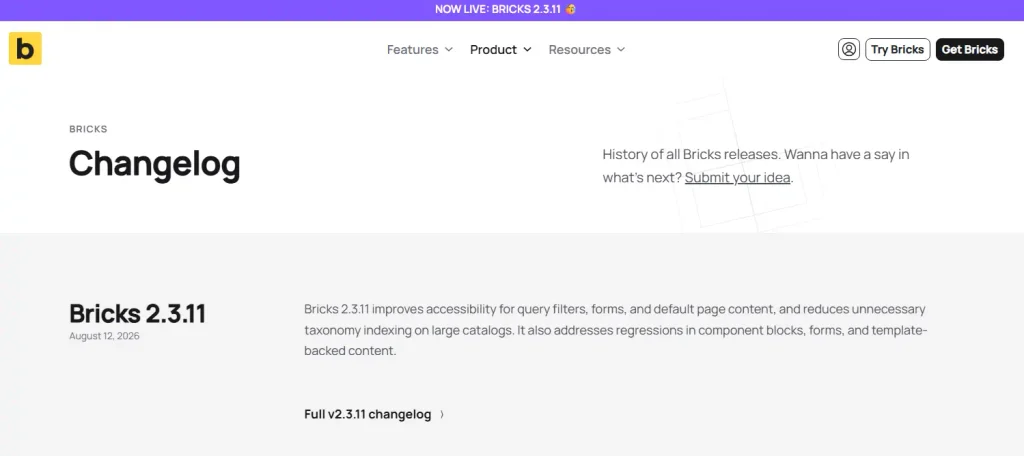
The 2.3.11 release focuses primarily on improvements and fixes, including accessibility work for forms and query filters, component-related fixes, WooCommerce corrections, query-loop fixes, and improvements to default page markup.
Bricks 2.4 is also publicly documented, but it remains a beta release at the time of writing. This distinction matters because some of the most interesting new capabilities being discussed around Bricks belong to 2.4 rather than the current stable release.
The Bricks 2.4 beta includes or previews additions such as:
- Bricks AI Abilities and MCP-oriented workflows;
- a Builder Browser for managing templates, components, and enabled post types;
- expanded global import and export workflows;
- customizable builder layouts and interface profiles;
- new WooCommerce setup and modular elements;
- bi-directional synchronization between supported Custom CSS declarations and visual style controls;
- additional component, variable, responsive styling, and workflow improvements.
Those developments make the roadmap worth watching, but a purchasing decision today should not depend entirely on beta functionality. Evaluate the stable product based on what your website actually needs now and treat 2.4 features as upcoming functionality until they reach a stable release.
You can verify the latest release directly in the official Bricks changelog.
Bricks Builder pricing and licensing
Bricks has a relatively simple pricing model because every current plan includes the complete feature set. The main differences are the number of licensed production websites and whether you pay annually or purchase the unlimited Lifetime license.
Prices below were checked on August 15, 2026, for the U.S. market. Prices are in USD. Applicable taxes are calculated at checkout based on location and can change the final amount.
| Plan | Production websites | Price | Billing |
|---|---|---|---|
| Starter | 1 | $79 | Yearly subscription |
| Business | 3 | $149 | Yearly subscription |
| Agency | Unlimited | $249 | Yearly subscription |
| Ultimate Lifetime | Unlimited | $599 | One-time payment |
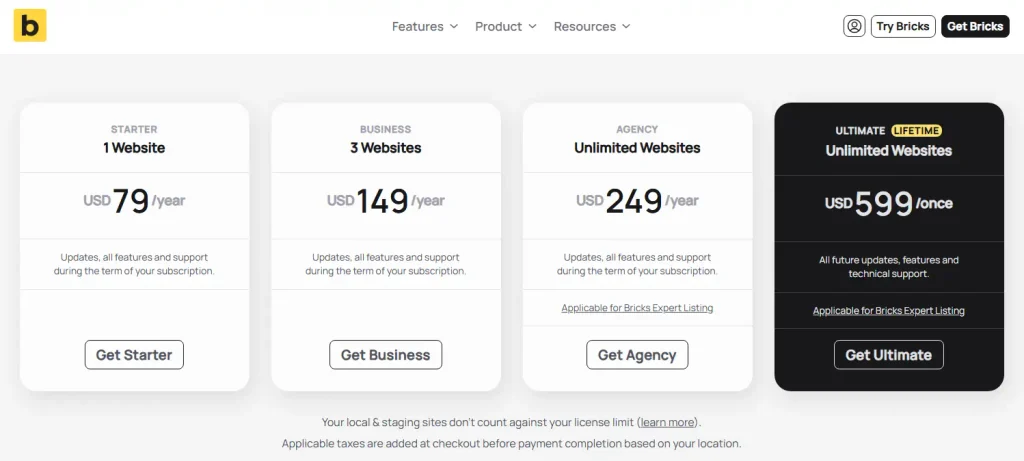
Local and staging installations do not count against the normal license activation limit. That is useful if you maintain separate development, staging, and production environments.
All plans include the same feature set
Bricks does not require the Agency or Lifetime tier to unlock the core advanced builder functionality. Current plans include the available builder features, updates, and technical support during the active license period.
The official pricing page currently lists more than 110 elements as well as features such as Query Loop Builder, Menu Builder, Popup Builder, WooCommerce Builder, conditions, and interactions.
How annual subscriptions work
Starter, Business, and Agency are annual subscriptions and renew yearly until canceled.
If you cancel, the license remains active until the end of the current billing period. After the license becomes canceled, Bricks states that you can continue editing existing Bricks websites, but you lose access to updates, technical support, and community templates.
Continuing to run an outdated builder indefinitely is not a good maintenance strategy for an active WordPress website. Security, WordPress compatibility, PHP compatibility, browser behavior, and plugin integrations can change over time.
Is Bricks Ultimate Lifetime worth considering?
Ultimate Lifetime is most relevant to agencies, freelancers, and users expecting to maintain multiple Bricks websites over a long period.
The $599 upfront cost is substantially higher than Starter or Business, so it is difficult to justify for someone building only one site unless avoiding recurring builder payments is especially important.
For an agency that would otherwise renew the $249 unlimited-site Agency subscription for several years, the Lifetime option becomes much easier to evaluate. The correct decision depends on how many production websites you expect to maintain, how long you expect to use Bricks, and whether you are comfortable committing to the product ecosystem.
60-day money-back guarantee
Bricks currently provides a 60-day money-back guarantee for eligible initial purchases.
That is particularly relevant because there is no downloadable permanent free edition. Bricks does provide an online playground where you can evaluate the current builder before buying.
Builder workflow and design systems
Bricks becomes more distinctive when a project moves beyond designing isolated pages.
The builder supports global classes, variables, Theme Styles, templates, responsive controls, custom code, reusable components, and selectable HTML tags. These capabilities let a team build a more systematic design layer instead of styling every element independently.
For example, a website can establish reusable classes for buttons, cards, headings, spacing, grids, and layout patterns. Changing the underlying class can then update multiple instances instead of forcing the same visual change to be repeated page by page.
This approach is powerful, but it also rewards discipline.
If every element receives unrelated local styling and the project has no conventions for class names, spacing, components, or variables, the site can become difficult to maintain even though the builder technically supports a structured workflow.
Bricks is therefore particularly attractive when you want the visual builder to participate in an intentional design system rather than operate purely as a collection of drag-and-drop widgets.
Dynamic content and Query Loops
Dynamic content is one of the strongest reasons to evaluate Bricks for complex WordPress projects.
The Query Loop system can retrieve content and repeat a designed layout for each result. Current documentation covers queries involving posts, taxonomy terms, users, arrays, and external API responses.
That enables use cases such as:
- blog and news grids;
- related posts;
- custom post type directories;
- team-member listings;
- taxonomy archives;
- product listings;
- content retrieved from supported external data sources;
- reusable cards populated with dynamic fields.
Dynamic data can then populate headings, images, links, text, custom fields, metadata, and other values inside the repeated design.
This is a different type of requirement from simply building a homepage. A small business brochure site may never need an advanced query system. A directory, real-estate site, catalog, membership project, editorial site, or complex WooCommerce implementation may depend on it.
That distinction should influence the buying decision. Paying for advanced dynamic capabilities provides little value if the website will only contain five static pages.
Components and reusable systems
Bricks Components provide another layer of reuse beyond CSS classes.
A component can represent a reusable structure such as a card, navigation item, button group, hero section, callout, or another element tree. Individual component instances can expose properties so content varies without breaking the shared underlying design.
Changes to the main component can propagate to its instances, while instance-specific properties allow selected text, images, links, variants, classes, queries, or other values to differ.
Components can also work with Query Loops, and Bricks currently supports using eligible components as blocks inside the WordPress block editor when the Gutenberg integration is enabled.
That last capability can be useful for teams where developers or designers establish controlled components but content editors continue writing normal posts in Gutenberg.
Instead of giving every editor unrestricted access to a complex visual layout, the team can expose reusable components with selected editable properties.
Bricks for WooCommerce
Bricks includes dedicated WooCommerce functionality rather than requiring the store to depend entirely on default WooCommerce templates.
The current stable product provides WooCommerce elements and template workflows for areas such as product archives and individual product pages. Available product-oriented elements include product title, gallery, price, stock, metadata, ratings, reviews, content, add-to-cart controls, related products, and up-sells or cross-sells.
WooCommerce data can also be used inside dynamic layouts and Query Loops.
This makes Bricks relevant to stores that need significantly more design control than the default WooCommerce presentation.
However, a visual builder does not remove the operational complexity of ecommerce. Store owners still need to manage hosting resources, caching exclusions, payment gateways, transactional email, backups, plugin compatibility, database growth, security, checkout testing, and updates.
Bricks 2.4 beta expands the WooCommerce workflow further with new setup tools and modular Cart, Checkout, and My Account concepts. Because those features remain associated with the beta release at the time of this review, they should not be treated as the primary reason to buy the current stable product.
Bricks performance and SEO considerations
Bricks is frequently discussed as a performance-oriented alternative to larger visual builders, but that claim requires an important qualification.
Web Choice Desk has not run an equivalent controlled benchmark comparing Bricks with Elementor, Divi, Breakdance, or another builder. We therefore do not label Bricks the fastest WordPress page builder.
What can be evaluated without inventing a benchmark is the level of control the builder provides over implementation.
Bricks supports structured CSS classes, variables, selectable HTML tags, responsive design controls, templates, and a broad set of native capabilities. Those tools can help a disciplined developer build a maintainable frontend without relying on a large collection of unrelated visual add-ons.
They do not guarantee good performance.
A Bricks website can still become slow because of:
- large unoptimized images;
- heavy video backgrounds;
- multiple font families and weights;
- third-party analytics and marketing scripts;
- poorly designed database queries;
- excessive animations and interactions;
- large plugin stacks;
- weak hosting resources;
- incorrect cache or CDN configuration.
The same caution applies to SEO. A builder can help you create semantic page structures and responsive layouts, but it cannot replace keyword research, content quality, internal linking, crawlability, canonical configuration, structured data, technical SEO, or a broader search strategy.
Bricks for agencies and client websites
The licensing and reusable-system features make Bricks particularly interesting for agencies.
Both Agency and Ultimate Lifetime support unlimited production websites, and Bricks explicitly permits license use on client websites.
Local and staging sites do not count toward the normal license limit, which supports common development workflows.
For agencies, however, licensing is only part of the decision.
A team standardizing on Bricks should also define:
- class and variable naming conventions;
- component standards;
- which templates clients may edit;
- builder access permissions;
- backup and staging procedures;
- which functionality belongs in Bricks and which belongs in plugins or custom code;
- how projects will be maintained if the original developer leaves.
A powerful builder does not replace development standards. In many cases, having more control makes those standards more important.
Learning curve and ease of use
Bricks does not require you to write code to build a website. The company explicitly positions the visual workflow as usable without coding knowledge.
That does not mean every user will find Bricks equally easy.
A user who already understands CSS classes, Flexbox, Grid, responsive breakpoints, HTML structure, templates, custom fields, and WordPress post types will be able to understand why many of Bricks’ more advanced controls exist.
A complete beginner may first need to learn both the builder and those underlying web concepts.
This is not necessarily a weakness. Learning structured CSS and reusable design concepts can improve long-term maintainability. It simply means Bricks is not automatically the most approachable starting point for someone who wants to drag a few widgets onto a page and avoid thinking about the underlying structure.
For that user, Elementor may be easier to evaluate first because it has a downloadable free version and a large ecosystem of beginner-oriented material.
Bricks Builder pros and cons
| Pros | Cons |
|---|---|
| Theme and visual builder are integrated into one product | You cannot simply keep an unrelated third-party theme underneath Bricks |
| All current plans include the full feature set | No downloadable permanent free version |
| Global classes, variables, and reusable design controls | Structured workflow creates a larger learning curve for complete beginners |
| Strong dynamic data and Query Loop capabilities | Advanced functionality can be unnecessary for simple brochure websites |
| Reusable Components with customizable properties | A poorly organized class and component system can still become difficult to maintain |
| WooCommerce-specific elements and templates | WooCommerce remains operationally complex regardless of the builder |
| Unlimited annual and Lifetime licensing options | Lifetime requires a substantial upfront payment |
| Local and staging installations do not consume normal license activations | Switching away can require rebuilding theme and builder-dependent layouts |
| 60-day money-back guarantee | Current affiliate program has not launched |
| Online playground lets you evaluate the workflow before purchase | Several notable 2.4 features are still beta rather than stable |
Who should use Bricks?
Bricks is easiest to recommend when its more structured capabilities solve actual project requirements.
- Developers and technical designers: Bricks provides visual editing while preserving access to classes, variables, custom code, semantic tags, dynamic data, and queries.
- Freelancers: Business can cover several sites, while Agency and Ultimate Lifetime remove the production-site limit.
- Agencies: reusable components, templates, design systems, client-site licensing, and unlimited-site options can support standardized production workflows.
- Dynamic WordPress projects: Query Loops and dynamic data are relevant to directories, catalogs, custom post types, editorial systems, and other structured content.
- WooCommerce developers: dedicated product elements and template controls provide considerably more visual flexibility than relying exclusively on standard store templates.
- Long-term users: the Ultimate Lifetime plan may appeal to buyers who expect to use Bricks on multiple sites for several years.
Who should avoid Bricks?
Bricks is less compelling when its advanced controls create complexity without solving a real requirement.
- Complete beginners wanting the simplest possible path: another builder with a simpler onboarding experience may be easier to learn initially.
- Users committed to an existing third-party theme: Bricks itself is the theme, not a plugin designed to sit on top of your current theme.
- Users requiring a permanent free local version: the free evaluation option is an online playground rather than a downloadable free edition.
- Very simple websites: the native WordPress editor may already provide everything a small conventional website needs.
- Teams without maintenance standards: sophisticated classes, queries, dynamic content, components, and templates need organization if several people will maintain the project.
- Buyers attracted primarily by beta features: base the purchase on stable functionality and treat Bricks 2.4 as a preview until it reaches stable release.
Bricks alternatives
Elementor
Elementor is the most obvious alternative when ease of initial evaluation, a downloadable free version, a large template ecosystem, and broad third-party support matter more than Bricks’ theme-based structured workflow. For a direct side-by-side decision, see our Bricks vs Elementor comparison covering pricing, design systems, dynamic content, WooCommerce, and licensing.
Our Elementor Review 2026 covers Free versus Pro, pricing, Elementor 4, WooCommerce, performance considerations, and migration risk in more detail.
Divi
Divi is worth evaluating when unlimited-site licensing and a lower-cost Lifetime core license are more important than Bricks’ developer-oriented approach to queries, components, and structured design systems.
Read our complete Divi review for its current pricing, Lifetime licensing, Divi 5, limitations, and ideal use cases.
WordPress Site Editor
The native WordPress block and Site Editor workflow should remain on the shortlist when the project does not need an advanced third-party builder.
Using native blocks can reduce dependency on a proprietary builder and eliminate a separate builder license, although more complex forms, popups, dynamic interfaces, queries, or ecommerce designs may require additional plugins or development.
For a broader comparison of these approaches, see our Best WordPress Page Builders in 2026.
Is Bricks Builder worth it in 2026?
Bricks is worth serious consideration in 2026 for developers, freelancers, agencies, and technically comfortable WordPress users who want a visual builder built around reusable systems and dynamic websites.
The strongest argument for Bricks is not a claim that it automatically produces a faster website. It is the amount of structured control available within the visual workflow.
Classes, variables, templates, Query Loops, dynamic data, conditions, interactions, components, custom code, WooCommerce tools, and selectable HTML structures give experienced users a large toolkit without forcing every project into a simple widget-by-widget approach.
Pricing is also relatively straightforward. Every plan receives the full feature set, so you choose primarily according to site count and billing preference rather than paying extra to unlock core professional functionality.
The $79 Starter license is the logical entry point for one production website. Business makes more sense for a freelancer maintaining a small number of sites. Agency fits ongoing unlimited-site work without the larger Lifetime payment. Ultimate Lifetime is the strategic option for buyers who expect to standardize on Bricks across many projects for several years.
The main reasons to choose something else are equally clear. Bricks replaces your theme, has no downloadable permanent free version, exposes more technical concepts than some beginner-oriented builders, and can create significant architectural dependency once a website relies heavily on Bricks templates, components, queries, and dynamic structures.
There is also no reason to buy Bricks today solely because of Bricks 2.4. The beta roadmap is promising, but the stable product should already justify the purchase before future features are included in the decision.
Choose Bricks when you want visual WordPress development to behave more like a structured design system. Choose a simpler builder when you mainly want to assemble conventional pages with the shortest possible learning curve.
Bricks Builder FAQ
Bricks is a premium WordPress theme with an integrated visual website builder. It is installed under Appearance > Themes rather than as a page-builder plugin on top of another theme.
As of August 15, 2026, Bricks Starter costs $79 per year for one website, Business costs $149 per year for three websites, Agency costs $249 per year for unlimited websites, and Ultimate Lifetime costs $599 once for unlimited websites. Applicable taxes may be added at checkout.
Yes. The current Ultimate Lifetime plan costs $599 as a one-time payment and supports unlimited production websites. Bricks states that the Lifetime license includes future updates, features, and technical support.
Bricks can be used without coding, but complete beginners may face a larger learning curve because the platform exposes concepts such as CSS classes, variables, responsive design, templates, dynamic data, components, and Query Loops. Users who understand basic HTML and CSS concepts are more likely to benefit from its structured workflow.
Neither is universally better. Bricks is particularly attractive to developers and agencies that want a theme-based builder, structured CSS, components, Query Loops, and dynamic websites. Elementor is easier to evaluate for many beginners because it has a downloadable free version and a larger established extension ecosystem.
Yes. Bricks includes WooCommerce-specific elements and template workflows for product and store layouts, and WooCommerce data can be used in dynamic content and Query Loops. Store performance and reliability still depend on hosting, caching, plugins, database workload, payment systems, and the rest of the WooCommerce stack.
Related reading
Product version, pricing, license limits, refund terms, affiliate-program status, and key product documentation last checked: August 15, 2026.
Trademark notice: Bricks, WordPress, WooCommerce, Elementor, and Divi are trademarks of their respective owners. Web Choice Desk is an independent publication and is not affiliated with or endorsed by Bricks.
Disclosure: Bricks has not launched its affiliate program as of August 15, 2026. Links to Bricks in this review are direct, non-affiliate links. This does not affect how the product’s strengths, limitations, or alternatives are evaluated.