
Cloudways is not a traditional shared host, and that distinction matters before you compare its prices with Hostinger, SiteGround, or other mainstream WordPress hosting providers. Instead of putting your website on a conventional hosting plan, Cloudways adds a managed platform on top of cloud infrastructure and gives you two very different ways to use it: Cloudways Flexible and Cloudways Autonomous.
Flexible gives you more control over the underlying server and lets you choose among cloud providers. Autonomous takes the opposite approach: it abstracts most server decisions and automatically scales WordPress resources when demand changes.
That makes Cloudways interesting for developers, agencies, growing WordPress sites, WooCommerce stores, and businesses that have outgrown entry-level hosting. It also makes the platform more complicated than a typical beginner-oriented host.
This Cloudways review explains what you actually get, how pricing works, where additional costs can appear, and which type of website is most likely to benefit from the platform.
On this page
- The case for (and against) Cloudways
- What is Cloudways?
- Cloudways Flexible vs Autonomous
- Cloudways promo code 2026: SUMMER404 for 40% off
- Cloudways pricing
- Performance and hosting stack
- Backups, staging, and migrations
- Cloudways support
- Does Cloudways include email hosting?
- Cloudways security features
- How scaling works on Cloudways
- Cloudways for agencies and multiple websites
- Cloudways pros and cons
- Who should use Cloudways?
- Who should skip Cloudways?
- Free trial, billing, and cancellation
- Is Cloudways worth it in 2026?
The case for (and against) Cloudways
Cloudways makes the most sense when you want managed WordPress hosting with more infrastructure flexibility than conventional hosts normally provide.
Cloudways Flexible is particularly attractive for users who want to choose their cloud provider, server size, location, and resources without managing a raw VPS themselves. You can also place multiple websites on the same server instead of paying a separate hosting fee for every installation.
Cloudways Autonomous is better suited to WordPress and WooCommerce projects where automatic scaling and reduced infrastructure management matter more than server-level control.
The main trade-off is complexity. Cloudways exposes more infrastructure decisions, billing variables, optional services, and server concepts than most shared or simplified managed WordPress hosts. The advertised server price also does not necessarily represent your entire bill because backups, bandwidth usage, premium support, email services, CDN features, or other add-ons can affect the final cost.
- Best for: growing WordPress sites, developers, agencies, WooCommerce, and users who want more control over hosting resources.
- Less suitable for: beginners who simply want one inexpensive website, bundled email hosting, and minimal infrastructure decisions.
- Main advantage: managed cloud infrastructure without requiring you to administer a raw cloud server yourself.
- Main drawback: pricing and configuration are more complex than conventional WordPress hosting.
What is Cloudways?
Cloudways is a managed cloud hosting platform. Instead of operating exactly like a conventional hosting company with a small set of fixed shared hosting packages, it provides a management layer between you and cloud infrastructure.
With Cloudways Flexible, you can deploy applications on infrastructure from providers including DigitalOcean, Vultr, Linode, Amazon Web Services, and Google Cloud. Cloudways then handles much of the server management layer while giving you a dashboard for tasks such as deployments, backups, staging, SSL, monitoring, caching, scaling, and team access.
Cloudways Autonomous takes a different approach. It is designed specifically around managed WordPress and WooCommerce workloads and hides much more of the infrastructure layer. Instead of choosing a conventional server size and manually scaling it when demand changes, Autonomous uses an autoscaling architecture designed to allocate additional capacity when required.
This distinction is fundamental because someone evaluating Cloudways Flexible is effectively shopping for a managed cloud server, while someone evaluating Autonomous is buying a more abstracted managed WordPress platform.
Cloudways Flexible vs Autonomous
| Feature | Cloudways Flexible | Cloudways Autonomous |
|---|---|---|
| Infrastructure control | Higher | Lower |
| Cloud provider selection | Yes | Infrastructure is abstracted |
| Multiple applications | Supported within server resources | Depends on plan allocation |
| Automatic infrastructure scaling | Not the core model | Yes |
| WordPress | Yes | Yes |
| WooCommerce | Yes | Yes |
| Laravel and custom PHP | Yes | No, WordPress-focused |
| Best fit | Control and flexibility | Hands-off scaling |
For many Web Choice Desk readers, Flexible will be the more relevant starting point because it preserves much of the flexibility normally associated with cloud servers while reducing the amount of server administration required.
Autonomous becomes more compelling when traffic variability itself is the problem. A store expecting campaigns, flash sales, launches, or unpredictable peaks may value automatic scaling more than direct control over a specific virtual machine.
Cloudways promo code 2026: SUMMER404 for 40% off
Cloudways is currently running a limited-time summer promotion with promo code SUMMER404, giving 40% off all hosting plans for four months. The offer also includes unlimited free expert-led migrations and is scheduled to remain valid through September 15, 2026.
- Promo code: SUMMER404
- Discount: 40% off for 4 months
- Migrations: unlimited free expert-led migrations
- Valid through: September 15, 2026
This is a temporary Cloudways promo code, so verify that the discount is still displayed before completing checkout.
Cloudways pricing
Cloudways pricing requires more attention than the headline monthly number because the platform combines infrastructure resources, usage-based billing, and optional services.
Cloudways Flexible pricing
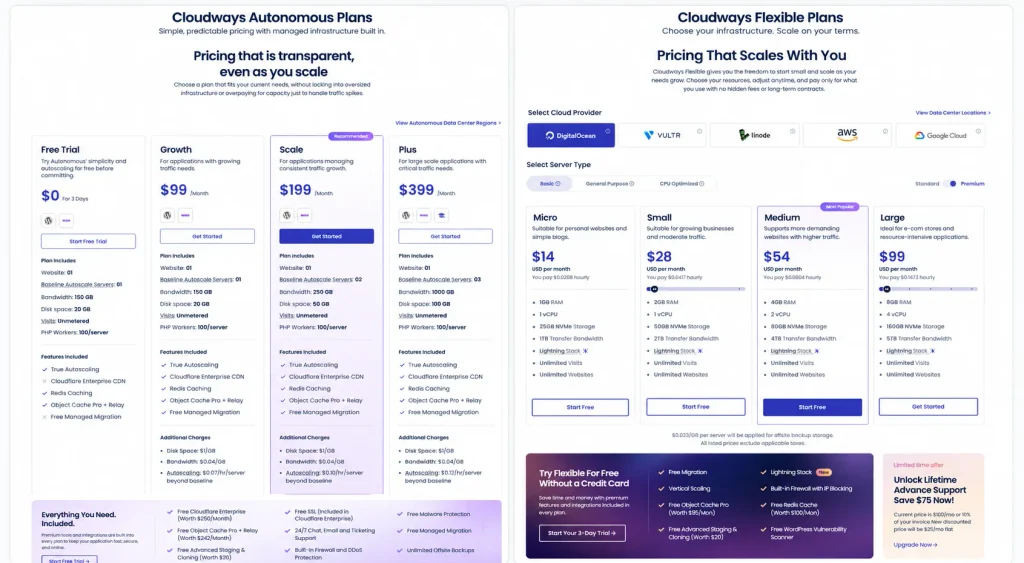
At the time this review was updated, Cloudways Flexible pricing on the public US site started at $11 per month with DigitalOcean infrastructure. Larger servers and other infrastructure providers cost more.
The important difference from per-site managed WordPress hosting is that a Flexible server can host multiple applications as long as its resources can support them. That can make the economics attractive for agencies or site owners consolidating several WordPress installations on one server.
However, server cost should not be interpreted as an all-inclusive hosting bill. Off-site backup storage on Flexible is billed separately, and additional services can increase the account total.
Cloudways Autonomous pricing
Cloudways Autonomous uses a different pricing structure. Current public plans include Growth at $99 per month, Scale at $199 per month, and Plus at $399 per month, with a custom Enterprise tier available above them.
These plans include defined baseline capacity and allowances for resources such as bandwidth and disk space. Additional autoscaling capacity, storage, or bandwidth can generate extra charges depending on the plan and usage.
This means Autonomous is not simply a more expensive version of Flexible. You are paying for a different operating model built around automatic scaling and a more abstracted infrastructure layer.
Cloudways extra costs to consider
- Flexible backups: off-site backup storage is billed separately based on storage consumption.
- Cloudflare Enterprise on Flexible: available as an optional paid add-on.
- Email: traditional mailbox hosting is not bundled into the core server price; email services are available separately.
- Premium support: Standard Support is included, while higher support tiers cost extra.
- Bandwidth: allowances and overage treatment vary according to the underlying infrastructure or product.
- Autonomous overages: additional bandwidth, storage, and autoscaling usage can increase the final bill.
For that reason, compare Cloudways using your expected total monthly configuration rather than comparing only the lowest server price with an all-inclusive shared hosting package.
Performance and hosting stack
Cloudways provides several performance-oriented technologies at the platform level, including server-side caching, object caching options, CDN integration, and infrastructure monitoring.
The Flexible product also gives users a choice of infrastructure provider, server size, and data center. Those decisions can materially affect capacity and real-world performance.
Cloudways has also introduced its Lightning Stack for supported Flexible configurations, while Autonomous includes technologies such as Redis caching, Object Cache Pro with Relay, and Cloudflare Enterprise as part of its managed architecture.
However, Web Choice Desk has not run a controlled benchmark comparing Cloudways against competing hosts for this review. We therefore do not label Cloudways the fastest host or publish unsupported TTFB, uptime, Core Web Vitals, or load-test claims.
Hosting performance depends on the cloud provider, region, server resources, application, WordPress configuration, cache behavior, database workload, plugins, theme, traffic pattern, and CDN configuration. A meaningful comparison requires testing equivalent workloads under controlled conditions.
Backups, staging, and migrations
Cloudways includes tools for automated backups and restoration, but the billing model differs between products. Flexible charges separately for off-site backup storage, while backup costs are included in Autonomous plan pricing.
Staging and cloning tools are also available, making it possible to work on changes without immediately applying them to a production site.
Migration is another strong part of the current offering. Cloudways provides free managed migrations for WordPress and WooCommerce applications on eligible paid accounts, and WordPress users can also use its migration plugin for self-service transfers.
Users migrating non-WordPress applications should check the current migration allowance and fees because the rules are different from WordPress and WooCommerce.
Cloudways support
Standard Support is included with Cloudways and provides 24/7 access through live chat and tickets.
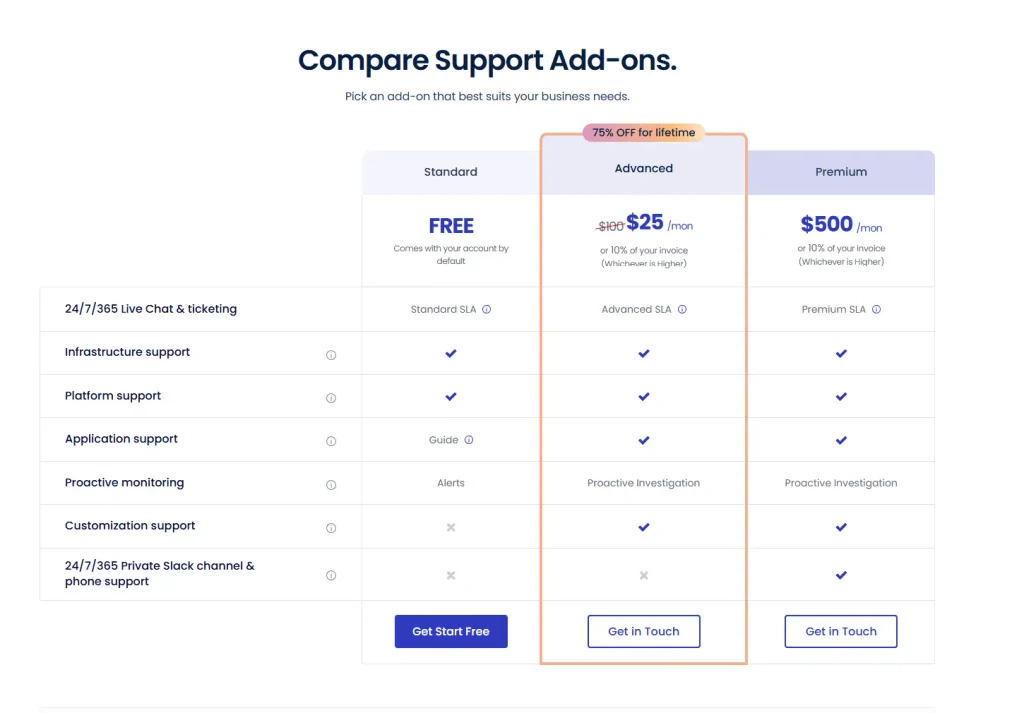
Cloudways also sells Advanced and Premium support tiers. These extend the support relationship with features such as priority handling, deeper application troubleshooting, performance and database assistance, proactive monitoring, and additional account-level support.
Premium Support adds options such as a private Slack channel and phone access to senior support engineers.
This tiered model is worth understanding before purchase. A company that expects hands-on assistance with complex application issues may have a different total cost than a technically comfortable user who only needs the included Standard Support.
Does Cloudways include email hosting?
Cloudways should not be treated like a traditional hosting package that includes a large number of free mailboxes alongside the website.
Email services are handled separately through available integrations and add-ons. That separation can be perfectly reasonable for businesses already using Google Workspace, Microsoft 365, or another dedicated email provider, but it can add cost and setup work for someone migrating from inexpensive shared hosting with bundled mailboxes.
Cloudways security features
Cloudways includes several platform-level security features such as managed firewalls, SSL support, malware protection features, backups, and account security controls.
Some configurations also use Cloudflare services for additional network and edge protection.
These features reduce infrastructure administration, but managed hosting does not eliminate the website owner’s security responsibilities. WordPress core, themes, plugins, administrator accounts, custom code, access policies, and compromised credentials can still create application-level risks.
How scaling works on Cloudways
Scaling is one of the biggest reasons to choose Cloudways, but Flexible and Autonomous solve the problem differently.
Flexible lets you change server resources when your workload grows. The exact scaling options depend on the underlying infrastructure provider, and some providers offer more flexibility for scaling resources up or down than others.
Autonomous is designed to remove much of that decision-making. Its infrastructure can automatically add capacity when traffic or resource demand increases, with additional autoscaling usage billed according to the selected plan.
If your traffic is relatively predictable and you prefer controlling the server yourself, Flexible can be the more economical approach. If unpredictable traffic spikes are the main operational concern, Autonomous addresses that problem more directly.
Cloudways for agencies and multiple websites
Cloudways Flexible becomes particularly interesting when several websites can share the same server resources.
Instead of buying a separate managed hosting subscription for every client site, an agency can organize multiple applications within its Cloudways infrastructure, create team access, separate projects, monitor resources, and transfer server ownership when required.
The important limitation is that “multiple websites” does not mean unlimited computing capacity. Every application on a Flexible server competes for the same underlying CPU, RAM, storage, database, and other server resources.
A server that comfortably hosts several lightweight brochure sites may not behave the same way with several busy WooCommerce stores. Capacity planning still matters.
Cloudways pros and cons
Pros
- Choice of multiple cloud infrastructure providers with Flexible.
- Managed layer reduces the work involved compared with administering a raw VPS.
- Multiple applications can share a Flexible server.
- Pay-as-you-go model instead of requiring a long prepaid hosting term.
- Automatic scaling option through Cloudways Autonomous.
- Staging, cloning, backups, monitoring, and migration tools.
- Useful for agencies, developers, and growing WordPress projects.
- Three-day trial available without requiring a credit card for eligible new trials.
Cons
- More complicated than beginner-focused shared hosting.
- The headline server price may not represent the entire monthly cost.
- Email hosting is not bundled like it is with many traditional hosts.
- Flexible off-site backup storage generates an additional charge.
- Advanced and Premium support cost extra.
- Choosing providers, server sizes, resources, and add-ons can overwhelm inexperienced users.
- Autonomous can become considerably more expensive than entry-level Flexible hosting.
Who should use Cloudways?
Cloudways is a strong fit for users who have moved beyond basic shared hosting but do not want to manage raw cloud infrastructure themselves.
- Agencies: Flexible can consolidate multiple client applications and provide team-oriented management features.
- Developers: the platform offers more infrastructure control than simplified WordPress hosting while removing much routine server administration.
- Growing WordPress sites: server resources can be increased as workloads grow.
- WooCommerce: both Flexible and Autonomous can suit stores, with Autonomous particularly relevant when traffic spikes are difficult to predict.
- Businesses with multiple sites: sharing appropriately sized Flexible infrastructure can improve the economics compared with paying separately for every website.
Who should skip Cloudways?
Cloudways is probably unnecessary if your priority is simply getting a small website online as cheaply and easily as possible.
A conventional host may make more sense when you want one dashboard with domain registration, basic hosting, email mailboxes, simple pricing, and minimal server terminology. If you are deciding between that simpler hosting model and managed cloud infrastructure, our Hostinger vs Cloudways comparison explains the trade-offs side by side.
If you are comparing Cloudways with a more premium WordPress-specific managed platform focused on staging, backups, security, and agency workflows, read our WP Engine Review 2026.
The same applies if you do not want to think about RAM, CPU, cloud providers, bandwidth, server sizing, backup storage, or optional infrastructure services. Cloudways manages much of the technical work, but Flexible does not completely hide the infrastructure model.
Free trial, billing, and cancellation
Cloudways currently offers eligible users a three-day trial without requiring a credit card for both Flexible and Autonomous.
After moving to paid service, Cloudways uses a pay-as-you-go model rather than requiring the multi-year prepayment commonly associated with heavily discounted shared hosting plans.
Cloudways also uses postpaid billing for active services. If you cancel, you can still receive a final invoice covering resources consumed before deletion or cancellation.
Another important detail is that simply stopping or ignoring a server does not necessarily stop billing. To stop charges, unused paid resources and add-ons must be properly deleted or deactivated.
Is Cloudways worth it in 2026?
Cloudways is worth considering when the flexibility and scalability of cloud infrastructure solve a real problem for your website.
For a developer, agency, growing publisher, or business running several websites, Flexible provides a useful middle ground between inexpensive shared hosting and fully self-managed cloud servers.
For a WordPress or WooCommerce business where unpredictable peaks are more important than infrastructure control, Autonomous offers a different proposition built around automatic scaling and higher availability architecture.
Cloudways becomes harder to justify when your needs are simple. A small site with little traffic and no infrastructure requirements may get better value from a simpler hosting service with bundled features and predictable fixed pricing.
The right comparison is therefore not “Is Cloudways cheaper than shared hosting?” It is “Does Cloudways remove enough server-management work while giving me the flexibility or scaling my project actually needs?”
If the answer is yes, Cloudways is one of the more distinctive managed hosting options to evaluate because it lets you choose how much infrastructure control you want rather than forcing every customer into the same hosting model.
Cloudways FAQ
Yes. Cloudways supports WordPress on its Flexible platform and also offers Autonomous, a WordPress-focused product built around automatic scaling. Flexible is better suited to users who want more infrastructure control, while Autonomous is designed for users who prefer a more hands-off scaling model.
Cloudways pricing depends on the product, infrastructure, server resources, and optional services you choose. At the time this page was updated, Flexible started at $11 per month on DigitalOcean, while current Autonomous paid plans started at $99 per month. Additional usage and add-ons can increase the final bill.
Not in the same way many traditional shared hosts bundle mailboxes with hosting. Cloudways offers email-related integrations and add-ons separately, so users who need business email should include that in their total cost comparison.
Yes. Eligible users can currently test Cloudways Flexible or Autonomous for three days without adding a credit card.
Cloudways Flexible allows multiple applications to run on a server, subject to the server’s available resources. Autonomous uses plan-based application allowances, so the number of sites depends on the selected product and plan.
No. Cloudways is a managed cloud hosting platform. Flexible places a management layer over cloud infrastructure, while Autonomous provides a more abstracted managed WordPress architecture.
Disclosure: Web Choice Desk may earn a commission when you purchase through qualifying links. This does not change the price you pay or how products are evaluated.