
Quick verdict: Hostinger is a strong WordPress hosting option for beginners, small businesses, content sites, and users who want managed features without paying premium managed-hosting prices. Its biggest strengths are low introductory pricing, an approachable control panel, WordPress-specific tools, global server locations, free migrations, and increasingly capable multi-site plans. The main catches are much higher renewal prices, long prepaid terms behind the lowest advertised rates, resource limits even on plans marketed as unlimited, and no phone support.
For most new WordPress websites, the decision is not simply whether Hostinger is cheap. The more important questions are which plan provides the resources you actually need, what the hosting will cost after the introductory term, and whether you are comfortable with Hostinger’s support and backup model.
For a small site, blog, portfolio, or simple business website, Premium is the logical entry point. The current Unlimited plan becomes more attractive when you need more storage, daily backups, or several websites. Cloud Startup makes more sense when the project needs substantially more CPU, RAM, PHP workers, and room to grow.
Prices, features, plan names, resource limits, and policies in this review were checked on August 7, 2026, using Hostinger’s United States pricing and legal pages. Promotional pricing can change at any time.
| Question | Web Choice Desk assessment |
|---|---|
| Is Hostinger good for WordPress? | Yes, particularly for beginners, small businesses, blogs, and cost-conscious multi-site users |
| Best entry plan | Premium for a small site; Unlimited for a more complete managed setup |
| Best feature | Strong feature-to-price ratio during the introductory term |
| Main drawback | Renewal pricing is substantially higher than the introductory rate |
| WordPress management | Automatic updates, migrations, caching, backups, developer tools, and staging depending on the plan |
| Support | 24/7 online support and AI assistance; no phone support |
| Money-back period | 30 days for eligible hosting purchases, subject to exclusions |
| Best for | Beginners, creators, small businesses, freelancers, and growing WordPress sites |
| Less suitable for | Users requiring phone support, premium enterprise management, or very high shared-hosting resource usage |
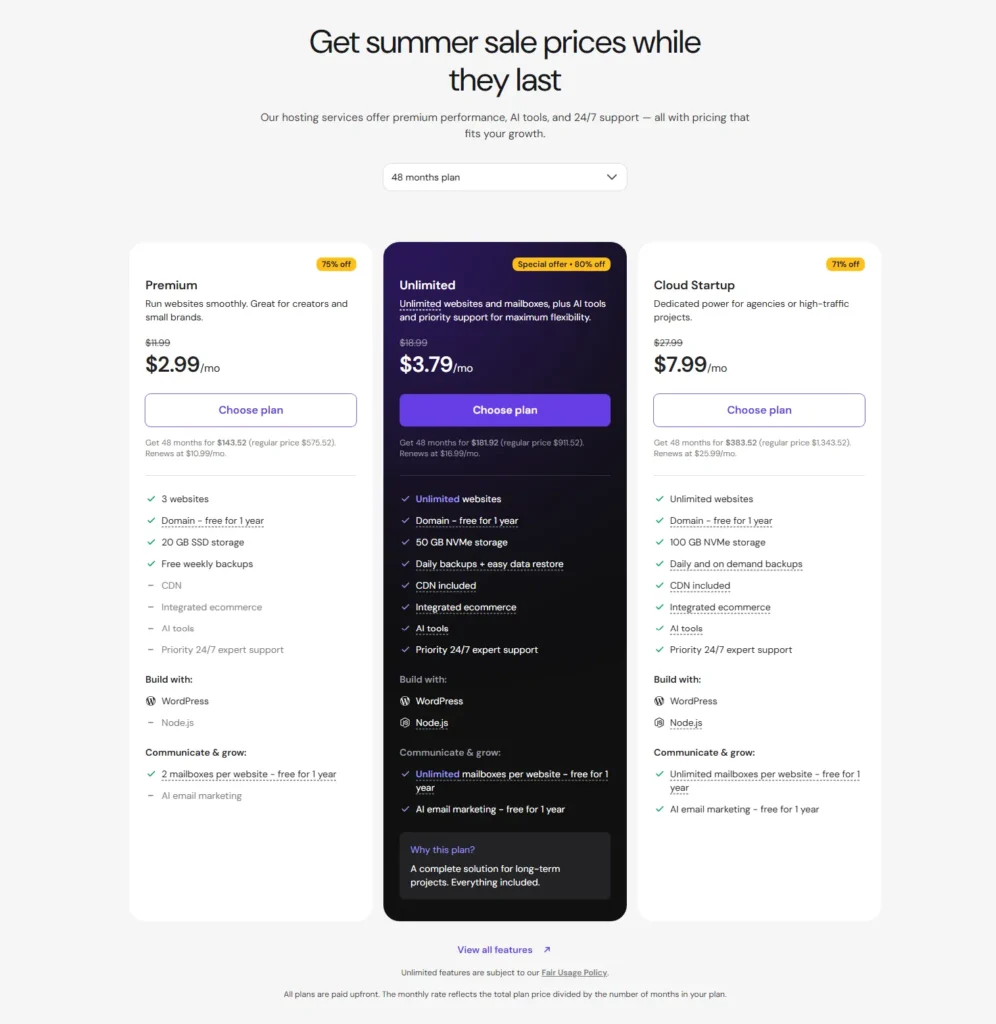
The current pricing is heavily dependent on the contract length. The lowest monthly-equivalent prices shown by Hostinger require paying for a 48-month term upfront, so compare the total initial payment and renewal rate rather than looking only at the large promotional number.
On this page
- What is Hostinger WordPress hosting?
- Hostinger WordPress hosting pricing
- Which Hostinger plan should you choose?
- hPanel and ease of use
- WordPress-specific features
- Performance and infrastructure
- Server locations and CDN
- Backups, staging, and security
- Website migration
- Hostinger for WooCommerce
- Customer support
- The meaning of unlimited and the real resource limits
- Refunds and cancellation
- Hostinger pros and cons
- Who should use Hostinger?
- Who should avoid Hostinger?
- Hostinger alternatives
- Final verdict
- Frequently asked questions
What is Hostinger WordPress hosting?
Hostinger provides managed hosting configured for WordPress rather than simply giving you an empty server and leaving all administration to you.
Hostinger describes its managed WordPress service as taking care of several underlying tasks such as installation, software updates, security, backups, and performance optimization. You still remain responsible for the website itself, including its content, plugins, design decisions, SEO strategy, and business operations.
The WordPress-oriented toolkit includes capabilities such as:
- WordPress installation;
- automatic WordPress updates;
- automatic website migration;
- LiteSpeed-based optimization and caching;
- object caching on eligible configurations;
- automatic backups;
- staging tools on eligible plans;
- WP-CLI and SSH;
- Git integration;
- PHP version controls;
- WordPress multisite support;
- WooCommerce-oriented features;
- AI-assisted website and hosting tools.
This makes Hostinger considerably more beginner-oriented than renting an unmanaged VPS. It is still WordPress hosting, however, not a service where the host takes responsibility for every plugin conflict, broken customization, or business-specific configuration.
Hostinger WordPress hosting pricing
Hostinger’s public U.S. pricing page currently highlights three primary managed hosting options relevant to WordPress: Premium, Unlimited, and Cloud Startup.
The lowest prices shown below are based on a 48-month prepaid term. They are monthly equivalents, not month-to-month billing prices.
| Plan | Intro price | Initial 48-month payment | Renewal | Websites | Storage | Backups |
|---|---|---|---|---|---|---|
| Premium | $2.99/mo | $143.52 | $10.99/mo | 3 | 20 GB SSD | Weekly |
| Unlimited | $3.79/mo | $181.92 | $16.99/mo | Unlimited* | 50 GB NVMe | Daily |
| Cloud Startup | $7.99/mo | $383.52 | $25.99/mo | Unlimited* | 100 GB NVMe | Daily and on demand |
All three plans currently include a domain for the first year, SSL, access to global data centers, migration tools, WordPress support, ecommerce capabilities, and AI-related tools. The exact allowances differ between plans.
The renewal price matters more than the introductory discount
The strongest pricing criticism is straightforward: the attractive introductory rate does not continue forever.
Premium moves from a $2.99 monthly equivalent during the promotional 48-month term to a listed renewal rate of $10.99 per month. Unlimited moves from $3.79 to $16.99, while Cloud Startup moves from $7.99 to $25.99.
This does not automatically make Hostinger expensive at renewal, but it changes the comparison. Someone choosing Hostinger primarily because of the introductory price should calculate whether the regular renewal price still makes sense several years later.
Do not mistake the monthly equivalent for monthly billing
The $2.99, $3.79, and $7.99 figures are calculated by dividing the prepaid contract price by 48 months. The customer pays the full term upfront.
This distinction matters when comparing Hostinger with services that use genuine month-to-month billing or shorter commitments.
Applicable taxes may also be added depending on the buyer’s location. Hostinger’s international pricing page states that displayed prices exclude VAT.
Which Hostinger plan should you choose?
Premium: best for a small WordPress site
Premium is the sensible starting point when you are running a blog, portfolio, small company website, or another relatively straightforward WordPress project.
The current plan supports three websites and provides 20 GB of SSD storage, weekly backups, a free domain for the first year, two mailboxes per website for the first year, and the core Hostinger WordPress environment.
Its main limitation is not the number of marketing features. It is the smaller resource allocation compared with the higher plans.
Unlimited: the more balanced managed WordPress plan
Unlimited is the more attractive choice when you expect the website to grow, operate several WordPress installations, or want daily backups rather than weekly backups.
It currently provides 50 GB of NVMe storage, additional CPU and RAM compared with Premium, more PHP workers, more databases, daily backups, and an unlimited website allowance subject to fair use.
The relatively small introductory price difference between Premium and Unlimited makes this tier worth considering even for a single serious business website. The decision becomes less obvious at renewal because Unlimited also has the larger renewal price.
Cloud Startup: for sites that need more resources
Cloud Startup moves beyond the lower shared-hosting resource allocations and is positioned for agencies, ecommerce, and higher-traffic projects.
The current comparison lists 100 GB of NVMe storage, 4 GB of RAM, four CPU cores, 100 PHP workers, a larger database allowance, and daily plus on-demand backups.
It is the better choice when resource headroom matters more than obtaining the absolute lowest hosting price.
hPanel and ease of use
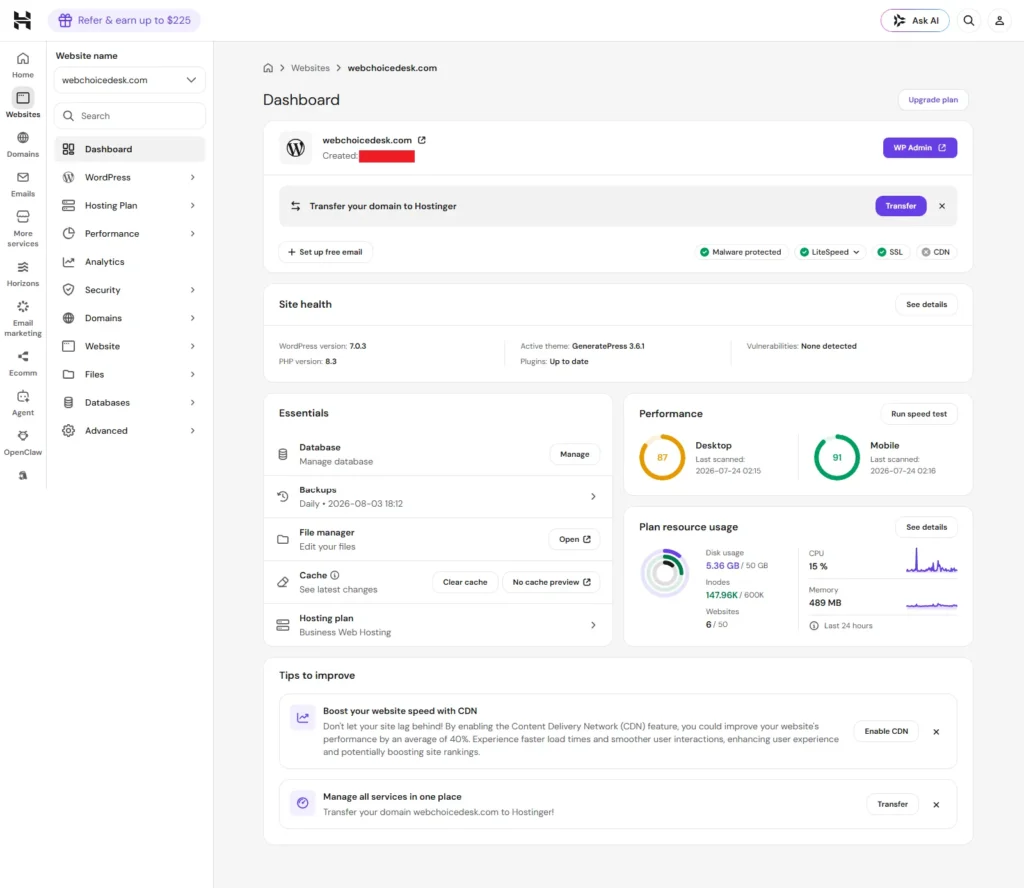
Hostinger uses its own control panel, hPanel, instead of cPanel on its primary managed hosting products.
For beginners, that is generally an advantage. The interface centralizes websites, domains, email, databases, backups, WordPress tools, migrations, billing, security, and other settings without exposing every server option at once.
Users already trained on cPanel may need a short adjustment period because menus and terminology are different. That does not mean hPanel is technically inferior; it is simply Hostinger’s own management environment.
The bigger practical question is whether you need a standard control panel for a specific agency process, reseller workflow, or third-party integration. For an ordinary WordPress site, hPanel covers the tasks most owners perform regularly.
WordPress-specific features
Hostinger’s value proposition is stronger than offering a one-click WordPress installer and calling the service managed hosting.
The current WordPress environment includes tools for installation, automatic updates, migrations, caching, backups, development, security, and site management.
Automatic WordPress updates
Automatic updates reduce the routine work involved in maintaining WordPress core, themes, and plugins. They do not remove the need to monitor a site after an update, particularly when it uses custom code, ecommerce extensions, or plugins with complex dependencies.
Developer tools
Hostinger provides tools such as WP-CLI, SSH access, Git integration, cron jobs, and PHP version management. These features make the service more useful for technical users than a simplified website-builder-only product.
AI features
Hostinger has increasingly integrated AI into its hosting environment, including website-generation tools, troubleshooting, optimization, and Kodee, its AI assistant.
These tools can reduce repetitive setup work, but they should not determine the hosting decision by themselves. Hosting resources, backups, server locations, support, renewal price, and migration options remain more important long-term considerations.
Performance and infrastructure
Hostinger uses LiteSpeed technology, caching, image and code optimization tools, and a global infrastructure intended to improve WordPress performance.
Hostinger also advertises a 99.9% monthly uptime guarantee. Its current Hosting Agreement states that if it fails to meet that guarantee, an eligible customer can request a credit equal to 5% of the monthly hosting fee for the affected month, subject to the agreement’s exclusions and claim requirements.
This is a service guarantee, not proof that every Hostinger WordPress site will achieve a specific Core Web Vitals score or loading time.
Web Choice Desk has not performed a controlled original Hostinger benchmark for this review. We therefore do not present a page-load time, TTFB, uptime percentage, stress-test capacity, or Core Web Vitals result as our own measurement.
Real WordPress performance will also depend on:
- the selected hosting plan;
- the data-center location;
- theme and page builder;
- plugins;
- image sizes;
- fonts;
- database size;
- cached versus uncached traffic;
- external scripts;
- WooCommerce activity;
- traffic concurrency.
For that reason, claims that Hostinger is universally “fast” or “slow” without a documented test environment are not useful.
Server locations and CDN
Hostinger currently offers web and cloud hosting data centers across North America, South America, Europe, and Asia.
Its published locations for web and cloud plans include:
- North America: Arizona, Massachusetts, and New York;
- South America: Brazil;
- Europe: France, Germany, Lithuania, United Kingdom, and Netherlands;
- Asia: India, Indonesia, Singapore, and Malaysia, with some plan-specific exceptions.
The best location is usually the one closest to the majority of your audience rather than the one closest to you personally.
Hostinger also operates a CDN that can distribute static content closer to visitors. A CDN helps with geographic delivery, but it does not eliminate the importance of choosing an appropriate origin server or optimizing WordPress itself.
Backups, staging, and security
Backups
The backup schedule depends on the plan. Premium currently includes weekly backups, Unlimited includes daily backups, and Cloud Startup adds daily and on-demand backups.
Hostinger’s Hosting Agreement also makes an important point that should not be ignored: customers remain responsible for maintaining appropriate independent copies of their website data.
That is a good practice with any hosting provider. A host-level backup should not be your only copy of a business-critical WordPress site.
Staging
Hostinger provides WordPress staging on eligible higher-tier hosting. A staging site creates a separate copy of the website so changes can be tested before replacing the live version.
Publishing a staging copy can overwrite files and database changes made on the live site after the staging environment was created. Always make a current backup and understand the deployment behavior before publishing.
Security
Hostinger’s WordPress plans include security features such as SSL certificates, a web application firewall, malware scanning, automatic updates, and DDoS-related protections. Higher plans can include additional protections.
Managed security reduces routine work but does not eliminate the site owner’s responsibilities. Weak administrator passwords, vulnerable plugins, exposed API keys, poorly maintained custom code, and insecure third-party integrations can still compromise a WordPress website.
Website migration
Hostinger offers automatic and assisted website migration for existing WordPress sites.
For WordPress, the migration process can be started from hPanel by submitting a website migration request. Hostinger also advertises free migrations as part of its managed hosting service.
A migration service can reduce the friction of changing hosts, but you should still verify:
- DNS configuration;
- SSL activation;
- email records;
- forms and outgoing mail;
- scheduled tasks;
- WooCommerce orders;
- cache configuration;
- analytics and tracking;
- redirects;
- search-engine accessibility after the move.
A migration is complete only after the new copy has been tested, not merely after the files have arrived on the new server.
Hostinger for WooCommerce
Hostinger supports WooCommerce and markets managed ecommerce capabilities across its current WordPress lineup.
For a small store, the regular managed WordPress plans may be sufficient. A store with more concurrent shoppers, heavier plugins, complex product catalogs, large databases, or resource-intensive checkout activity should pay closer attention to CPU, RAM, PHP workers, backups, and the difference between shared and cloud resources.
Cloud Startup is the more logical Hostinger tier when ecommerce resource usage becomes significant.
Hosting alone does not make a WooCommerce store reliable. You still need to manage:
- payment gateways;
- transactional email;
- cache exclusions;
- security;
- database maintenance;
- checkout testing;
- plugin compatibility;
- independent backups.
Customer support
Hostinger provides 24/7 online support through its account interface and also uses Kodee as an AI-assisted support and hosting-management layer.
One limitation is clear: Hostinger does not offer phone support.
The company argues that online support makes it easier to share screenshots, error messages, links, and technical instructions. That approach can work well for many WordPress problems, but users who strongly prefer speaking to a technician by phone should treat the absence of telephone support as a real disadvantage.
Web Choice Desk did not conduct a controlled support-response test for this review, so we do not present a response time or satisfaction score as our own measurement.
The meaning of unlimited and the real resource limits
The current Unlimited and Cloud Startup plans advertise unlimited websites, but this does not mean unlimited server resources.
Hostinger’s Hosting Agreement explicitly states that plans containing unlimited services remain subject to fair usage and technical limits such as CPU, RAM, database size, PHP workers, processes, and inode counts.
| Resource | Premium | Unlimited | Cloud Startup |
|---|---|---|---|
| Websites | 3 | Unlimited* | Unlimited* |
| Storage | 20 GB SSD | 50 GB NVMe | 100 GB NVMe |
| RAM | 2 GB | 3 GB | 4 GB |
| CPU cores | 1 | 2 | 4 |
| PHP workers | 40 | 60 | 100 |
| Inodes | 400,000 | 600,000 | 2,000,000 |
| Databases | 10 | 150 | 300 |
| Maximum database size | 3 GB | 3 GB | 6 GB |
This distinction is especially important for agencies. Hosting many lightweight websites is very different from hosting the same number of busy WooCommerce stores.
If several sites compete for the same CPU, RAM, PHP workers, database capacity, or inode allowance, the practical limit may be reached long before the theoretical website count.
Refunds and cancellation
Hostinger currently provides a 30-day refund period for eligible hosting purchases, subject to its refund policy and payment-method exclusions.
The policy contains important exceptions. Not every product, domain extension, add-on, payment method, or service is refundable under the same rules.
The free domain included with certain long-term hosting promotions also needs special attention. Hostinger’s refund policy says promotional free domains are generally non-refundable, and the company may deduct the domain’s value from the hosting refund while allowing you to keep the domain for the remainder of its registration period.
Before requesting a cancellation:
- download an independent website backup;
- export databases;
- verify domain ownership;
- check email migration requirements;
- move DNS when necessary;
- review which free or bundled products will be canceled.
Hostinger’s Hosting Agreement states that customers are responsible for moving their site content away from the service before termination.
Hostinger pros and cons
| Advantages | Disadvantages |
|---|---|
| Low introductory prices | Lowest prices require a long prepaid term |
| Beginner-friendly hPanel | Renewal prices are substantially higher |
| Managed WordPress features | No phone support |
| Global server locations | “Unlimited” plans still have technical resource limits |
| Free automatic website migrations | Host-level backups should not replace independent backups |
| LiteSpeed and caching tools | Entry plan only has weekly backups |
| Daily backups on Unlimited | Some advanced tools depend on the plan |
| WP-CLI, SSH, Git, and PHP controls | Users accustomed to cPanel need to learn hPanel |
| 30-day refund period for eligible hosting | Refund exclusions apply to domains, services, and payment methods |
| Cloud upgrade path | Not the same level of management as premium enterprise WordPress hosts |
Who should use Hostinger?
Beginners building their first WordPress website
hPanel, automatic WordPress installation, migrations, SSL, backups, AI tools, and managed updates reduce the number of separate systems a beginner has to understand on the first day.
Blogs and content websites
Premium or Unlimited can provide a relatively inexpensive environment for content-driven WordPress projects, provided the site remains within the plan’s resource limits.
Small businesses
A small business can obtain hosting, a domain for the first year, email allowances, SSL, migration, backups, and website-management tools through one provider.
Freelancers managing several lightweight websites
The current Unlimited plan is particularly interesting for freelancers because the website count is not the main restriction. Resource limits still matter, so it is better suited to several modest sites than an unlimited number of resource-intensive stores.
Growing websites that can move to cloud hosting later
The existence of a Cloud Startup upgrade path gives a growing site somewhere to move without immediately changing providers.
Who should avoid Hostinger?
Users who require phone support
Hostinger explicitly does not provide telephone support. Choose another provider when voice support is a requirement rather than a preference.
Users attracted only by the $2.99 headline price
The lowest price requires a 48-month commitment and does not represent the renewal price. A buyer unwilling to prepay for several years should compare shorter terms and competing hosts.
Very resource-intensive WordPress projects
High-traffic ecommerce, complex membership platforms, heavy database workloads, and mission-critical applications may need more isolated or specialized infrastructure than lower Hostinger shared plans provide.
Organizations requiring specialized compliance environments
Hostinger’s Hosting Agreement states that the standard services are not intended to provide a PCI- or HIPAA-compliant environment. Organizations with regulated workloads should evaluate specialized hosting requirements rather than assuming a standard WordPress plan is sufficient.
Hostinger alternatives
SiteGround
SiteGround is worth comparing when WordPress-oriented management and support are more important than obtaining Hostinger’s lowest introductory price. If you are also evaluating a more specialized managed WordPress platform, our SiteGround vs WP Engine comparison explains the differences in pricing, renewal, staging, backups, email, support, and developer workflows.
Compare renewal pricing and resource limits carefully because both companies use introductory offers.
Cloudways
Cloudways is a different proposition. It is aimed more toward users who want managed cloud infrastructure and greater flexibility over the underlying cloud provider.
If you are considering a more premium WordPress-specific managed platform with staging, daily backups, developer workflows, and 24/7 support, see our WP Engine Review 2026.
It may be more appropriate for technically confident WordPress users whose priority is cloud control rather than an all-in-one beginner hosting experience. For a direct side-by-side decision, see our Hostinger vs Cloudways comparison, including pricing, billing, WordPress tools, and the best fit for different types of websites.
Kinsta
Kinsta sits in a more premium managed WordPress category and may make more sense for businesses where advanced management, isolated resources, workflows, and support are more important than low introductory pricing.
An unmanaged VPS
An unmanaged VPS provides much more server control, but it also transfers significantly more responsibility to the user. It is not a direct beginner-friendly replacement for managed WordPress hosting.
Final verdict
Hostinger makes the most sense when you want WordPress-specific management and a broad feature set without moving immediately into premium managed WordPress pricing.
Premium is suitable for a small site where keeping the initial cost down matters most.
Unlimited is the more balanced plan for users who need daily backups, more resources, additional websites, and a more complete long-term WordPress setup.
Cloud Startup is the stronger choice when CPU, RAM, PHP workers, on-demand backups, and higher resource ceilings matter more than the lowest price.
The main reason not to buy Hostinger solely from an advertisement is the pricing structure. The introductory rate can be attractive, but the lowest number assumes a 48-month prepayment and the renewal rate is much higher.
The second important caveat is the word unlimited. It refers to specific allowances such as website count, not unlimited computing power. CPU, RAM, storage, PHP workers, database size, and inode limits still exist.
Hostinger is a strong value-oriented WordPress host when you choose the plan based on its real resources and renewal cost rather than the promotional headline alone.
Before purchasing, compare the current checkout total, renewal rate, resource limits, backup schedule, and included features because Hostinger can change promotions and plan structures over time.
Frequently asked questions
Yes. Hostinger provides managed WordPress features such as automatic installation and updates, migrations, backups, caching, developer tools, security features, and global server locations. Its strongest fit is beginners, small businesses, blogs, and cost-conscious WordPress users.
As of August 7, 2026, the U.S. pricing page lists Premium from $2.99 per month, Unlimited from $3.79 per month, and Cloud Startup from $7.99 per month when purchasing a 48-month term upfront. Renewal prices are substantially higher, so compare the renewal rate before buying.
The $2.99 figure is a monthly equivalent based on paying $143.52 for a 48-month Premium term upfront. It is not a standard month-to-month billing price, and the current listed renewal rate is $10.99 per month.
The current Unlimited and Cloud Startup plans advertise unlimited websites, but the hosting is still subject to fair usage and technical limits including storage, CPU, RAM, PHP workers, database size, processes, and inode allowances.
Backup frequency depends on the plan. Premium currently includes weekly backups, Unlimited includes daily backups, and Cloud Startup includes daily and on-demand backups. An independent backup should still be maintained for important websites.
No. Hostinger states that it does not offer phone support. Customers receive online assistance through its support interface, chat-based support, documentation, and the Kodee AI assistant.
Eligible hosting purchases currently have a 30-day refund period, but exclusions and special conditions apply to some domains, services, payment methods, and bundled products. Check the current refund policy before purchasing.
Trademark notice: Hostinger and WordPress are trademarks of their respective owners. Web Choice Desk is an independent publication and is not affiliated with or endorsed by Hostinger.
Plans, pricing, resource limits, and policies last checked: August 7, 2026.
Affiliate disclosure: Web Choice Desk may earn a commission when you purchase through eligible links on our site, at no additional cost to you. This does not affect the prices, limitations, or recommendations presented in this review.