
SiteGround and WP Engine both sell managed WordPress hosting, but they target different buyers. SiteGround is generally easier to justify for small businesses, freelancers, and multi-site owners who want lower introductory pricing, email hosting, unmetered data transfer, and a broad hosting bundle. WP Engine is the more specialized WordPress platform for teams that value separate development environments, managed workflows, account controls, and WordPress-focused operational tooling.
This SiteGround vs WP Engine comparison focuses on the factors that materially change the buying decision in 2026: introductory and renewal pricing, website and visit limits, storage, backups, staging, email, CDN and caching, support, developer tools, WooCommerce, and the type of site each platform fits best.
Prices, plan limits, and product documentation were checked on August 21, 2026, for the United States. Promotional pricing can change, so always verify the final checkout amount and renewal terms before buying.
Disclosure: Web Choice Desk does not currently have an approved SiteGround affiliate relationship, and no verified WP Engine affiliate redirect is active on this site. Links to both providers in this comparison are direct, non-affiliate links.
On this page
- SiteGround vs WP Engine: quick verdict
- SiteGround vs WP Engine: key differences
- SiteGround vs WP Engine pricing and renewal
- Sites, visits, storage, and bandwidth
- Backups and staging
- Email and domain services
- Performance, CDN, and caching
- SiteGround vs WP Engine support
- Developer and agency tools
- SiteGround vs WP Engine for WooCommerce
- Who should choose SiteGround?
- Who should choose WP Engine?
- Alternatives to SiteGround and WP Engine
- Final verdict: SiteGround or WP Engine?
- Frequently asked questions
SiteGround vs WP Engine: quick verdict
| Category | Better fit | Why |
|---|---|---|
| Lowest introductory price | SiteGround | StartUp currently begins at $2.99/month for the first prepaid 12-month term |
| Lower renewal entry point | SiteGround | StartUp renews at $17.99/month versus WP Engine Startup at $35/month |
| Managed WordPress workflow | WP Engine | Development, Staging, and Production environments with WordPress-specific platform tooling |
| Email hosting | SiteGround | Email accounts are included; WP Engine expects a third-party email provider |
| Multiple sites at lower cost | SiteGround | GrowBig and GoGeek allow unlimited websites within plan resources |
| Agency and developer workflow | Depends | Both have staging and developer tools; WP Engine is more specialized around managed WordPress operations |
| Traffic model | SiteGround | SiteGround publishes suitable-visit guidance and unmetered data transfer; WP Engine uses explicit monthly visit allowances |
| Performance | No universal winner | A controlled equivalent benchmark is required |
Choose SiteGround if you want a more affordable managed WordPress package that includes email, supports multiple sites on higher plans, and gives you staging and developer tools without moving into WP Engine’s price range. For a deeper look at the provider itself, read our SiteGround Review 2026.
Choose WP Engine if the website is important enough that a WordPress-specialized operational platform, separate environments, managed workflows, team controls, and WordPress-focused support matter more than the lowest hosting bill.
SiteGround vs WP Engine: key differences
The biggest difference is not that one is “managed” and the other is not. Both manage important parts of the WordPress stack. The difference is how much specialization and operational structure you are buying.
SiteGround is a broader web-hosting platform with managed WordPress features layered into the service. It includes email accounts, SSL, CDN, backups, Site Tools, WordPress management, and developer tools. Higher plans add more resources and collaboration capabilities.
WP Engine is more narrowly centered on WordPress operations. Its workflow is built around Development, Staging, and Production environments, backup checkpoints, managed caching and CDN features, team permissions, transfer workflows, and WordPress-specific platform support. Read our WP Engine Review 2026 for the full product breakdown.
SiteGround vs WP Engine pricing and renewal
SiteGround has the lower entry price, but its discount is introductory. The current U.S. pricing shows StartUp at $2.99/month, GrowBig at $4.99/month, and GoGeek at $7.99/month when prepaid for 12 months. Published renewal rates are $17.99, $29.99, and $44.99 per month respectively.
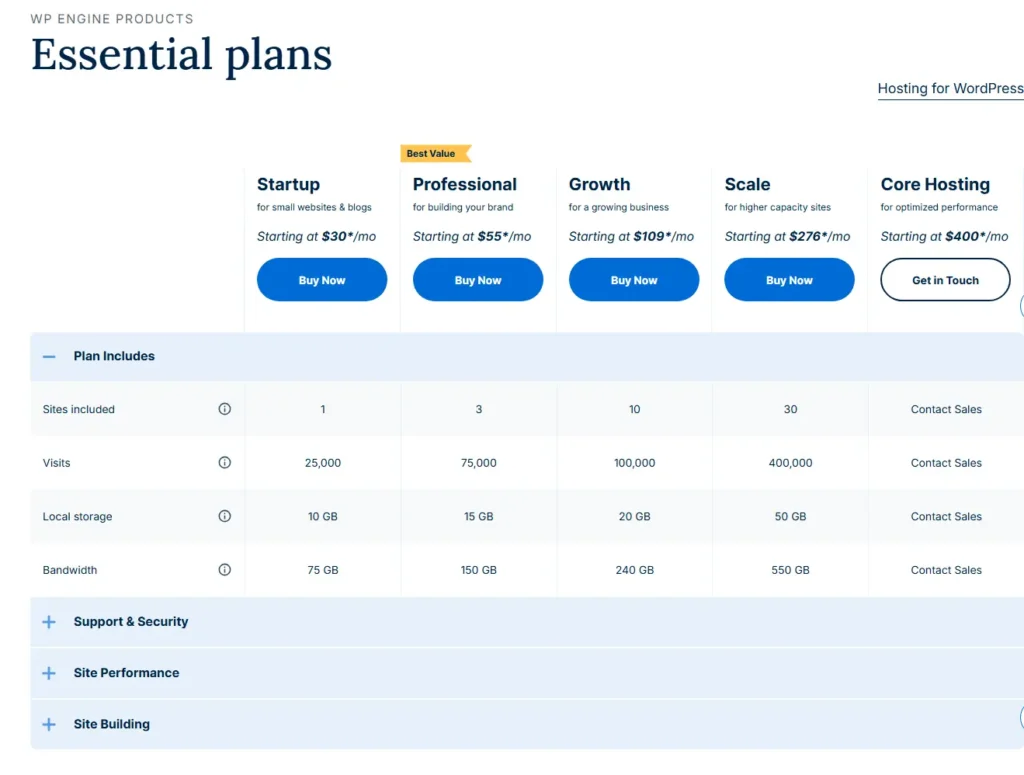
WP Engine’s current Essential hosting lineup starts substantially higher. Its public plans page shows Startup from $30/month, Professional from $55, Growth from $109, and Scale from $276. WP Engine separately publishes renewal rates of $35, $65, $130, and $330 per month for renewals on or after March 11, 2026.
| Plan | Starting price | Published renewal | Sites | Visit guidance / allowance |
|---|---|---|---|---|
| SiteGround StartUp | $2.99/mo | $17.99/mo | 1 | ~10,000 monthly |
| SiteGround GrowBig | $4.99/mo | $29.99/mo | Unlimited | ~100,000 monthly |
| SiteGround GoGeek | $7.99/mo | $44.99/mo | Unlimited | ~400,000 monthly |
| WP Engine Startup | From $30/mo | $35/mo | 1 | 25,000 visits |
| WP Engine Professional | From $55/mo | $65/mo | 3 | 75,000 visits |
| WP Engine Growth | From $109/mo | $130/mo | 10 | 100,000 visits |
| WP Engine Scale | From $276/mo | $330/mo | 30 | 400,000 visits |
The price gap is large enough that the decision should not be based on feature checklists alone. SiteGround can be materially cheaper even after renewal, while WP Engine has to justify its premium through the value of its managed WordPress workflow.
Sites, visits, storage, and bandwidth
SiteGround StartUp supports one website with 10 GB of web space and publishes guidance of roughly 10,000 monthly visits. GrowBig and GoGeek allow unlimited websites within the plan’s resource limits, with 50 GB and 100 GB of space and guidance around 100,000 and 400,000 visits per month. SiteGround also advertises unmetered data transfer on these plans.
WP Engine uses explicit website and monthly-visit allowances. Startup includes one site and 25,000 visits per month; Professional supports three sites and 75,000 visits; Growth supports ten sites and 100,000 visits; Scale supports 30 sites and 400,000 visits. The equivalent plans also have defined storage and bandwidth allocations.
This difference matters for portfolios and agencies. SiteGround’s unlimited-site allowance on GrowBig and GoGeek is attractive when many smaller websites can comfortably share the plan’s resources. WP Engine’s site limits are more explicit, so per-site economics can become expensive sooner.
Backups and staging
Both providers take managed workflows seriously, but their implementations are different.
SiteGround includes automated daily backups and documents multi-location redundancy and recovery tools. Its WordPress hosting platform also provides one-click staging on plans that include the feature, alongside WP-CLI, SSH, Git integration, and PHP version controls.
WP Engine organizes each site around separate Development, Staging, and Production environments. It provides automated daily and manual backup checkpoints, and current documentation describes 30 days of backup checkpoints for site environments.
For a developer or team with a formal test-and-deploy process, WP Engine’s environment model is a meaningful part of the product. For many small businesses and freelancers, SiteGround’s staging and backup tooling may already be sufficient at a much lower price.
Email and domain services
This is one of SiteGround’s clearest practical advantages for buyers who want fewer providers.
SiteGround includes email accounts with its hosting plans and provides a webmail interface and migration tooling. The email service uses storage from the hosting allocation, so it should not be treated as a separate unlimited storage product.
WP Engine does not provide normal mailbox hosting and does not function as an all-in-one domain registrar and email host. Businesses using WP Engine should plan on a separate provider for mailbox hosting and reliable transactional email.
Performance, CDN, and caching
SiteGround includes its WordPress optimization stack, caching tools, CDN, and Google Cloud-based infrastructure. WP Engine includes platform caching, EverCache technology, and global CDN delivery.
Web Choice Desk has not run a controlled original SiteGround vs WP Engine benchmark for this comparison. We therefore do not claim that either provider is universally faster, has better Core Web Vitals, or produces a lower TTFB.
Actual page speed depends on theme quality, plugins, database workload, page caching, media, third-party scripts, traffic pattern, geographic location, and the type of request being served. Built-in caching and CDN tools can simplify optimization, but they do not make every WordPress site fast automatically.
SiteGround vs WP Engine support
Both companies provide 24/7 support, but the channels and product positioning differ.
SiteGround markets 24/7 human support as part of its WordPress hosting package and provides support through its account system. WP Engine provides 24/7 WordPress-focused support, but phone support is unavailable on its Lite and Startup tiers, making chat the primary real-time channel for Startup users.
Support quality can vary by issue and individual interaction. Web Choice Desk has not conducted a controlled support-response benchmark, so this comparison does not assign a support-speed winner.
Developer and agency tools
SiteGround offers more developer capability than its low introductory price may suggest. Its platform documents WP-CLI, SSH and SFTP access, Git integration, PHP version controls, staging, collaborators, and client handoff features. GoGeek also includes white-label capabilities.
WP Engine is more specialized around the WordPress development lifecycle. Development, Staging, and Production environments, transferable sites, team permissions, activity logs, SSH/SFTP, Local integration, and deployment-oriented workflows make it particularly relevant to agencies and development teams.
The agency decision is therefore not simply “WP Engine for developers, SiteGround for beginners.” A freelancer or agency with many smaller client sites may prefer SiteGround’s economics, while a team that values standardized WordPress operations may prefer WP Engine’s workflow even at a higher recurring cost.
SiteGround vs WP Engine for WooCommerce
Both can host WooCommerce, but store owners should compare operational requirements rather than only the monthly price.
SiteGround can be appealing to smaller stores because it combines hosting, email, backups, caching, CDN, and WordPress tools in one lower-cost package. WP Engine offers ecommerce-focused capabilities and optional WooCommerce performance products for stores that need a more specialized managed platform.
For either provider, checkout traffic, logged-in sessions, database activity, payment integrations, dynamic requests, backups, and traffic spikes matter more than brochure-style page-view counts.
Who should choose SiteGround?
- Small businesses that want managed WordPress hosting without WP Engine’s price level.
- Freelancers and agencies with many smaller sites that can use GrowBig or GoGeek’s unlimited-site allowance efficiently.
- Users who want email included with the hosting account.
- WordPress users who need staging and developer tools but do not need WP Engine’s more specialized environment workflow.
- Buyers who understand renewal pricing and still find SiteGround’s regular rates competitive for their needs.
Who should choose WP Engine?
- Businesses with revenue-critical WordPress sites where managed operations are worth paying more for.
- Development teams that actively use separate Development, Staging, and Production environments.
- Agencies that value standardized WordPress workflows, permissions, transfers, and platform-level management.
- Teams that prefer WordPress-specialized infrastructure and support over a broader hosting bundle.
- Organizations comfortable using separate email and domain providers.
Alternatives to SiteGround and WP Engine
Hostinger is worth considering when price and a simple bundled WordPress hosting experience matter more than a premium managed workflow. Read our Hostinger WordPress Hosting Review 2026.
Cloudways is a different option for users who want managed cloud infrastructure and more flexibility over the underlying cloud provider and server size. See our Cloudways Review 2026.
If those two alternatives are already on your shortlist, our Hostinger vs Cloudways comparison explains their different hosting models side by side.
Final verdict: SiteGround or WP Engine?
SiteGround is the stronger value proposition for most small businesses, freelancers, and WordPress users who want managed features without paying for a highly specialized WordPress platform. Its lower introductory and renewal prices, included email, multi-site higher plans, backups, caching, CDN, staging, and developer tools cover a broad range of practical needs.
WP Engine makes more sense when WordPress operations themselves are important enough to justify a premium. Its structured environment model, managed workflow, WordPress-focused platform, and team-oriented tooling can be valuable for agencies, developers, and established businesses.
The decision rule is therefore straightforward: choose SiteGround when you want more hosting for the money; choose WP Engine when you want more WordPress operations managed as a platform.
Frequently asked questions
Yes at the currently published entry and renewal prices. SiteGround StartUp begins at $2.99 per month for the first prepaid 12-month term and renews at $17.99 per month, while WP Engine Startup begins from $30 per month with a published renewal rate of $35 per month. Pricing can change.
Yes. SiteGround includes email accounts with its hosting plans. The mailboxes use storage from the hosting plan. WP Engine does not provide normal mailbox hosting and expects customers to use a third-party email provider.
Both provide staging capabilities on applicable plans. SiteGround documents one-click WordPress staging alongside WP-CLI, SSH, Git, and PHP tools. WP Engine organizes sites around Development, Staging, and Production environments.
SiteGround can be more economical for portfolios of smaller sites because GrowBig and GoGeek allow unlimited websites within plan resources. WP Engine uses explicit website limits on its Essential plans, so agencies should compare the total number and resource needs of their client sites.
There is no universal answer without equivalent controlled testing. Both include caching and CDN technologies, while actual speed depends on the website, theme, plugins, database workload, location, traffic pattern, and configuration. Web Choice Desk has not run a controlled SiteGround vs WP Engine benchmark for this comparison.
Both offer serious developer tools. SiteGround provides staging, WP-CLI, SSH, Git integration, and PHP controls, while WP Engine adds a more specialized WordPress operational workflow around Development, Staging, and Production environments, transfers, permissions, and managed platform tooling.
Related reading
- WP Engine Review 2026
- Hostinger WordPress Hosting Review 2026
- Cloudways Review 2026
- Hostinger vs Cloudways 2026
Pricing, renewal rates, plan limits, and product features last checked: August 21, 2026.
Trademark notice: SiteGround, WP Engine, WordPress, WooCommerce, Hostinger, and Cloudways are trademarks of their respective owners. Web Choice Desk is an independent publication and is not affiliated with or endorsed by these companies.