
Hostinger is the better choice for most beginners, creators, small businesses, and website owners who want a simpler hosting experience at a low initial cost. Cloudways is the stronger fit for developers, agencies, growing WooCommerce stores, and technically comfortable users who want more control over infrastructure, billing, and scaling.
The biggest difference between Hostinger and Cloudways is not a single feature or benchmark. It is the type of hosting experience each company sells. Hostinger bundles more of the website stack into an approachable managed platform. Cloudways sits closer to managed cloud infrastructure, exposing more choices around servers, resources, providers, and scaling.
That means there is no universal winner in this Hostinger vs Cloudways comparison. Hostinger is easier to recommend when simplicity and low upfront pricing matter most. Cloudways becomes more compelling when infrastructure flexibility and room to scale are worth additional complexity.
On this page
- Hostinger vs Cloudways: quick verdict
- Hostinger vs Cloudways at a glance
- Hostinger vs Cloudways pricing and billing
- Ease of use: Hostinger is simpler
- Infrastructure and scaling: Cloudways offers more control
- Hostinger vs Cloudways performance
- WordPress and WooCommerce
- Backups, staging, and migrations
- Email, domains, and support
- Hostinger pros and cons
- Cloudways pros and cons
- Who should choose Hostinger?
- Who should choose Cloudways?
- Hostinger vs Cloudways: final verdict
Hostinger vs Cloudways: quick verdict
| Category | Better fit | Why |
|---|---|---|
| Beginners | Hostinger | Simpler setup and a more bundled hosting experience |
| Lowest entry cost | Hostinger | Very low promotional pricing when committing to a long prepaid term |
| Billing flexibility | Cloudways | Flexible uses hourly pay-as-you-go billing instead of requiring a multi-year prepaid commitment |
| Cloud provider choice | Cloudways | Flexible lets you choose among several cloud infrastructure providers |
| Domain and email bundle | Hostinger | Current eligible plans include a domain and email features for an initial period |
| Infrastructure control | Cloudways | More control over server resources, provider, region, applications, and scaling |
| Multiple technical projects | Cloudways | Flexible can run multiple applications on shared server resources |
| Simple small-business hosting | Hostinger | Fewer infrastructure decisions and more website essentials in one platform |
| Automatic infrastructure scaling | Cloudways Autonomous | Designed around managed WordPress autoscaling |
| Performance | No universal winner | A fair performance winner requires equivalent controlled testing |
Choose Hostinger when you want hosting to be affordable, straightforward, and mostly self-contained.
Choose Cloudways when you want managed hosting without giving up meaningful control over the infrastructure underneath your website.
Hostinger vs Cloudways at a glance
Hostinger and Cloudways both serve WordPress users, but comparing them as if they were two versions of the same product can lead to the wrong decision.
Hostinger’s managed WordPress plans emphasize convenience. Hosting, WordPress management, domains, email allowances, backups, CDN features, security tools, and support live within the same broader ecosystem.
Cloudways offers a more infrastructure-oriented approach. Flexible lets you select cloud infrastructure and server resources, while Autonomous removes many of those choices and instead focuses on automatically scaling WordPress workloads.
| Feature | Hostinger | Cloudways |
|---|---|---|
| Hosting model | Managed hosting for WordPress, web hosting, and cloud hosting | Managed cloud platform with Flexible and Autonomous products |
| Management interface | hPanel | Cloudways platform |
| Cloud provider selection | No equivalent selection on its standard managed WordPress plans | Yes with Flexible |
| WordPress | Yes | Yes |
| WooCommerce | Yes | Yes |
| Automatic infrastructure scaling | Not the core managed WordPress model | Yes with Autonomous |
| Free domain | First year on eligible current plans | Not part of the core hosting package |
| Email mailboxes | Included for an initial period on current plans | Available separately through add-ons |
| Backups | Included; frequency depends on plan | Flexible off-site backup storage is billed separately; Autonomous includes off-site backups |
| Staging | Available on eligible plans | Available |
| Billing approach | Lowest prices require longer prepaid terms | Usage-oriented and hourly billing |
| Best suited to | Beginners, creators, small businesses, and simpler projects | Developers, agencies, growing sites, and users who want more infrastructure flexibility |
Hostinger vs Cloudways pricing and billing
Hostinger has the substantially lower headline entry price, but the pricing models are different enough that comparing only the monthly numbers is misleading.
Prices below were checked on August 11, 2026 for the U.S. market. Hosting prices, promotions, taxes, plan structures, and add-on charges can change, so verify the current checkout terms before purchasing.
| Product | Displayed price | Billing structure | Important detail |
|---|---|---|---|
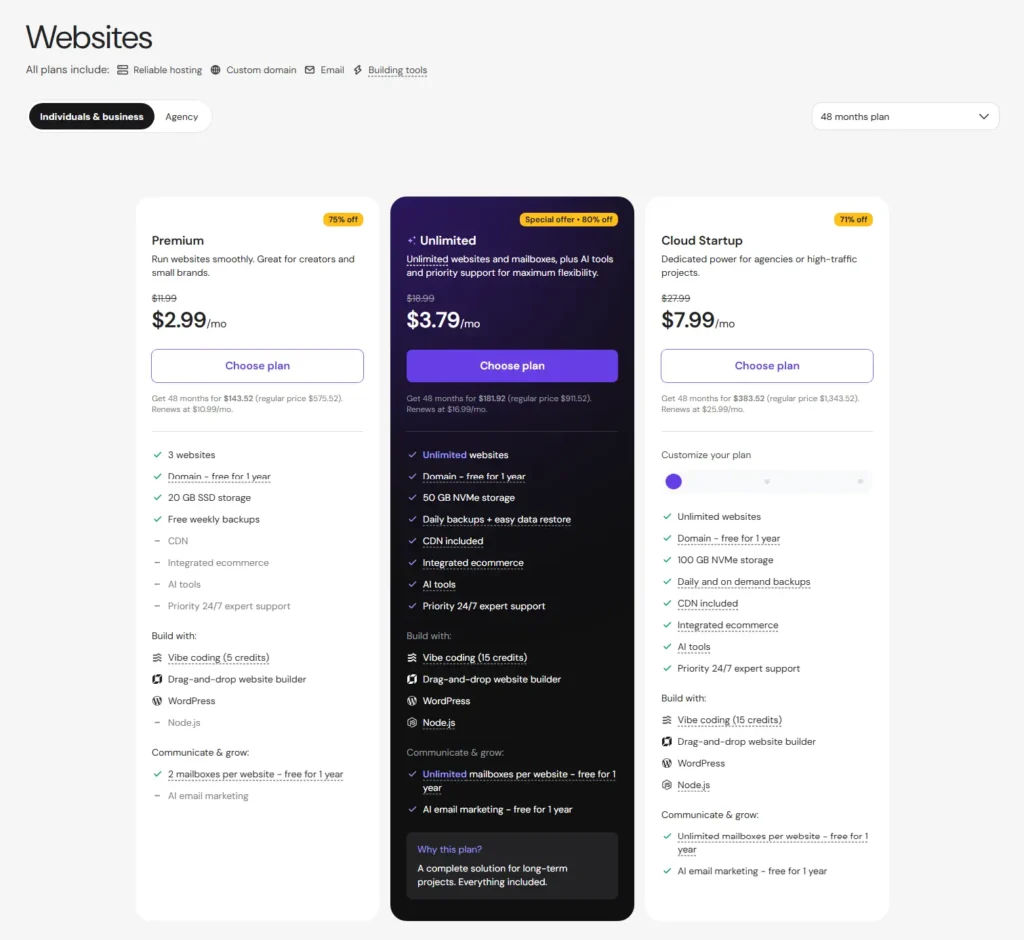
| Hostinger Premium | $2.99/month | $143.52 prepaid for 48 months | Currently renews at $10.99/month |
| Hostinger Unlimited | $3.79/month | $181.92 prepaid for 48 months | Currently renews at $16.99/month |
| Hostinger Cloud Startup | $7.99/month | $383.52 prepaid for 48 months | Currently renews at $25.99/month |
| Cloudways Flexible entry configuration | $11/month | Hourly pay-as-you-go billing | 2 GB RAM, 1 vCPU, 50 GB storage and 2 TB transfer on the current entry DigitalOcean configuration |
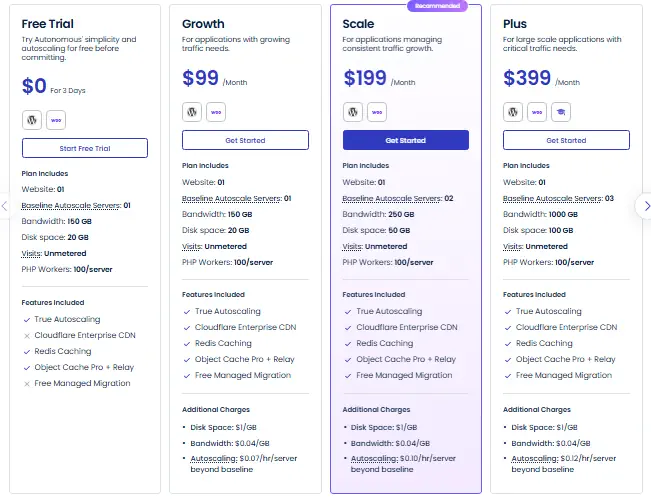
| Cloudways Autonomous Growth | $99/month | Plan-based pricing | Additional storage, bandwidth, and autoscaling usage can cost extra |
| Cloudways Autonomous Scale | $199/month | Plan-based pricing | Higher baseline autoscaling allocation and included resources |
| Cloudways Autonomous Plus | $399/month | Plan-based pricing | Designed for larger applications with more baseline capacity |
Hostinger rewards longer commitments
The lowest Hostinger prices currently displayed require purchasing 48 months in advance. The advertised monthly figure is the total prepaid amount divided by the number of months, not a month-to-month subscription at the promotional rate.
This model can produce a very low effective cost if you already expect to keep the hosting service for several years. The trade-off is that you pay a much larger amount upfront and face a higher listed rate when the initial term ends.
Premium currently costs $143.52 for 48 months and renews at a listed $10.99 per month. Unlimited costs $181.92 for the initial 48 months and currently renews at $16.99 per month. Cloud Startup costs $383.52 for the initial term and currently renews at $25.99 per month.
Hostinger also markets unlimited websites and other unlimited features on eligible plans. Unlimited should not be interpreted as unlimited CPU, RAM, storage, PHP workers, processes, databases, or other computing resources. Technical and fair-use limits still apply.
Cloudways charges for a different type of hosting
Cloudways Flexible currently starts at $11 per month for an entry DigitalOcean configuration with 2 GB of RAM, one vCPU, 50 GB of storage, and 2 TB of transfer bandwidth. Billing is calculated hourly, so reaching that headline price does not require prepaying several years of hosting.
A Flexible server can run multiple websites or applications as long as the underlying resources can support them. This changes the economics for developers and agencies because several appropriately sized websites can share one server rather than requiring a separate hosting subscription for each installation.
The server price is not necessarily the final Cloudways bill. Flexible currently charges separately for off-site backup storage, and optional email, CDN, support, security, and site-management services can increase total cost.
Cloudways Autonomous is a different product rather than a more expensive version of the $11 Flexible server. Growth currently starts at $99 per month, Scale at $199, and Plus at $399. These plans are built around managed WordPress autoscaling and include services such as Cloudflare Enterprise, Redis caching, Object Cache Pro with Relay, and off-site backups.
Which is cheaper: Hostinger or Cloudways?
Hostinger is substantially cheaper to start when you are comfortable with a long prepaid term. It is the clearer budget choice for one or several relatively straightforward websites.
Cloudways becomes financially more interesting when flexibility has value. A developer or agency may prefer paying for one appropriately sized Flexible server that hosts several applications, while a business with unpredictable WordPress traffic may be willing to pay considerably more for Autonomous and its automatic scaling model.
The correct comparison is therefore not simply $2.99 versus $11. Compare the initial payment, renewal price, number and type of websites, resource requirements, backup costs, email needs, optional services, and how long you expect to keep the hosting.
Ease of use: Hostinger is simpler
Hostinger is easier to understand for someone who has never managed hosting before.
Its hPanel interface centralizes websites, domains, email, WordPress management, migrations, backups, security, databases, and billing. You still need to understand WordPress itself, but you can operate a typical website without making many server-level decisions.
Cloudways is also managed hosting, but Flexible deliberately exposes more of the infrastructure. You choose a cloud provider, server size, location, resources, applications, backups, and optional services. Those choices are valuable when you need them and unnecessary overhead when you do not.
Autonomous reduces much of that complexity because the infrastructure is more abstracted. It is still a premium and more specialized product, however, rather than a direct beginner-hosting equivalent to Hostinger Premium.
Ease-of-use winner: Hostinger. Cloudways gives experienced users more meaningful choices, but Hostinger asks fewer technical questions before a website is ready to operate.
Infrastructure and scaling: Cloudways offers more control
This is where Cloudways separates itself most clearly from Hostinger’s mainstream managed WordPress offering.
Cloudways Flexible currently lets you deploy on infrastructure from DigitalOcean, Vultr, Linode, AWS, and Google Cloud. You can choose server resources and location and then scale the infrastructure as requirements change.
The exact scaling behavior depends on the underlying provider. Some infrastructure options allow both upward and downward vertical scaling, while others have more restrictive resource-change paths.
Cloudways Autonomous solves scaling differently. Instead of asking the site owner to select and resize a conventional server, it uses a managed autoscaling architecture for WordPress and WooCommerce. That can be attractive for campaigns, launches, ecommerce peaks, and other workloads where demand changes quickly.
Hostinger also offers an upgrade path from its lower-cost managed hosting into Cloud Startup and larger infrastructure products. This gives growing websites more resources without immediately switching companies. It does not provide the same degree of cloud-provider and server-level choice as Cloudways Flexible.
Infrastructure-control winner: Cloudways. Hostinger intentionally hides more of the infrastructure, while Cloudways makes infrastructure flexibility part of the product.
Hostinger vs Cloudways performance
We do not name a performance winner in this comparison because Web Choice Desk has not run an equivalent controlled benchmark of Hostinger and Cloudways.
Both companies provide performance-oriented infrastructure and caching features, but the number of variables is too large to turn marketing specifications into a universal speed ranking.
Hostinger’s managed WordPress environment uses LiteSpeed infrastructure, caching, CDN features, image and code optimization tools, and plan-specific computing resources.
Cloudways Flexible currently provides technologies such as its Lightning Stack, Redis, Object Cache Pro, staging and cloning, and optional Cloudflare Enterprise integration. The server provider, server size, region, and resource allocation also directly affect the environment.
Autonomous includes a different stack built around automatic scaling, Cloudflare Enterprise, Redis caching, and Object Cache Pro with Relay.
A trustworthy performance comparison would need to control the WordPress version, theme, plugins, database, content, cache state, PHP configuration, server region, CDN setup, visitor location, concurrency, and testing methodology.
Without that controlled environment, declaring either company universally faster would overstate the evidence.
WordPress and WooCommerce
Both providers can run WordPress and WooCommerce, but their ideal users are different.
Hostinger for WordPress
Hostinger packages WordPress installation, automatic updates, migrations, caching, backups, security tools, staging on eligible plans, WP-CLI, SSH, Git integration, PHP controls, and other management features into hPanel.
That makes Hostinger particularly attractive to site owners who want WordPress to be the main thing they manage rather than the server underneath it.
For a blog, portfolio, small company site, content project, or relatively modest WooCommerce store, the current Hostinger lineup provides a straightforward progression from Premium through Unlimited to Cloud Startup as requirements increase.
Cloudways for WordPress
Cloudways is more attractive when the WordPress site has already reached the point where infrastructure decisions matter.
Flexible gives developers and agencies more control over resources and lets multiple applications share a server. Autonomous is specifically designed for managed WordPress and WooCommerce workloads where automatic scaling is a priority.
That distinction is especially relevant for ecommerce. A small store with predictable traffic may value Hostinger’s simpler bundle more than Cloudways’ infrastructure flexibility. A larger store with technical requirements or unpredictable peaks may get more value from the Cloudways model.
WordPress winner for simplicity: Hostinger. WordPress winner for infrastructure flexibility: Cloudways.
Backups, staging, and migrations
Backups
Hostinger includes backups with its current managed WordPress plans. Premium has weekly backups, Unlimited has daily backups, and Cloud Startup adds daily and on-demand backups.
Cloudways Flexible also provides automated off-site backups, but backup storage is billed separately. The current public pricing page lists off-site backup storage at $0.033 per GB per server.
Autonomous includes off-site backups within its managed plan structure.
Regardless of the provider, a business-critical website should maintain an independent backup rather than relying exclusively on the hosting account.
Staging
Both platforms provide staging capabilities for eligible WordPress configurations. This allows changes to be tested away from the production website before deployment.
Staging does not remove the need for backups. Deploying a staging environment can overwrite newer production data depending on the workflow and platform, which is particularly important for WooCommerce and membership sites with continuously changing databases.
Migrations
Hostinger offers free website migration for supported websites and provides a migration workflow through hPanel.
Cloudways provides a free WordPress Migrator plugin and currently offers free managed migrations for WordPress and WooCommerce applications on eligible paid accounts. Migration rules differ for non-WordPress applications and trial accounts.
Neither migration service should replace post-migration verification. DNS, SSL, forms, transactional email, redirects, scheduled tasks, analytics, ecommerce transactions, and cache behavior should all be tested after moving a production site.
Email, domains, and support
Domains and email
Hostinger has the advantage when you prefer to keep more website services under one provider.
Current eligible Hostinger plans include a domain for the first year. Premium includes two mailboxes per website for the first year, while the current Unlimited and Cloud Startup offers include larger email allowances during the initial period.
Cloudways does not bundle traditional mailbox hosting into the core server price. Rackspace Email is currently available separately as an add-on, and businesses can also continue using dedicated services such as Google Workspace or Microsoft 365.
This separation is not necessarily a disadvantage for an agency or established business that already manages domains, DNS, and email elsewhere. It does make Cloudways less self-contained for a beginner who expects hosting, domain registration, and mailboxes to arrive as one package.
Support
Hostinger provides 24/7 online support but does not offer phone support. That is an important limitation for buyers who consider telephone access a requirement.
Cloudways includes Standard Support with 24/7 live chat and ticketing. Advanced and Premium support tiers are available separately for customers who need deeper application assistance, priority handling, or more direct access to senior engineers.
Premium Cloudways Support also provides a private Slack channel and phone access to senior support engineers.
Web Choice Desk has not conducted an equivalent controlled support-response test for these two providers, so we do not claim that one support team responds faster or resolves issues better based on our own measurements.
Hostinger pros and cons
| Pros | Cons |
|---|---|
| Very low introductory prices | Lowest prices require a long prepaid term |
| Beginner-friendly hPanel | Renewal prices are substantially higher than introductory rates |
| Managed WordPress tools | No phone support |
| Domain and email features bundled on eligible plans | Unlimited features remain subject to resource limits and fair use |
| Backups included | Premium currently has weekly rather than daily backups |
| Free migrations | Less infrastructure control than Cloudways Flexible |
| Cloud Startup provides an upgrade path | Long-term value should be evaluated using the renewal price, not only the promotion |
Cloudways pros and cons
| Pros | Cons |
|---|---|
| Choice of cloud providers with Flexible | More complex than beginner-oriented hosting |
| Hourly pay-as-you-go billing | The headline server price may not represent the complete bill |
| Multiple applications can share Flexible server resources | Email hosting is a separate service |
| More infrastructure control | Flexible off-site backups are billed separately |
| Automatic scaling through Autonomous | Advanced and Premium support cost extra |
| Staging, cloning, monitoring, and migration tools | More decisions around providers, servers, resources, and add-ons |
| Useful for developers, agencies, and growing sites | Autonomous is much more expensive than entry-level hosting |
Who should choose Hostinger?
Hostinger is the better default choice when simplicity and price matter more than infrastructure control.
- First-time WordPress users: hPanel and managed WordPress tools remove many server-level decisions.
- Bloggers and creators: the lower plans provide an inexpensive route to running a content-focused WordPress site.
- Small businesses: hosting, domain eligibility, email features, backups, WordPress management, and security tools are available within one ecosystem.
- Cost-conscious users: the introductory prices are difficult to match when a four-year commitment is acceptable.
- Freelancers with relatively lightweight sites: Unlimited can accommodate multiple websites while remaining subject to shared resource limits.
- Users who do not want to manage cloud infrastructure: Hostinger hides more of the server layer by design.
The main warning is pricing. Do not choose Hostinger based on the $2.99 or $3.79 figure alone. Confirm the upfront payment, renewal rate, resource allocation, and backup schedule before committing.
For a deeper examination of its individual plans and limitations, read our Hostinger WordPress Hosting Review 2026.
Who should choose Cloudways?
Cloudways becomes the stronger option when flexibility or scaling solves a problem that simpler managed hosting does not.
- Developers: Flexible exposes considerably more infrastructure control without requiring full administration of a raw cloud server.
- Agencies: multiple applications can share appropriately sized server resources, and Cloudways provides team and project-management workflows.
- Growing WordPress sites: Flexible resources can be increased as workloads change.
- WooCommerce stores: both products can serve ecommerce, while Autonomous is particularly relevant when unpredictable traffic peaks make autoscaling valuable.
- Businesses with several technical websites: consolidating compatible workloads can change the economics of Flexible.
- Users who dislike multi-year prepayments: hourly billing provides substantially more commitment flexibility.
Cloudways is probably unnecessary when your only requirement is getting a small website online as cheaply and simply as possible. In that situation, the additional infrastructure choices may create complexity without providing enough practical benefit.
Our full Cloudways Review 2026 examines Flexible, Autonomous, support, migrations, email, backups, scaling, and additional costs in more detail.
Hostinger vs Cloudways: final verdict
Hostinger wins for simplicity, low entry cost, and the convenience of having more website essentials bundled together. Cloudways wins for infrastructure control, billing flexibility, and advanced scaling options.
For a personal website, blog, portfolio, small company website, or relatively straightforward WordPress project, Hostinger is the more natural starting point. Its current long-term promotions keep the initial effective monthly cost very low, while hPanel removes many infrastructure decisions from day-to-day site management.
For a developer, agency, technically demanding WordPress site, or business that has started thinking seriously about server resources and scaling, Cloudways deserves closer consideration. Flexible gives you considerably more infrastructure control, while Autonomous addresses a different requirement with managed automatic scaling.
Neither company automatically wins on performance without equivalent testing. Neither headline price tells the complete story either. Hostinger requires you to account for the prepaid term and future renewal rate, while Cloudways requires you to account for resources, usage, backup storage, and optional services.
The simplest decision rule is this: choose Hostinger if you want hosting to stay mostly in the background; choose Cloudways if you want more control over what happens underneath it.
If neither model is the right fit and you want a more premium WordPress-specific managed platform, our WP Engine Review 2026 covers pricing, renewal, staging, backups, support, and the types of sites it suits best.
Hostinger vs Cloudways FAQ
Hostinger is better for most beginners and small websites when low introductory pricing, simple management, bundled email and domain features, and fewer infrastructure decisions matter most. Cloudways is better suited to users who want greater control over cloud infrastructure, resources, billing, and scaling.
It depends on the store. Hostinger can be a simpler and less expensive choice for smaller WooCommerce stores with predictable requirements. Cloudways becomes more attractive for technically demanding or growing stores, particularly when infrastructure control or Autonomous autoscaling solves a real operational problem.
Hostinger is substantially cheaper at the introductory rate, but its lowest prices require a 48-month prepaid term and renew at higher rates. Cloudways Flexible currently starts at $11 per month with hourly billing, so it requires less long-term commitment but may incur additional costs for backups and optional services.
Traditional email mailboxes are not bundled into the core Cloudways server price. Email is available separately through add-ons such as Rackspace Email or through third-party services. Hostinger currently includes email allowances for an initial period on eligible managed WordPress plans.
Hostinger is generally easier for beginners. hPanel abstracts more server management and combines hosting, WordPress tools, domains, email, backups, and related services in a simpler environment. Cloudways Flexible exposes more infrastructure choices.
Related reading
Pricing, plans, and key product details last checked: August 11, 2026. Hosting offers and product configurations can change.
Affiliate disclosure: Web Choice Desk may earn a commission when you purchase through qualifying links. This does not change the price you pay or how we compare products.