
Affiliate disclosure: This article contains affiliate links. If you purchase Rank Math through one of our links, Web Choice Desk may earn a commission at no extra cost to you. This does not affect our editorial analysis.
Rank Math has grown from a conventional WordPress SEO plugin into a broad SEO toolkit that now combines on-page controls, Schema, sitemaps, redirects, analytics, rank tracking, Content AI, internal-link automation, and MCP tools for AI assistants. That breadth is useful, but it also makes setup more important: enabling every module is not automatically better, and a green plugin score is not the same thing as a Google ranking signal.
This guide explains what Rank Math actually includes in 2026, how to configure it without creating duplicate SEO output, where Free ends and PRO begins, how the newer AI features work, and where the plugin’s limitations matter. It is designed as a practical reference rather than a claim that installing one SEO plugin will improve rankings by itself.
Last checked: September 18, 2026. At the time of verification, WordPress.org listed Rank Math SEO version 1.0.278, more than 4 million active installations, a minimum WordPress version of 6.7, testing through WordPress 7.1, and PHP 7.4 or newer. Rank Math’s PRO changelog listed version 3.0.121 as the latest stable PRO release. Pricing, plan packaging, AI usage limits, and feature availability can change after publication.
On this page
- Rank Math in 2026: the quick answer
- Rank Math Free vs PRO, Business, and Agency
- How to install and set up Rank Math correctly
- Migrating from Yoast, AIOSEO, SEOPress, or another SEO plugin
- Which Rank Math modules should you enable?
- The Rank Math on-page SEO workflow
- Schema and structured data: what Free and PRO really include
- Redirects and 404 monitoring
- XML sitemaps and indexing controls
- Search Console, Analytics, and rank tracking
- Local SEO: useful for one location, PRO for multiple locations
- WooCommerce SEO with Rank Math
- Content AI in 2026: feature-based limits, not the old credit system
- AI Link Genius: internal-link automation in Rank Math PRO
- Rank Math MCP Tools: the major 2026 addition
- Rank Math pricing in September 2026
- Rank Math strengths and limitations
- Which Rank Math plan should you use?
- Common Rank Math mistakes to avoid
- Rank Math vs Yoast: where this guide stops
- Final verdict: how to use Rank Math well in 2026
Rank Math in 2026: the quick answer
Rank Math is best understood as a modular SEO control layer for WordPress. The free plugin already covers many common technical and on-page tasks: titles and meta descriptions, robots directives, XML sitemaps, structured data, Search Console integration, redirects, 404 monitoring, social metadata, local SEO basics, WooCommerce SEO basics, and a configurable content-analysis workflow.
The paid tiers add the features that matter more to advanced publishers, ecommerce sites, agencies, and larger content operations: advanced Schema controls, rank tracking allowances, News and Video sitemaps, multi-location Local SEO, more WooCommerce controls, AI Link Genius, advanced reporting, and broader Content AI usage. The newest direction is MCP, which lets compatible AI assistants inspect and, where permitted, change Rank Math settings and SEO data.
| Best fit | What Rank Math offers | Main caution |
|---|---|---|
| Bloggers and content sites | On-page controls, Schema, sitemaps, content analysis, redirects, Content AI | Do not optimize for the plugin score instead of search intent |
| Technical WordPress users | Granular modules, robots/indexing controls, redirects, Schema, MCP | More controls also create more ways to misconfigure the site |
| WooCommerce stores | Product Schema and WooCommerce SEO settings, with extra PRO controls | Advanced identifiers, variation Schema, and dedicated tests are paid features |
| Local businesses | Local SEO and business metadata | Multiple locations require PRO |
| Agencies | Client licensing, large tracking allowances, reporting and management tools | PRO personal-site licensing is not a substitute for Business/Agency licensing |
| AI-assisted SEO workflows | Content AI, AI Link Genius, MCP tools | AI output and automated changes still require review |
Rank Math Free vs PRO, Business, and Agency
One reason Rank Math attracts attention is that the free plugin is not merely a teaser. It contains enough technical SEO functionality for many ordinary WordPress sites. The paid tiers are better viewed as an expansion layer for advanced Schema, tracking, AI-assisted linking, ecommerce, local SEO, reporting, and client work.
| Area | Free | Paid expansion |
|---|---|---|
| On-page SEO | Titles, descriptions, focus keywords, robots controls, content analysis | Additional automation, advanced reporting and paid-only workflow features |
| XML sitemaps | Core XML sitemap controls | News Sitemap and Video Sitemap are PRO features |
| Schema | Many common Schema types and Gutenberg blocks | Custom Schema, templates, importing Schema, multiple Schema on a page and other advanced controls |
| Redirects | Built-in Redirection Manager with common redirect types and Regex support | CSV import/export and additional advanced workflows are PRO |
| 404 monitoring | Built-in 404 Monitor | Additional paid ecosystem features complement link management |
| Local SEO | Single-location business configuration | Multiple Locations and several advanced local options are PRO |
| WooCommerce | Baseline WooCommerce SEO and Product Schema integration | GTIN/MPN, richer variation Schema, product-specific tests and other advanced controls |
| Internal linking | Core link-related analysis | AI Link Genius is PRO only |
| Content AI | Free tier with limited uses of most features | Starter, Creator and Expert tiers increase monthly feature allowances |
| MCP | Core MCP tools are available, with Free-specific capabilities | Some reports and advanced link/SEO capabilities depend on paid features |
If your goal is to manage a normal blog, brochure site, or smaller WordPress project, start with Rank Math Free and enable only the modules you actually need. Upgrade when a paid feature solves a real workflow problem rather than because the dashboard exposes an upgrade prompt.
How to install and set up Rank Math correctly
Rank Math’s setup wizard is useful because it establishes the site’s identity, basic indexing behavior, sitemap configuration, analytics connections, and several module defaults. But a wizard is still making configuration choices on your behalf. Review what it enables instead of treating “recommended” as universally correct.
1. Back up the site before changing SEO plugins
If this is a brand-new site, the risk is low. If you are replacing Yoast, AIOSEO, SEOPress, a redirect plugin, or another tool already controlling titles, canonicals, Schema, sitemaps, or redirects, create a current backup first. On an important production site, staging is preferable when practical.
2. Install Rank Math from WordPress
Install the free Rank Math SEO plugin from the WordPress plugin directory. Paid users keep the free plugin installed because Rank Math PRO works as an additional layer on top of it rather than replacing the base plugin.
3. Choose Easy, Advanced, or Custom Mode
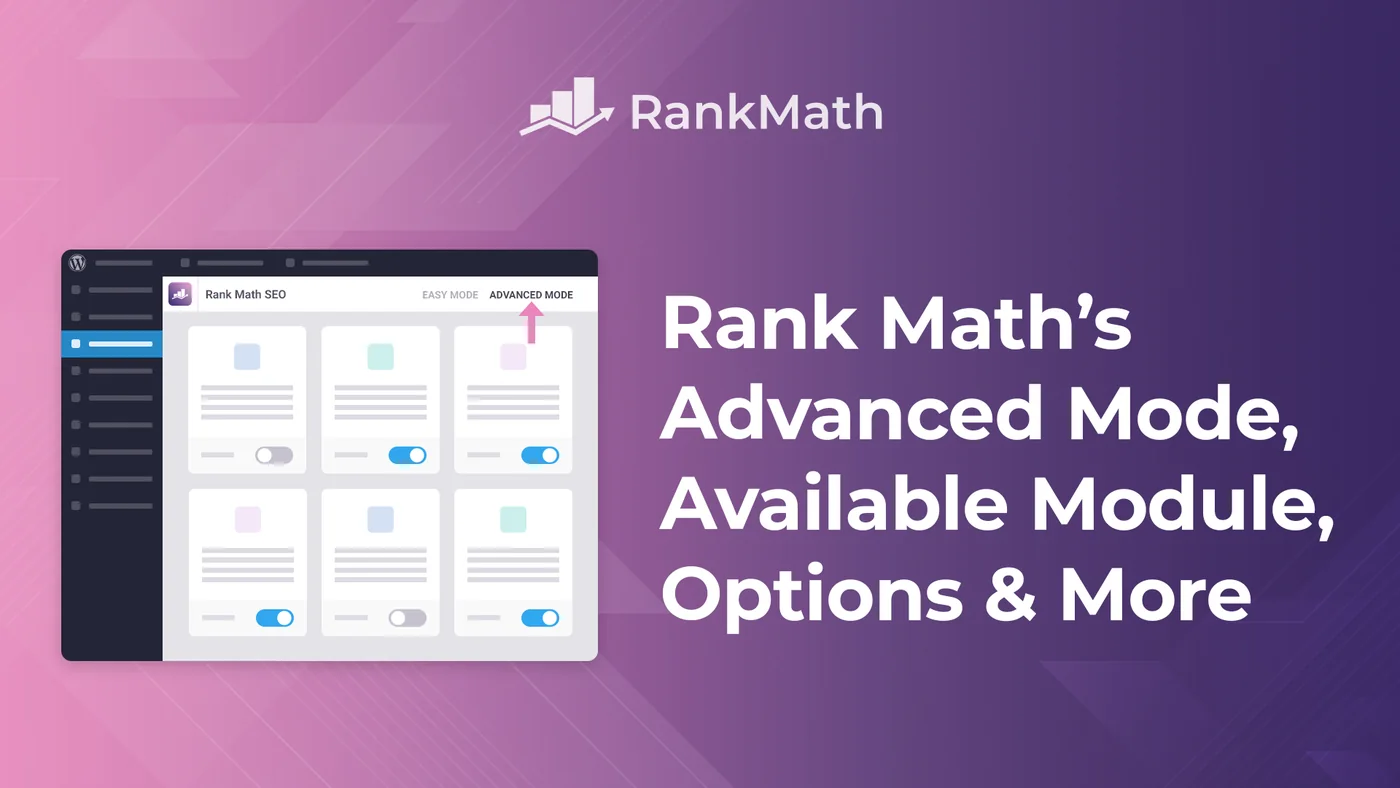
The current setup wizard offers Easy, Advanced, and Custom modes. Custom Mode is a PRO feature. Easy Mode hides some of the more technical settings, while Advanced Mode exposes the controls most experienced WordPress owners will want to inspect. You can switch between Easy and Advanced later.
For a content site where you understand basic SEO settings, Advanced Mode is usually the more transparent starting point because you can see Role Manager, 404 Monitor, Redirections, Schema defaults, and additional indexing controls instead of discovering them later.
4. Run the compatibility check
The wizard checks the environment and can flag conflicting SEO plugins. Do not leave two full SEO suites simultaneously generating title tags, canonicals, XML sitemaps, or Schema. The safe goal is a controlled handoff from the old plugin to Rank Math, not overlapping output.
5. Configure site identity and Knowledge Graph data
Choose whether the site represents a person or organization, confirm the site name and alternate name, and provide the appropriate logo and organizational information. These settings feed Rank Math’s site-level structured data, so use real business identity information rather than keyword-stuffed labels.
6. Connect Search Console and Analytics only if you want the integration
Rank Math can connect to Google Search Console and Google Analytics and display data inside WordPress. Its documentation also describes Search Console verification and sitemap submission through the integration. This is convenient, but it is optional: you can still use Google’s own interfaces directly. AdSense reporting is part of the paid feature set.
7. Review sitemap and indexing defaults
Do not blindly include every post type and taxonomy in XML sitemaps. Include URLs you actually want search engines to discover and index. Thin utility post types, empty archives, attachment pages, or duplicated taxonomies may need different treatment depending on the site architecture.
8. Finish the wizard, then audit the module dashboard
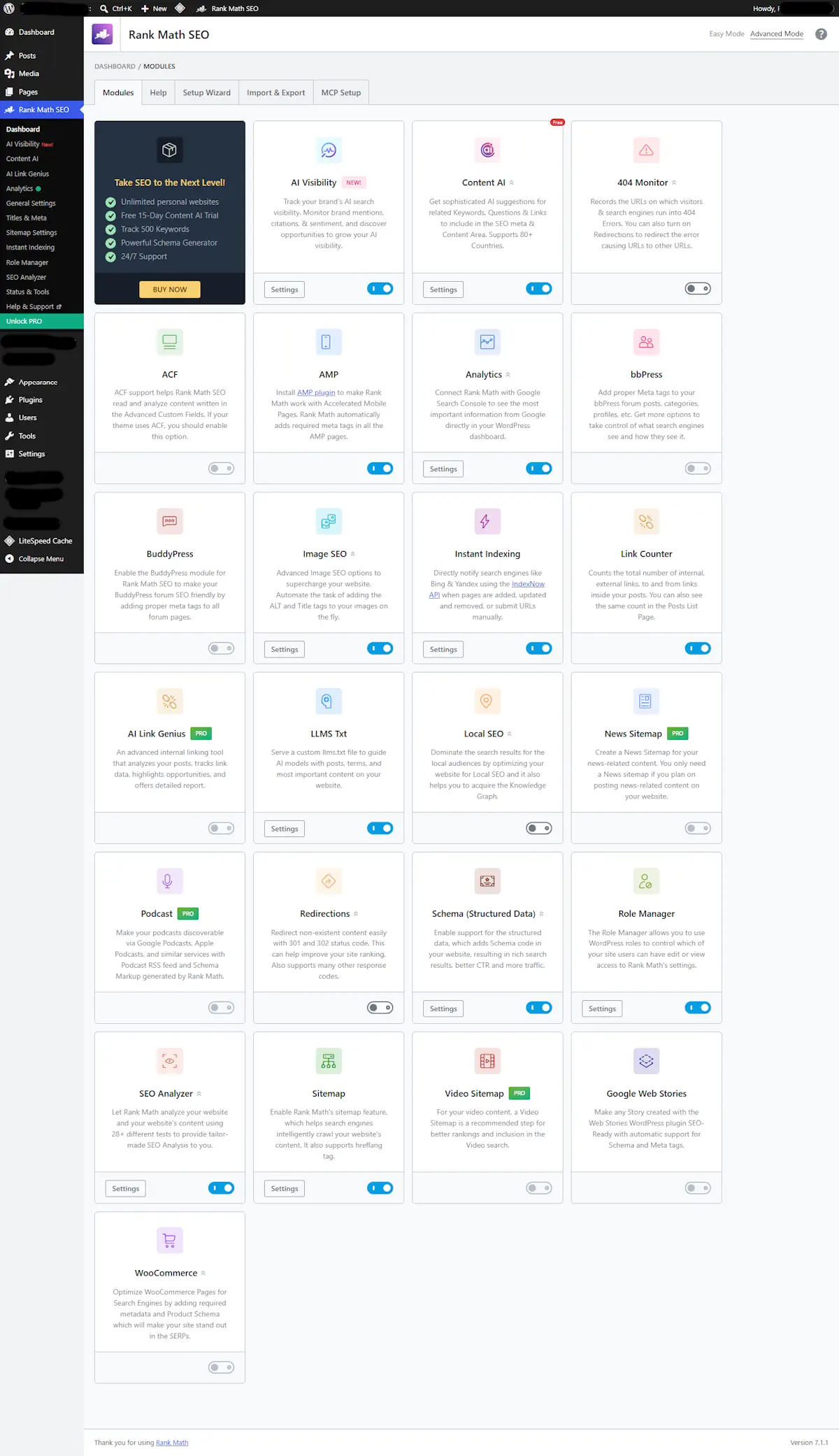
The most important setup step happens after the wizard: open the Rank Math dashboard and disable modules that do not solve a real need. A local business may need Local SEO; a news publisher may justify News Sitemap; a simple blog may not. A modular plugin stays easier to reason about when its unused modules remain off.
Rank Math maintains a detailed official setup guide if you want to compare each wizard screen with the current documentation.
Migrating from Yoast, AIOSEO, SEOPress, or another SEO plugin
Rank Math’s importer can detect and import data from several established SEO tools. Its current setup documentation includes Yoast SEO, All in One SEO, SEOPress, Redirection, Schema Pro, and All In One Schema among supported import paths.
The fact that an importer exists does not mean you should migrate without verification. After the import, inspect a sample of important URLs and compare:
- SEO title and meta description
- canonical URL
- robots directives
- primary category where relevant
- social metadata
- Schema output
- XML sitemap membership
- redirect rules
Then check page source or a structured-data validator rather than trusting only what the WordPress editor displays. If the old plugin created functionality that Rank Math does not import, preserve it separately before deactivation.
If you are specifically deciding whether the migration is worthwhile, our Rank Math vs Yoast SEO comparison focuses on the differences that matter before switching.
Which Rank Math modules should you enable?
There is no universal “turn everything on” configuration. Modules should follow the site type and the jobs you need the plugin to perform.
| Module or area | Enable when | Think twice when |
|---|---|---|
| Schema | You want Rank Math to manage structured data | Another plugin/theme already outputs the same Schema |
| Sitemap | Rank Math will be your XML sitemap provider | Another active SEO/sitemap system already owns this job |
| 404 Monitor | You need to identify requests hitting missing URLs | You already have reliable server/log monitoring and want less database logging |
| Redirections | You want redirects managed inside WordPress | Redirects are intentionally managed at server/CDN level |
| Analytics | You want GSC/GA data summarized in WordPress | You prefer fewer external connections in wp-admin |
| Local SEO | The site represents a real local business | The site has no local entity or location intent |
| WooCommerce | WooCommerce is active and Rank Math manages product SEO | The site is not a store |
| AI Link Genius | You have PRO and enough content for link auditing/automation | The site is tiny or you do not want automated link changes |
| Content AI | You want AI-assisted research/writing/metadata inside WordPress | Your existing workflow already handles these tasks elsewhere |
The Rank Math on-page SEO workflow
Inside the post editor, Rank Math brings together the SEO title, meta description, focus keywords, indexing directives, canonical settings, Schema, social metadata, and a checklist-style content analysis. That centralization is useful, but it is important to understand what the score does and does not mean.
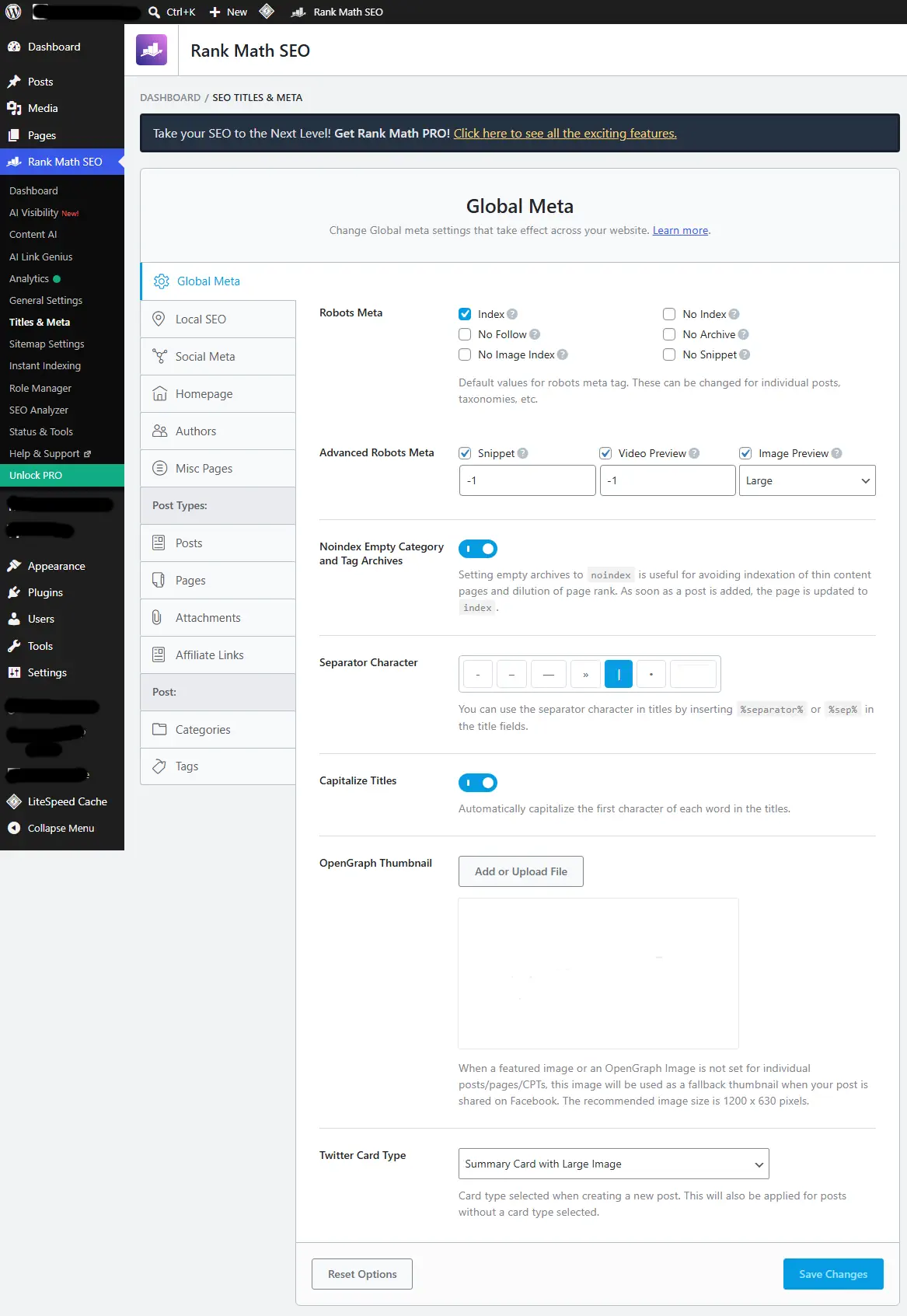
The Rank Math score is not a Google score. It is a workflow indicator based on checks implemented by the plugin. Search engines do not receive your 78/100 or 100/100 score as a ranking factor. A page that satisfies intent, earns useful links, is crawlable, and provides stronger information can outrank a “perfect-score” page.
Use the checklist to catch omissions such as a missing description, weak heading structure, or absent internal links. Ignore any suggestion that would make the writing worse simply to satisfy an exact-keyword count. The plugin should support editorial judgment, not replace it.
Schema and structured data: what Free and PRO really include
Schema is one of Rank Math’s strongest technical areas because the free version already supports a broad set of common types. Rank Math’s current documentation lists Free support for types including Article, Book, CollectionPage, Course, Event, Job Posting, Product, Recipe, Restaurant, Service, Software Application, Video, WebPage, WebSite, BlogPosting, Breadcrumb, Local SEO, News Article, WooCommerce, and others.
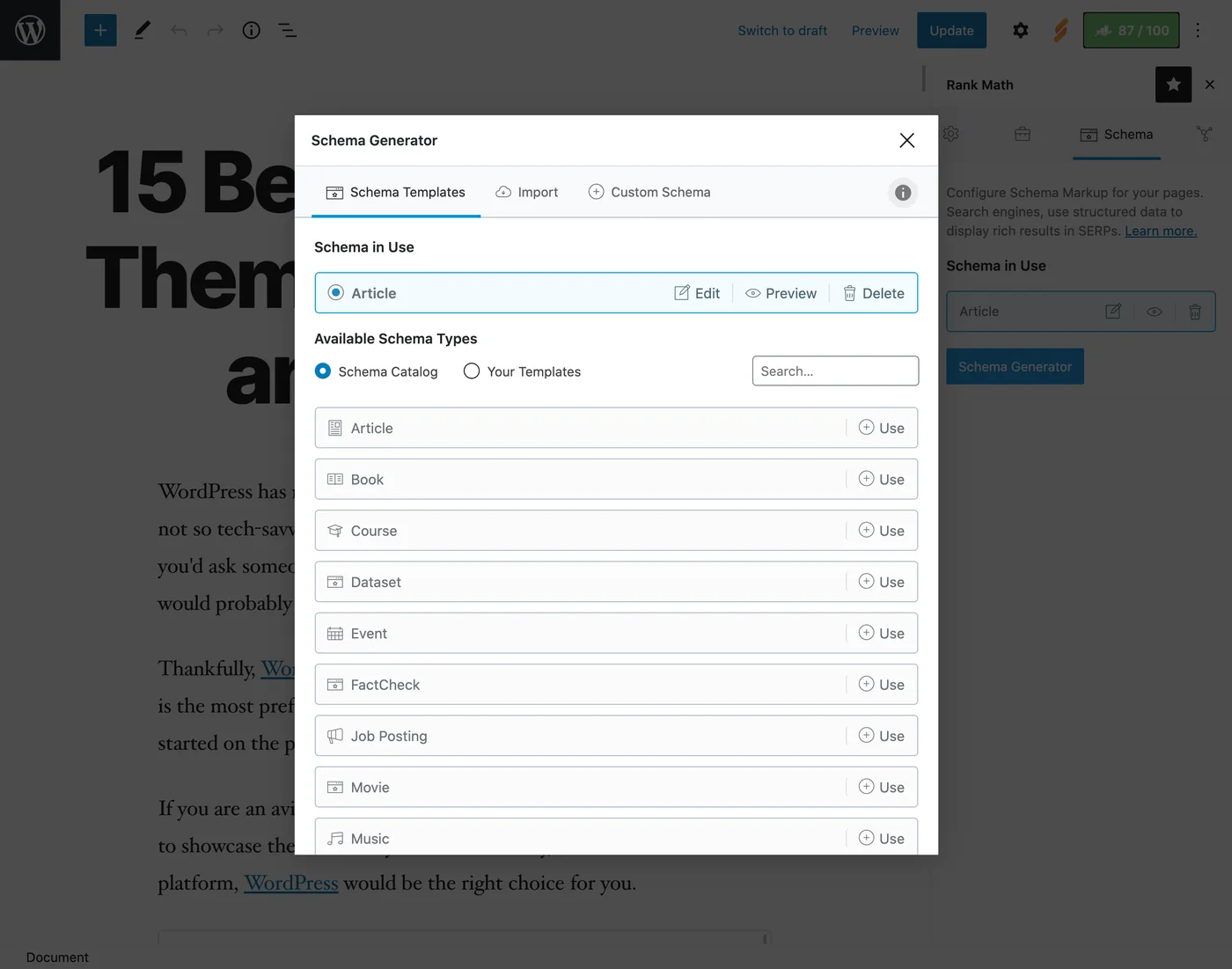
There is an important nuance around FAQ and HowTo. Free users can add them through Rank Math’s Gutenberg blocks, while the more flexible Schema Generator workflow for those types is part of PRO. The paid version also adds capabilities such as Custom Schema, Schema Templates, importing Schema, advanced editing, multiple Schema types on one page, and additional paid-only types.
For most publishers, the useful configuration is simple: choose a sensible default Schema per post type, then override it only where the page genuinely represents a different entity. Do not add Schema merely because the generator offers it. Structured data should describe visible content accurately.
If you use WooCommerce, Rank Math can pull product data into WooCommerce Product Schema rather than asking you to manually duplicate information such as price and availability.
Redirects and 404 monitoring
Rank Math includes a Redirection Manager that supports common HTTP redirect and status types including 301, 302, 307, 410, and 451. Regex matching is supported, which makes the tool useful for pattern-based migrations as well as single URL changes.
The 404 Monitor records requests to missing URLs. In Simple mode it focuses on the missing URI and access information; Advanced mode records more context such as the referring URL. Use the log to identify real broken paths, but do not redirect every random 404 to the homepage. A redirect should have a relevant destination.
One detail frequently reported incorrectly in comparisons is bulk CSV management. CSV import and export for Rank Math redirections is a PRO feature, not a free feature. The free Redirection Manager remains useful, but large migrations may justify either PRO or a server/CDN-level redirect workflow.
XML sitemaps and indexing controls
Rank Math can generate XML sitemaps for the content types you choose and exposes controls for posts, pages, taxonomies, authors, images, and other supported structures. The goal is not to maximize the number of URLs in the sitemap. It is to make the sitemap reflect the canonical URLs you actually want indexed.
News Sitemap and Video Sitemap are paid features. If you operate a qualifying news publication or a site where video discovery is strategically important, those modules can reduce the need for another dedicated plugin. A normal blog does not need to enable them just because they are available.
For indexation controls, review noindex settings for archives and thin taxonomies carefully. Changing robots behavior on a mature site can affect search visibility, so treat bulk changes as a migration and monitor Google Search Console afterward.
Search Console, Analytics, and rank tracking
Rank Math can connect Google Search Console and Google Analytics so you can view search and traffic information in WordPress. The pricing documentation states that analytics data is refreshed every seven days on Free and every three days on the paid plans.
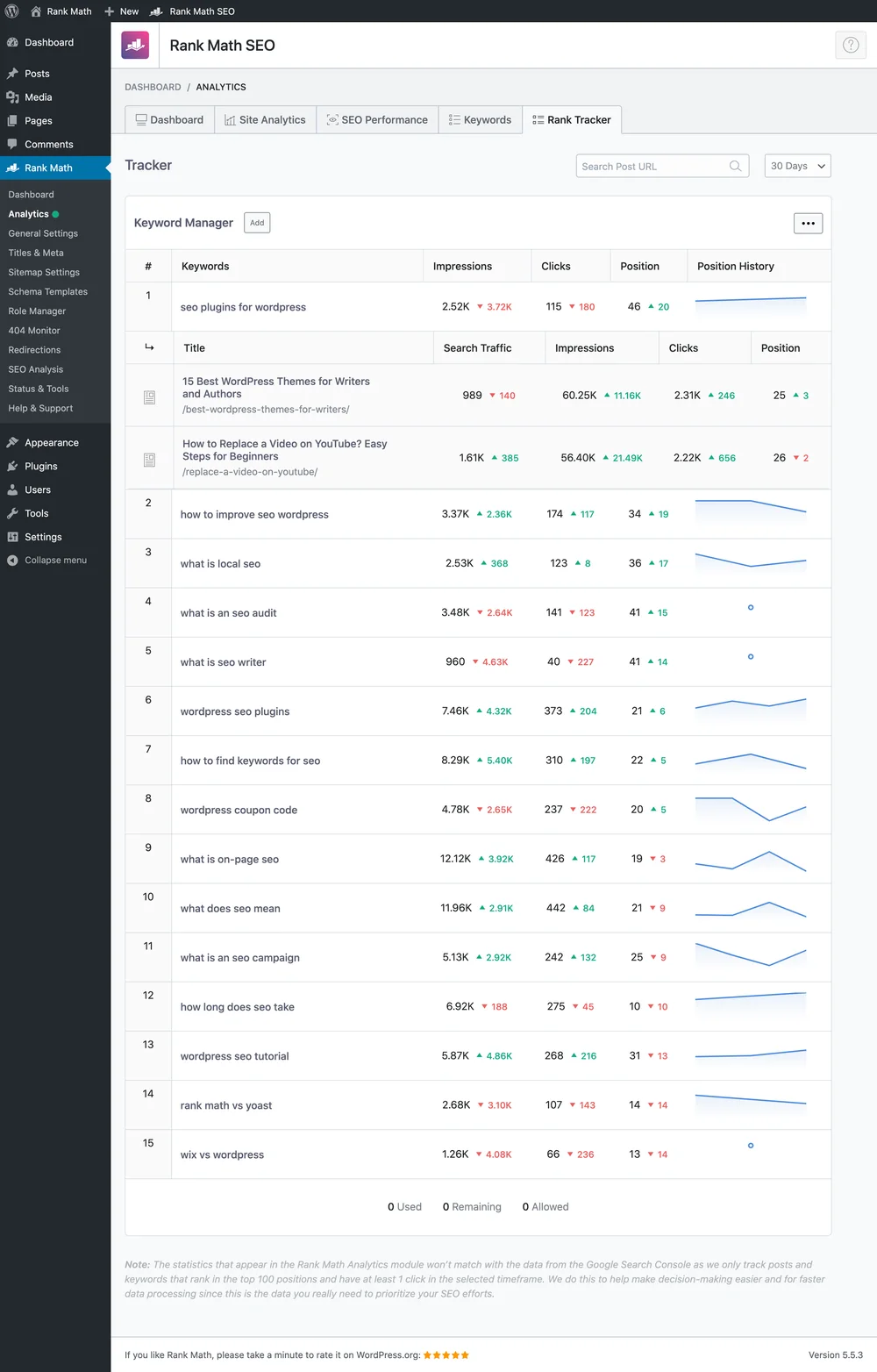
Paid plans also publish explicit keyword-tracking allowances: 500 tracked keywords on PRO, 10,000 on Business, and 50,000 on Agency. This is useful if you want more reporting inside WordPress, but it should not automatically replace a dedicated SEO platform if you rely on competitor research, broad keyword databases, backlink analysis, or more sophisticated reporting.
Also distinguish focus keywords from tracked keywords. Rank Math can let you optimize content around focus keywords without that meaning the same keywords are continuously monitored in its rank tracker.
Local SEO: useful for one location, PRO for multiple locations
The Local SEO module can define business identity information such as organization/person details, address, business type, opening hours, phone number, coordinates, and related structured data. That is useful when the website represents a real local business.
The key licensing distinction is Multiple Locations. Rank Math documents this as a PRO feature. When enabled, it can create the RM Locations custom post type and support a multi-location workflow. Do not choose Rank Math Free on the assumption that it includes the complete multi-location stack.
Keep the website’s business information consistent with the business’s real-world identity. The plugin can output structured data, but it does not replace maintaining accurate information in Google Business Profile and other relevant business listings.
WooCommerce SEO with Rank Math
Rank Math detects WooCommerce and can apply product-oriented SEO and Schema logic to store content. The free plugin includes baseline WooCommerce SEO settings and WooCommerce Product Schema integration. That is enough for many smaller stores that mainly need consistent metadata and product structured data.
PRO expands the ecommerce workflow with features such as GTIN/MPN and other global identifiers, richer handling of product variations in Schema, additional product-specific variables, and dedicated content-analysis tests for product pages. The exact free/paid boundary matters because “Rank Math supports WooCommerce” is true at both levels, but not every WooCommerce feature shown in a tutorial belongs to Free.
Before changing product URL bases, category bases, or archive indexation on an established store, document the existing URLs and redirects. Ecommerce URL changes can affect internal links, feeds, ads, external links, and search indexing beyond the SEO plugin itself.
Content AI in 2026: feature-based limits, not the old credit system
This is one of the areas where older Rank Math reviews are now misleading. Starting with Rank Math SEO 1.0.269 and Rank Math PRO 3.0.112, Content AI moved away from the old per-credit model to feature-based monthly usage limits. Each tool now has its own allowance instead of consuming from one shared word-credit balance.
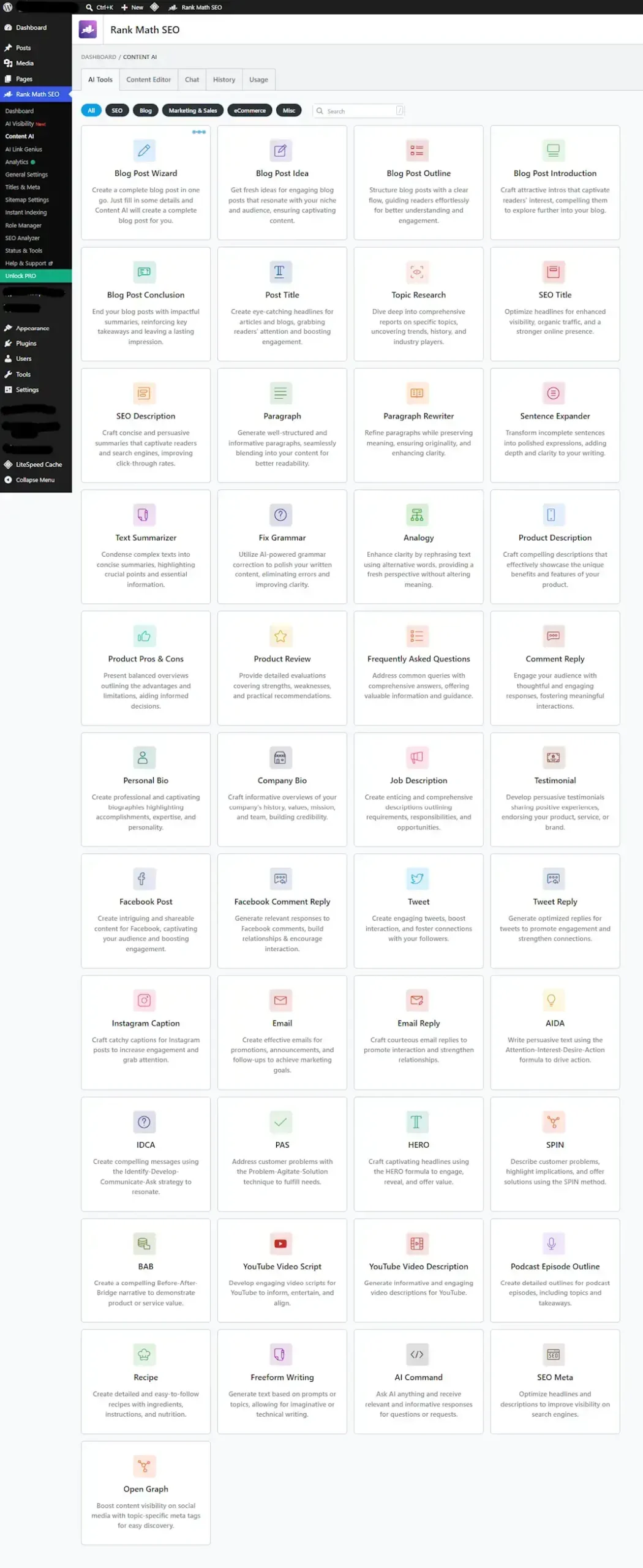
Rank Math says Free users receive a limited Content AI tier with most features capped at roughly one to five uses per feature. Paid Content AI plans are organized as Starter, Creator, and Expert with higher allowances. Representative current limits include:
| Content AI feature | Starter | Creator | Expert |
|---|---|---|---|
| Fix SEO Tests | 500 | 1,000 | Unlimited |
| Keyword Research | 10 | 30 | 100 |
| AI Image Alt Text | 50 | 100 | 500 |
| SEO Meta | 100 | 500 | Unlimited |
| Write Inside WordPress | 100 | 500 | Unlimited |
| Long Form Content | 15 | 60 | Unlimited |
| Link Suggestions | 100 | 500 | 1,000 |
| Link Opportunities | 50 | 200 | 1,000 |
Unused monthly feature allowances do not roll over. Business and Agency users can allocate Content AI usage across managed sites using percentage-based limits.
Content AI can be useful for metadata drafts, keyword research, rewriting, outlines, link suggestions, and other repetitive editorial tasks. But treat its output like any other generated content: check factual claims, search intent, originality, tone, and whether the suggestion actually improves the page. An AI feature inside an SEO plugin does not make generated copy automatically accurate or rank-worthy.
Rank Math documents the current system in its Content AI migration guide.
AI Link Genius: internal-link automation in Rank Math PRO
AI Link Genius is a PRO-only feature. It goes beyond the old idea of showing a few internal-link suggestions in the editor. The current tool can audit link health, identify broken and redirected links, surface orphan content, suggest internal links while you write, generate related-post suggestions, perform bulk link updates, and create keyword-to-URL maps for automated linking.
For a large editorial site, the most useful part is not “AI” by itself; it is having link inventory, opportunities, and bulk operations in the same WordPress workflow. The danger is also obvious: bulk link automation can propagate a bad rule quickly. Use previews, sensible maximum-link limits, and rollback/history features rather than applying a keyword map across the entire site without review.
Rank Math also integrates some AI-generated anchor and variation workflows with Content AI. That makes Content AI and AI Link Genius related products, but they are not the same feature: Content AI is broader content assistance, while AI Link Genius is specifically built around the site’s link graph.
Rank Math MCP Tools: the major 2026 addition
MCP is the most important new direction in Rank Math’s 2026 product. Model Context Protocol (MCP) provides a standardized way for a compatible AI assistant to access tools and data exposed by another system. In Rank Math’s case, that means an AI assistant can inspect SEO settings and content data and, for supported actions, apply changes through Rank Math instead of requiring you to click through every WordPress screen manually.
Rank Math SEO 1.0.278, released on September 8, 2026, added OAuth-based connections for MCP-enabled AI assistants and added tools to retrieve redirections, robots.txt, and llms.txt data. The company’s MCP documentation also describes tools for settings, system status, post metadata, Schema, links, site audits, link reports, and configuration.
Examples of current MCP tools include:
rank-math/get-settings— reads current Rank Math configurationrank-math/get-system-status— reports Rank Math, WordPress, and connected-system statusrank-math/get-post-schema— retrieves Schema applied to a post and the available Schema typesrank-math/get-post-seo-meta— retrieves post SEO metadatarank-math/get-post-links— returns internal and external links for a postrank-math/get-redirections— retrieves redirect rules and related datarank-math/set-website-identity— changes site identity settingsrank-math/set-global-seo-settings— changes site-wide SEO defaultsrank-math/set-sitemap-settings— changes sitemap configurationrank-math/set-module-status— enables or disables supported modules
Rank Math now even documents a workflow where an AI assistant can inspect a site and help complete the setup wizard through MCP. That can save time for repeatable configuration, especially across managed sites, but it also raises the stakes of permissions.
Use MCP as an automation interface, not an autopilot. Before allowing write operations on an important site, maintain a backup, understand which tools are read-only versus mutating, ask the assistant to preview intended changes, and verify the result afterward. A technically successful API call can still be a bad SEO decision.
You can review the current MCP capability set through the Rank Math MCP Tools documentation.
Rank Math pricing in September 2026
Rank Math currently displays promotional monthly equivalents but bills the paid plans annually. Prices below were checked on September 18, 2026 and are shown before VAT/taxes. Promotional pricing can change, so treat the vendor’s checkout as the final source before purchasing.
| Plan | Displayed introductory price | Renewal | Site allowance | Tracked keywords |
|---|---|---|---|---|
| PRO | €7.99/month, billed annually | €8.99/month equivalent; €107.88/year + tax | Unlimited personal websites | 500 |
| Business | €24.99/month, billed annually | €27.99/month equivalent; €335.88/year + tax | 100 client websites | 10,000 |
| Agency | €54.99/month, billed annually | €64.99/month equivalent; €779.88/year + tax | 500 client websites | 50,000 |
| Rank Math + WP Rocket | €11.99/month, billed annually | €13.99/month equivalent + tax | Rank Math on unlimited personal sites; WP Rocket for 1 site | 500 |
The distinction between personal and client websites matters. Rank Math says PRO is for websites you own 100%; client work belongs on Business or Agency. Business supports 100 client websites, while Agency supports 500.
Rank Math currently offers a 30-day money-back guarantee for new purchases, but the refund policy does not apply to renewals. The pricing page also states that PRO runs on top of the free plugin, so paid users keep both active.
If you are comparing tiers, use the current Rank Math pricing page rather than relying on an older review. If performance optimization is also on your shopping list, Rank Math currently sells a Rank Math + WP Rocket bundle, but evaluate it as two separate tools solving different jobs.
Rank Math strengths and limitations
Strengths
- Broad free feature set
- Strong Schema tooling
- Redirects and 404 monitoring inside the SEO stack
- Useful WooCommerce and Local SEO integration
- Integrated rank tracking on paid plans
- Content AI and AI Link Genius reduce repetitive work
- MCP opens a new AI-assisted administration workflow
- PRO can cover unlimited personal websites
Limitations
- The number of modules and settings can overwhelm beginners
- Several advanced Schema workflows are paid-only
- Large redirect migrations still need careful planning; CSV workflow is PRO
- Advanced ecommerce and multi-location capabilities require PRO
- It is not a replacement for every feature of a dedicated SEO research platform
- AI-generated or automated changes still need editorial review
- Write-capable automation increases configuration risk if permissions and review are weak
- Client websites require Business or Agency rather than the personal PRO license
We do not declare Rank Math the “fastest” SEO plugin or promise a ranking improvement because the vendor says so. Performance depends on the site, enabled modules, database, hosting, theme, other plugins, and workload. If speed matters to your decision, test the actual configuration you intend to run.
Which Rank Math plan should you use?
Use Rank Math Free if…
- You run a typical blog, portfolio, content site, or small business site.
- You need solid title/meta, sitemap, Schema, redirect, 404, and basic integration controls.
- You do not need AI Link Genius, multi-location Local SEO, News/Video sitemap, or advanced paid Schema workflows.
- You want to learn the interface before paying.
Use Rank Math PRO if…
- You own multiple personal websites and want one paid license for them.
- You need advanced Schema, AI Link Genius, richer tracking/reporting, or other PRO modules.
- You want the 500-keyword tracking allowance.
- You are not using the license for client websites.
Use Business if…
- You manage client websites as a freelancer or smaller agency.
- The 100-client-site allowance fits your operation.
- You need the 10,000-keyword tracking capacity and client-oriented workflow.
Use Agency if…
- You manage a larger client portfolio.
- You need up to 500 client websites under the published plan allowance.
- You can actually use the 50,000 tracked-keyword capacity and higher-scale reporting.
Do not buy a higher tier for a feature count you will never use. The correct plan is the lowest tier that covers your site ownership model and the specific paid features you need.
Common Rank Math mistakes to avoid
Chasing 100/100 instead of improving the page
Use the score as a checklist, not a target that overrides readability or search intent. Repeating an exact phrase unnaturally to turn a test green is not an SEO strategy.
Running two full SEO plugins at the same time
Duplicate canonicals, meta tags, Schema, and sitemaps create avoidable ambiguity. Import first, verify the handoff, then make sure only one system owns each SEO function.
Enabling every module
Modules should map to actual needs. A simple content site does not become more optimized because every ecommerce, news, video, local, and analytics module is active.
Redirecting every 404 to the homepage
Redirect only when there is a relevant replacement. Genuine removed content can return 404/410 when appropriate. Sitewide “everything goes home” rules can create confusing soft-404 behavior.
Automating internal links without reviewing the rule
A keyword map can save hours, but a broad phrase can also create irrelevant links across hundreds of posts. Preview, cap, test, and keep rollback available.
Giving an AI assistant write access without a review loop
MCP makes SEO administration more capable, not risk-free. Ask for an audit first, review proposed changes, apply narrow changes, and verify the final state. Backups and revision history are more valuable when automation becomes easier.
Rank Math vs Yoast: where this guide stops
This guide is intentionally deep on Rank Math. A product guide and a comparison answer different questions. If you are choosing between Rank Math and Yoast, the important issue is not learning every Rank Math module first; it is understanding the differences in workflow, pricing, Schema, redirects, tracking, AI features, and editorial philosophy.
For that decision, read our dedicated Rank Math vs Yoast SEO comparison for 2026. Keeping the comparison separate prevents this guide from pretending that one product’s feature depth automatically makes it the right choice for every WordPress site.
Final verdict: how to use Rank Math well in 2026
Rank Math’s strongest quality in 2026 is not one isolated feature. It is the amount of SEO work that can live in one modular WordPress system: metadata, Schema, sitemaps, redirects, 404 monitoring, analytics, rank tracking, local and WooCommerce SEO, Content AI, link management, and now MCP.
That same breadth is the reason to configure it deliberately. Start with the free plugin if it covers your needs, keep overlapping modules disabled, treat plugin scores as guidance rather than rankings, and upgrade only when advanced Schema, AI Link Genius, tracking, ecommerce/local features, or client licensing justify the cost.
MCP is the most interesting new development because it changes how Rank Math can be operated, not merely what appears inside its dashboard. For technical users and agencies, AI-assisted auditing and configuration can become a meaningful workflow advantage. For everyone else, the fundamentals remain unchanged: clean architecture, useful content, accurate metadata, sensible internal links, crawlable pages, and evidence-based SEO decisions still matter more than any plugin switch.
Related reading
- Rank Math vs Yoast SEO (2026): Which WordPress SEO Plugin Is Better?
- Best WordPress Themes for SEO in 2026
For many blogs, portfolios, small business sites, and content sites, yes. Rank Math Free includes core on-page controls, XML sitemaps, many Schema types, redirects, 404 monitoring, Search Console integration, local SEO basics, WooCommerce SEO basics, limited Content AI access, and core MCP capabilities. Upgrade when a specific paid feature or licensing requirement solves a real need.
No. Rank Math moved Content AI from the old credits model to feature-based monthly usage limits starting with Rank Math SEO 1.0.269 and Rank Math PRO 3.0.112. Each AI feature now has its own monthly allowance.
No. Rank Math documents AI Link Genius as a PRO-only feature. It includes link auditing, broken-link and orphan-page workflows, internal-link suggestions, related posts, bulk updates, and keyword-based automated linking.
No. Rank Math’s basic Local SEO module can be used for a single business location, while the Multiple Locations workflow is a Rank Math PRO feature.
Rank Math MCP Tools expose SEO data and supported actions to compatible AI assistants through Model Context Protocol. Current tools can read settings, metadata, Schema, links, redirects, robots.txt and other data, while supported write tools can change selected Rank Math settings. Rank Math added OAuth-based AI assistant connections in version 1.0.278.
It is better to avoid running two full SEO plugins with overlapping metadata, canonical, sitemap, and Schema output. Rank Math includes import workflows for several SEO plugins, including Yoast, so migrate carefully, verify the imported data, and make sure one system owns each SEO function.
Product details, software versions, feature availability, pricing, and renewal terms checked September 18, 2026 using Rank Math’s official documentation, changelogs, pricing pages, and the WordPress.org plugin directory. They may change after publication.