
Affiliate disclosure: This article contains affiliate links. If you purchase Rank Math through one of our links, Web Choice Desk may earn a commission at no extra cost to you. This does not affect our editorial analysis.
If Rank Math is already installed and your sitemap returns 404, Search Console says “Couldn’t fetch,” the SEO Score stays N/A, or metadata will not save, start by identifying which layer is failing: Rank Math itself, WordPress rewrites, cache/CDN, a WAF or REST route, the theme, or another plugin. Do not reset the plugin or edit server files until one small test narrows the layer.
This guide is focused on setup and troubleshooting. For plan comparisons, pricing, the full feature map, Content AI, AI Link Genius, WooCommerce, and broader MCP coverage, see our Rank Math SEO Plugin Guide 2026.
Version check: October 7, 2026. WordPress.org lists Rank Math Free 1.0.280, while Rank Math PRO’s current stable release is 3.0.123. Free 1.0.280 added wp rankmath sitemap generate for pre-generating sitemap files and fixed Analytics N/A and Polylang PRO metadata issues. Treat version-specific steps as dated troubleshooting evidence, not permanent behavior.
On this page
- Quick answer: isolate the failing layer before changing settings
- Rank Math for WordPress: the setup that prevents most problems
- How to configure Rank Math sitemaps without cache or indexing problems
- Rank Math sitemap 404 or HTML response: how to troubleshoot it
- Google Search Console says “Couldn’t fetch”: what to check
- Physical vs virtual robots.txt: why Rank Math edits may not appear
- SEO title, meta description, or focus keyword not saving: test the REST API
- Rank Math SEO Score N/A: what to check
- Duplicate Schema, canonicals, or meta tags: choose one owner
- Rank Math PRO Video Sitemap: setup and common pitfalls
- Rank Math Analytics or Search Console shows N/A
- Rank Math IndexNow does not submit normal URLs to Google
- Image SEO and Open Graph: what Rank Math actually changes
- Redirects, 404 Monitor, and breadcrumbs: useful tools without overusing them
- Rank Math with Polylang or WPML: check canonicals, sitemaps, and metadata by language
- Migrating from Yoast or AIOSEO to Rank Math: import, then audit
- Free vs PRO: only the troubleshooting difference that matters here
- Final Rank Math checklist before you call the setup complete
- How to keep the same Rank Math problems from coming back
Quick answer: isolate the failing layer before changing settings
Most Rank Math failures become easier to diagnose when you test the smallest observable boundary first. The table below is the fastest starting point.
| Symptom | Most likely layer | First test | PASS means |
|---|---|---|---|
/sitemap_index.xml returns 404 | Rewrite, permalink, cache, or server | Compare ?sitemap=1 with /sitemap_index.xml | If the query version works, Rank Math can generate XML and the failure is later in the rewrite/cache path |
| Search Console says “Couldn’t fetch” | Response, cache, wrong property, or delayed fetch | Confirm HTTP 200 and XML from the public sitemap URL | The sitemap is publicly reachable; then check Search Console property and last-read timing |
| SEO title or description will not save | REST API, WAF, JavaScript, theme/plugin conflict | Watch the request to /wp-json/rankmath/v1/updateMeta while saving | A 2xx response shifts attention away from WAF/REST blocking |
| SEO Score shows N/A | Imported/API-created content or stale analysis | Check Rank Math database tools and whether analysis was actually recalculated | The stored analysis has been refreshed rather than merely the post content |
| Duplicate Schema, canonical, or meta tags | Two output owners | View the final page source and count the duplicated tags/markup | One system owns each SEO layer |
Rank Math for WordPress: the setup that prevents most problems
The safest Rank Math setup is not “enable everything.” It is deciding which system owns each SEO layer: titles and meta descriptions, canonical tags, Schema, XML sitemaps, Open Graph, breadcrumbs, redirects, and image SEO. When two plugins — or a plugin and the theme — try to generate the same layer, symptoms can include duplicate meta tags, multiple canonicals, repeated Schema, or competing sitemaps.
1. Use Advanced Mode when you need technical control
Easy Mode hides some advanced options. For an editorial site, store, or technical WordPress project where you need to review indexing, taxonomies, redirects, 404 monitoring, Schema, and sitemap behavior by content type, Advanced Mode is usually more transparent.
You can switch modes later, but an initial audit is easier when you can see the settings that affect crawling and indexing. If you still need to install the plugin, use Rank Math’s official setup guide as a reference, but do not treat every default as mandatory for every site.
2. Review Index and Noindex by content type
On a typical editorial site, posts and pages with independent value are normally indexable. Categories, tags, author archives, and date archives require an editorial decision. If an archive is useful, organized, and serves as a real landing page, indexing can make sense. If it mostly repeats thin post lists, Noindex may be cleaner.
- Posts and pages: confirm the default is Index for content you want to rank.
- Categories: index them when they work as useful navigation or topic pages.
- Tags: avoid indexing them automatically if they create thin or near-duplicate archives.
- Author archives: a single-author site may duplicate much of the blog archive; multi-author sites can have stronger use cases.
- Date archives: month/year archives are rarely essential for ordinary editorial projects, but there is no universal rule.
- Attachments: if attachment pages have no independent value, redirecting them or preventing indexation is usually cleaner than keeping empty pages.
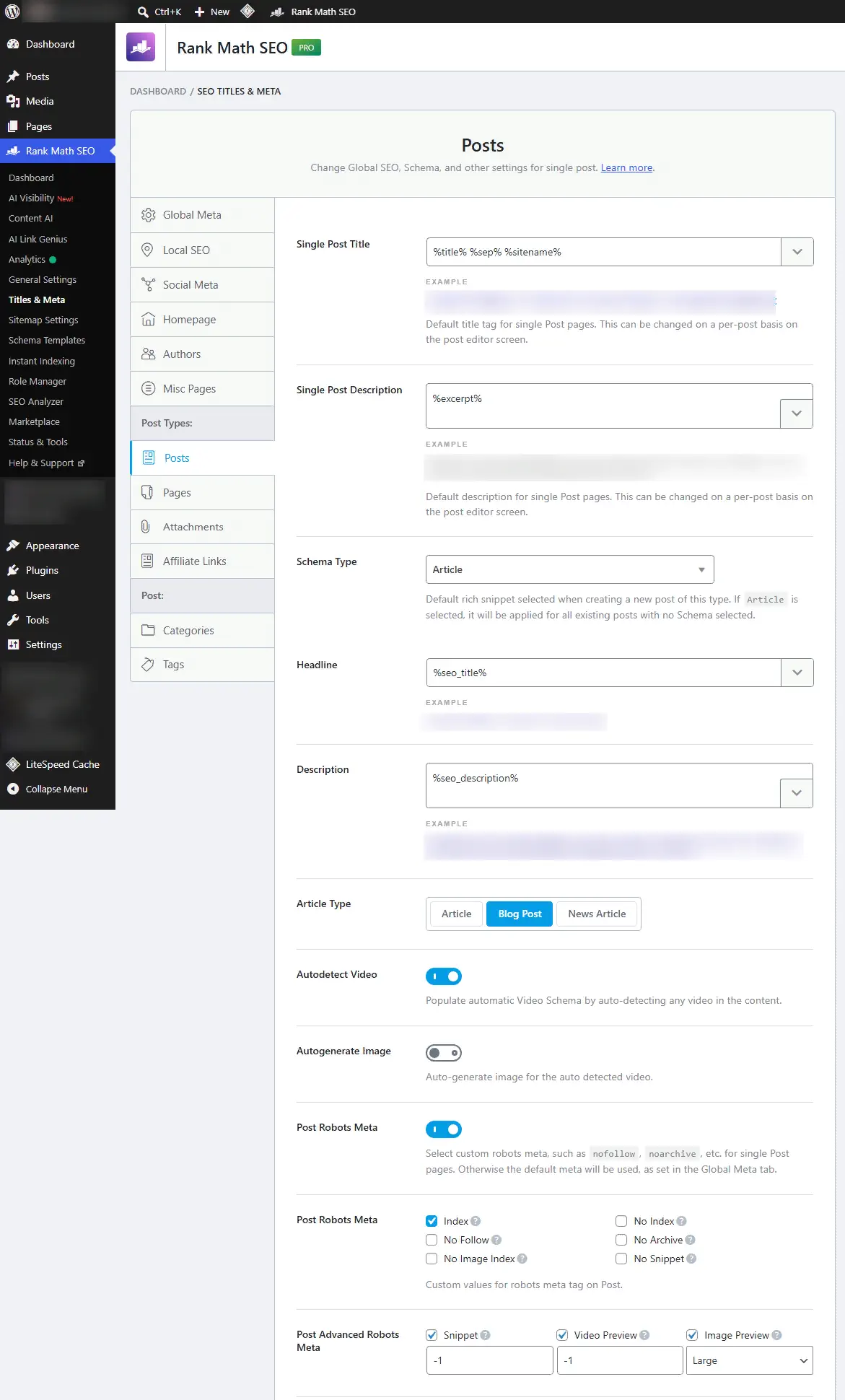
Keep the system coherent. URLs marked Noindex normally should not remain in the sitemap. Rank Math removes noindex pages from its sitemap and can also omit URLs that use a custom canonical pointing elsewhere.
How to configure Rank Math sitemaps without cache or indexing problems
Rank Math’s current sitemap documentation recommends 200 URLs per sitemap. Google can handle much larger sitemap files, but Rank Math reduced its own recommended value to keep generated files smaller. In the same area, review image inclusion and whether featured images should be added.
- Links Per Sitemap: 200 is Rank Math’s current recommendation.
- Images in Sitemaps: keep this enabled when you want content images discoverable.
- Include Featured Images: useful when the featured image does not appear in the body but should still be included.
- Post types and taxonomies: include only those that should be discovered and indexed.
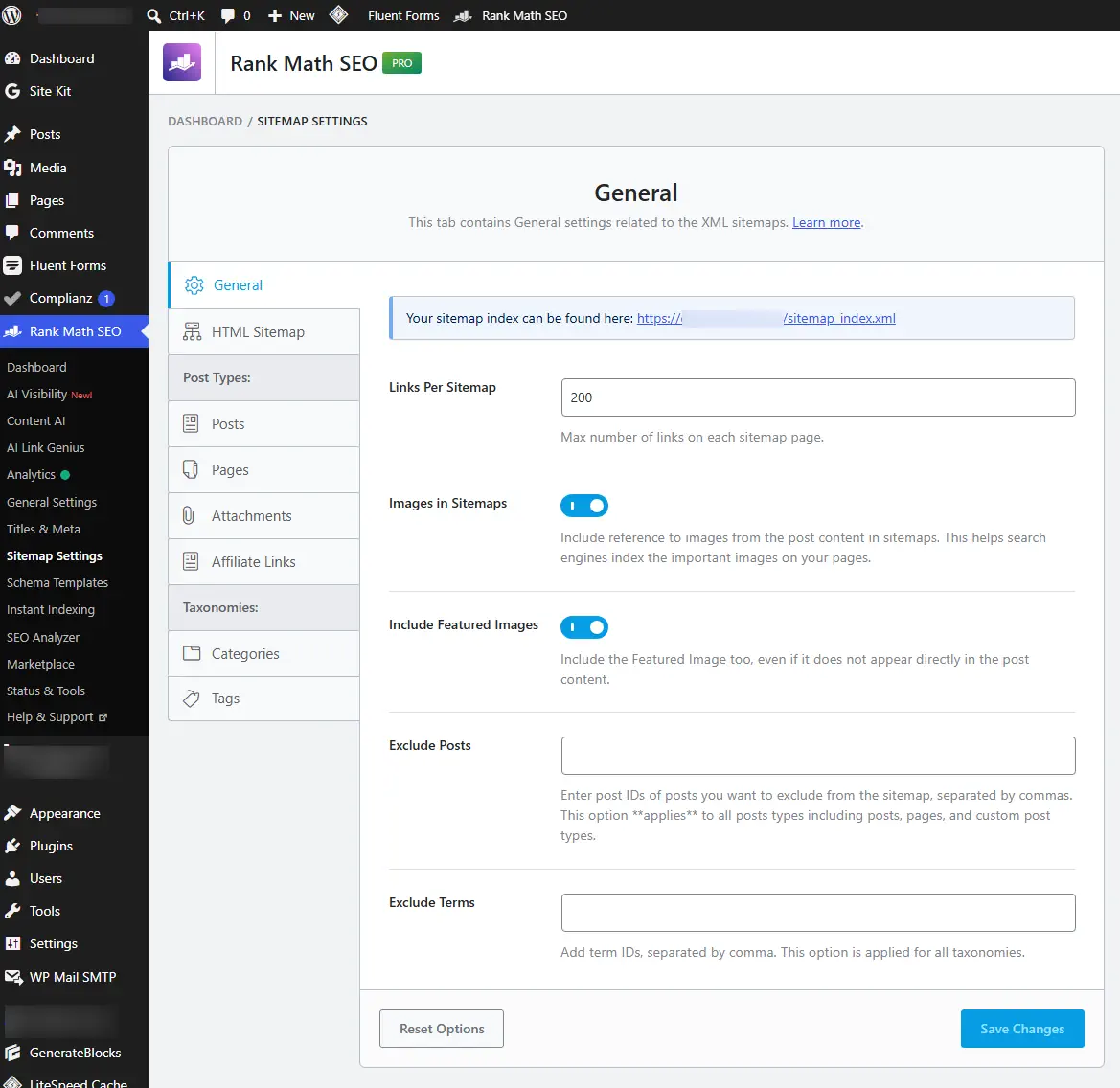
Rank Math documents its current sitemap options in the official sitemap guide. Version 1.0.280 also added wp rankmath sitemap generate for pre-generating sitemap files through WP-CLI on large installations. That can reduce reliance on dynamic generation, but it does not replace correct sitemap settings or fix cache conflicts by itself.
LiteSpeed Cache: exclude the sitemap from cache
A sitemap should reflect recent site changes. If a cache plugin or server keeps an old copy, you can see stale XML, the wrong content type, unexpected HTML, or inconsistent responses. Rank Math’s sitemap caching documentation recommends excluding sitemap files from LiteSpeed Cache.
/(.*)sitemap(.*).xml
/(.*)sitemap.xsl
/sitemap_index.xsl
/sitemap_index.xml
In LiteSpeed Cache, those exclusions belong under Cache → Excludes → Do Not Cache URIs. After saving, purge the relevant cache and test the sitemap in a clean browser session or another uncached request.
Rank Math sitemap 404 or HTML response: how to troubleshoot it
If /sitemap_index.xml returns 404, HTML, a blank response, or malformed XML, isolate the response path before changing settings. Rank Math generates sitemaps dynamically, so a failure can sit in WordPress, rewrites, cache, a physical file, the web server, or another plugin/theme.
First test: compare ?sitemap=1 with /sitemap_index.xml
https://example.com/?sitemap=1tests whether WordPress and Rank Math can generate the sitemap without relying on the friendly sitemap rewrite.https://example.com/sitemap_index.xmltests the normal public URL, including rewrite and cache/server behavior.
PASS: if ?sitemap=1 returns XML but /sitemap_index.xml fails, focus on permalinks, rewrite rules, cache, a physical sitemap file, or server configuration. FAIL: if both fail, also investigate Rank Math settings, plugin/theme conflicts, or WordPress execution. Rank Math’s official sitemap troubleshooting guide documents these failure modes.
Confirm the HTTP response instead of relying on the browser
From a terminal, a quick header check is:
curl -I https://example.com/sitemap_index.xmlA healthy public sitemap should return a successful response such as 200 OK and an XML-compatible content type. A 404, redirect loop, or text/html response narrows the problem before you touch WordPress settings. If your CDN or host rewrites headers, inspect the full response body as well instead of using the content type alone as proof.
Flush the low-risk layers first
- In Rank Math SEO → Sitemap Settings, temporarily change Links Per Sitemap, save, then return to the intended value.
- Go to Settings → Permalinks and click Save Changes without changing the permalink structure.
- Purge plugin, server, and CDN caches and keep sitemap URLs excluded from cache.
- Retest both sitemap URLs after each change so you know which action changed the result.
Check for a physical sitemap file before debugging rewrites
Rank Math’s troubleshooting documentation warns that a static file such as sitemap_index.xml in the site root can override or interfere with the virtual sitemap generated at runtime. If one exists, back it up and remove it only when you know it is obsolete, then retest. This is the sitemap equivalent of the physical-vs-virtual robots.txt problem covered later in this guide.
“XML or text declaration not at the start of entity” means output is appearing before XML
Rank Math documents this error as a whitespace/output problem. Inspect wp-config.php, the active theme’s functions.php, and recent code snippets for blank lines or output before the XML declaration. If those files look clean, use the official Health Check & Troubleshooting workflow to test for a plugin/theme conflict. After removing the stray output, purge caches and confirm the sitemap source begins directly with the XML declaration.
Apache and Nginx need different rewrite handling
Do not paste Apache rules into an Nginx configuration. On Apache, Rank Math documents the following sitemap rewrite rules:
# START of Rank Math Sitemap Rewrite Rules
RewriteEngine On
RewriteBase /
RewriteRule ^sitemap_index.xml$ /index.php?sitemap=1 [L]
RewriteRule ^([^/]+?)-sitemap([0-9]+)?.xml$ /index.php?sitemap=$1&sitemap_n=$2 [L]
RewriteRule ^([a-z]+)?-?sitemap.xsl$ /index.php?xsl=$1 [L]
# END of Rank Math Sitemap Rewrite Rules
Back up .htaccess before editing. On Nginx, Rank Math documents these sitemap rewrite rules:
# START Nginx Rewrites for Rank Math Sitemaps
rewrite ^/sitemap_index.xml$ /index.php?sitemap=1 last;
rewrite ^/([^/]+?)-sitemap([0-9]+)?.xml$ /index.php?sitemap=$1&sitemap_n=$2 last;
rewrite ^/([a-z]+)?-sitemap.xsl$ /index.php?xsl=$1 last;
# END Nginx Rewrites for Rank Math Sitemaps
Apply Nginx rules only if you manage that server layer or your host confirms where they belong. After the change, flush Rank Math sitemap settings, save WordPress permalinks, purge sitemap cache, and retest. A successful ?sitemap=1 test combined with a failing friendly URL is the evidence that makes rewrite troubleshooting appropriate.
If cache remains the suspect, disable sitemap caching as a diagnostic test
Rank Math documents this filter as a fallback when server-level cache interferes with sitemap output:
add_filter( 'rank_math/sitemap/enable_caching', '__return_false' );Use it as a controlled test, not a reflexive permanent tweak. If disabling sitemap caching fixes the response, you have evidence that the cache layer needs correction. Remove the diagnostic filter after you have fixed the underlying cache behavior unless you have a documented reason to keep it.
When rewrite order can matter
On one editorial WordPress site we manage with Rank Math and LiteSpeed Cache, the sitemap started working after the Rank Math rewrite rules were positioned before the LiteSpeed rules in .htaccess. That result was specific to that server, WordPress, and cache combination. Rank Math does not document that ordering as a universal requirement. This fix worked in that specific WordPress and LiteSpeed setup, but it may not work on every server. Back up your configuration, test the sitemap URLs, and revert the change if the issue persists.
MCP can expose sitemap status and 404 logs, but it does not replace diagnosis
Rank Math Free 1.0.279 and PRO 3.0.122 added the MCP tools rank-math/get-sitemap-status and rank-math/get-404-logs. In MCP-enabled workflows, they can expose sitemap status and 404 Monitor data without opening every WordPress screen manually. Use them as evidence inputs, then confirm the public HTTP response, cache/rewrite layer, and exact failing URL. For the broader MCP feature set, see the MCP section of our complete Rank Math guide.
Google Search Console says “Couldn’t fetch”: what to check
“Couldn’t fetch” is a Search Console status, not a diagnosis. First prove what the public sitemap returns. If the URL responds with 200 and valid XML, the failure may be property selection, stale cache, a delayed Google fetch, or a previously broken response that Search Console has not refreshed yet.
- HTTP test: confirm the public sitemap returns a successful response and XML, not a normal HTML page.
- Property test: make sure the submitted sitemap belongs to the exact Search Console property in use.
- Path test: submit
sitemap_index.xmlwithout spaces or a malformed path. - Indexing test: confirm important posts are set to Index and appear in the expected child sitemap.
- Cache test: exclude sitemap files from plugin, host, and CDN cache, then fetch the public URL again.
- Timing test: if the live sitemap is healthy, compare Search Console’s last-read time before repeatedly removing and resubmitting it.
“Your file appears to be an HTML page”
This message means Google received HTML where it expected a sitemap response. Fetch the sitemap yourself and inspect the body. If it is a branded 404 page, maintenance page, security challenge, login screen, or cached HTML response, fix that layer first. Rank Math’s sitemap troubleshooting documentation recommends checking the submitted URL, cache, and plugin/theme conflicts when this happens.
“Unsupported file format” is different from an XML declaration error
If Search Console says Unsupported file format, inspect the sitemap header and namespace instead of treating it as the same problem as whitespace before XML. Rank Math documents a valid header such as:
<?xml version="1.0" encoding="UTF-8"?>
<urlset xmlns="http://www.sitemaps.org/schemas/sitemap/0.9">
Check that the namespace ends in 0.9 and that XML attributes use straight single or double quotation marks rather than curly quotes. If the separate error is “XML or text declaration not at the start of entity”, then investigate whitespace or other output before the XML declaration in wp-config.php, the active theme, code snippets, or a conflicting plugin. These are related sitemap failures, but they are not the same diagnosis.
A sitemap helps discovery and crawling; it does not guarantee indexing. Once the sitemap is valid and reachable, indexing decisions still depend on Google’s crawl, canonicalization, and quality systems.
Physical vs virtual robots.txt: why Rank Math edits may not appear
Rank Math can generate a virtual robots.txt. If a physical robots.txt file exists in the site’s root directory, changes made in the Rank Math panel may not affect the live response because the physical file takes precedence.
Open example.com/robots.txt, inspect what is actually served, and compare it with the plugin configuration. If you want Rank Math to manage the file virtually, remove the physical file only when that is intentional and safe for your hosting setup. Also remember that robots.txt is not a substitute for Noindex: blocking crawling and asking a page not to be indexed are different controls.
SEO title, meta description, or focus keyword not saving: test the REST API
When the WordPress post saves but Rank Math fields do not, treat the save as a separate request. Rank Math’s metadata troubleshooting documentation lists JavaScript conflicts and firewall/WAF blocks among the common causes.
Open your browser’s Developer Tools → Network, save the Rank Math metadata, and inspect the request to:
/wp-json/rankmath/v1/updateMetaPASS: a successful 2xx response means the REST route is reachable, so move on to JavaScript errors, plugin/theme conflicts, or whether the expected fields were actually returned and stored. FAIL: a 401/403 or blocked request points toward permissions, Wordfence, Cloudflare, a hosting WAF, or another security rule. A 5xx response shifts attention toward PHP/server execution.
If the request is blocked, review the matching WAF/security log before creating a broad allow rule. If the route succeeds but the problem remains, use the official Health Check & Troubleshooting plugin: enable Troubleshooting Mode for your admin session, keep Rank Math active, switch to a default theme, then re-enable the theme and plugins one at a time until the failure returns. That isolates a conflict without taking the public site offline.
Rank Math SEO Score N/A: what to check
Imported posts or content changed outside the normal editor workflow can show SEO Score N/A. Rank Math’s SEO Score troubleshooting documentation describes a Recalculate Scores option under Status & Tools → Database Tools → Update SEO Scores. Tool availability can vary by version and installation, so confirm that option in your dashboard before following the procedure.
For workflows that create or update posts through an API or automation, saving content does not necessarily mean Rank Math’s content analysis has also been recalculated. A reliable automation should run the analysis step, calculate the relevant tests, and confirm the stored score instead of assuming a content save updates everything. Manual Gutenberg editing normally does not require reproducing this technical workflow.
Do not turn 100/100 into an editorial goal
Rank Math’s score is the plugin’s own heuristic. It can help surface useful checks, but Google does not receive an “87/100” or “100/100” Rank Math score as a ranking factor. If a test asks for keyword repetition that makes the text worse, or a structure that conflicts with the search intent, prioritize the reader and factual quality.
Your table of contents exists, but Rank Math does not detect it?
Rank Math cannot recognize every custom table of contents simply by inspecting the final HTML. Its TOC troubleshooting documentation explains that the test looks for Rank Math’s own TOC block or supported integrations. A theme-generated TOC, custom shortcode, or custom block can work correctly for readers and still leave the test unresolved.
If the TOC comes from an unsupported plugin, Rank Math documents the rank_math/researches/toc_plugins filter for adding that plugin to its detection list. Add the snippet in the child theme’s rank-math.php file, replacing the example plugin path and name with the real ones:
add_filter( 'rank_math/researches/toc_plugins', function( $toc_plugins ) {
    $toc_plugins['plugin-directory/plugin-filename.php'] = 'Plugin Name';
    return $toc_plugins;
} );
If the TOC is generated by the theme or another non-plugin method, Rank Math documents a separate filter that disables only the TOC analysis test. Add it to the child theme’s rank-math.php file when the rendered TOC is already valid and you intentionally do not want Rank Math to evaluate that test:
add_filter( 'rank_math/researches/tests', function( $tests, $type ) {
    unset( $tests['contentHasTOC'] );
    return $tests;
}, 10, 2 );
Do not use the second filter to hide a genuinely broken TOC. Confirm that the frontend links point to real heading IDs and work on desktop and mobile first.
Duplicate Schema, canonicals, or meta tags: choose one owner
If Rank Math generates Schema, do not let another plugin or the theme generate the same markup without a deliberate reason. The same principle applies to canonicals, meta descriptions, Open Graph, and breadcrumbs.
- Schema: validate the final page output, not only the WordPress editor.
- Canonical: inspect the source for more than one
rel="canonical". - Meta description: confirm the theme or another SEO plugin is not adding a second tag.
- Open Graph: avoid two systems generating
og:title,og:description, andog:image. - Breadcrumbs: if the theme already renders complete breadcrumbs, avoid adding a second visual system without need.
Rank Math also maintains a duplicate meta tag troubleshooting guide. The practical rule is simple: inspect the final HTML and choose one system to own each SEO layer.
A custom canonical can remove a URL from the sitemap
Rank Math normally uses a self-referencing canonical for indexable pages. If you set a custom canonical pointing to another URL, the plugin can remove the original page from its sitemap. That behavior is coherent: the custom canonical tells search engines that another URL is the preferred version.
Rank Math PRO Video Sitemap: setup and common pitfalls
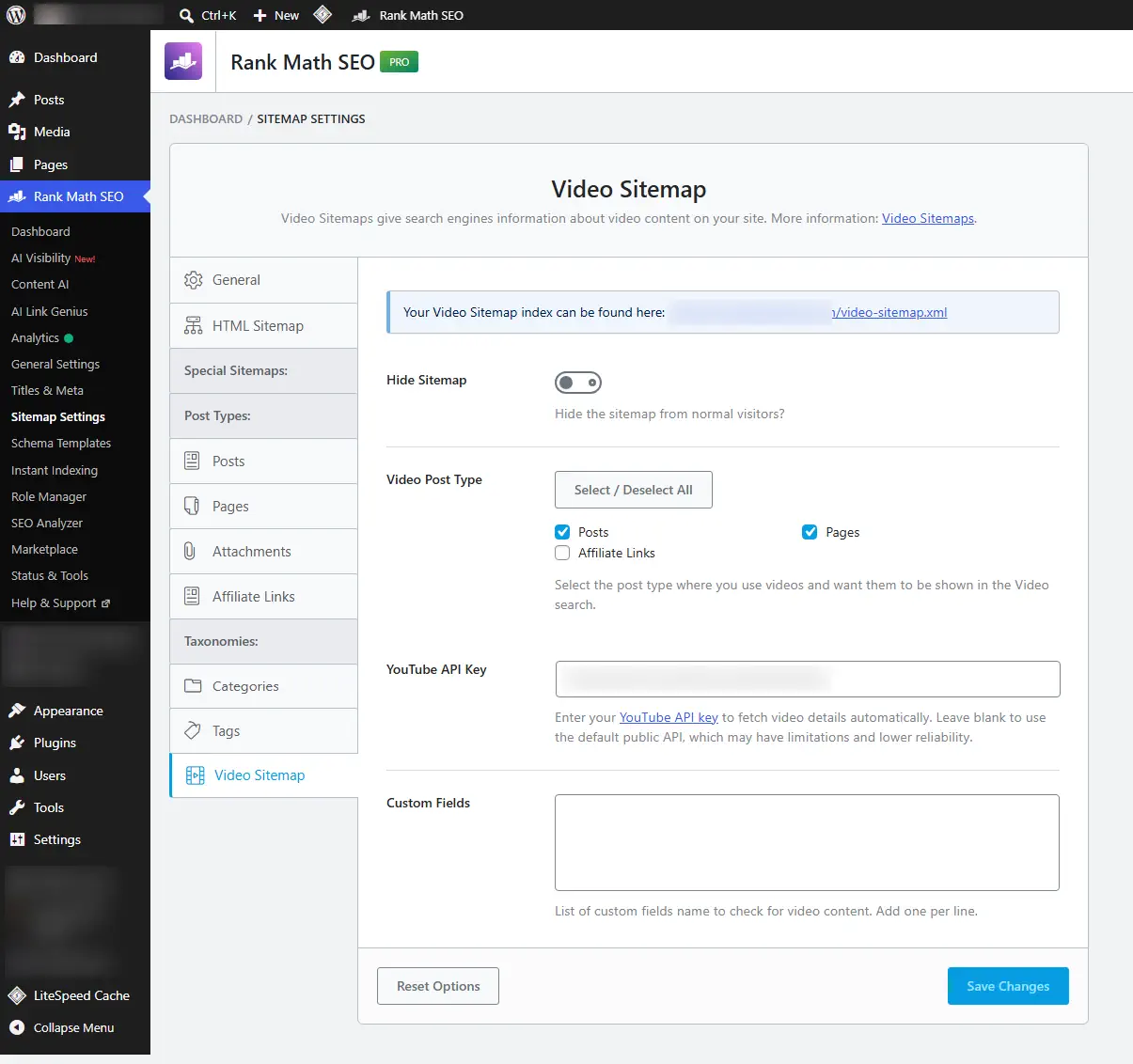
Video Sitemap is a PRO feature. To enable it, Schema and Sitemap modules need to be active. Rank Math can detect videos in selected post types and add Video Schema plus entries to the video sitemap. The official Video Sitemap documentation explains the current module requirements and settings.
YouTube Data API is optional, but it can improve metadata collection
Rank Math can use public video data, but its YouTube API documentation recommends creating a YouTube Data API key if titles, descriptions, or thumbnails are missing or inaccurate. The key uses your YouTube API quota, so do not treat it as unlimited.
Older videos can receive Video Schema retroactively
Rank Math PRO includes a Generate Video Schema for Old Posts/Pages tool that can scan configured post types, detect videos, and generate Video Schema for older content. If Rank Math becomes responsible for /video-sitemap.xml, do not leave another plugin generating a competing video sitemap on the same site.
Rank Math Analytics or Search Console shows N/A
Before dismantling the integration, check the plugin version. Rank Math Free 1.0.280, released October 6, 2026, fixed a case where Analytics sections could continue showing N/A after data was fetched.
If N/A remains on a current version, separate “no Google data exists” from “Rank Math is not displaying it.” Confirm the connected Google account, the selected Search Console/GA4 property, permissions, and whether the initial data collection completed. Then compare the same property directly in Google Search Console or Google Analytics. If Google has data but Rank Math does not, the failure is in the integration/display path rather than the underlying measurement source.
Rank Math IndexNow does not submit normal URLs to Google
IndexNow and the Google Indexing API are different systems. Rank Math’s Instant Indexing module uses IndexNow for search engines that support the protocol, such as Bing and Yandex. That does not mean Google received the URL.
Google’s Indexing API documentation limits the API to pages with JobPosting or BroadcastEvent embedded in a VideoObject. For ordinary articles, business pages, and blog posts, do not treat it as an official replacement for sitemaps, internal links, and normal crawling. IndexNow itself should be treated as a change notification, not a ranking or indexing guarantee.
Image SEO and Open Graph: what Rank Math actually changes
Rank Math’s Image SEO module can add missing ALT and TITLE attributes dynamically on the frontend. A useful detail is that this dynamic output can appear in the final HTML without being written back into the Media Library ALT field. Seeing a blank ALT field in the Media Library does not automatically prove the frontend ALT is also empty.
Even with automation, descriptive ALT text remains preferable for editorially important images. For social sharing, also verify Open Graph output and the social image. A featured image can serve as fallback, but important pages may need a dedicated social image depending on crop and aspect ratio.
Redirects, 404 Monitor, and breadcrumbs: useful tools without overusing them
Rank Math’s 404 Monitor is useful for finding broken URLs, but a 404 should not automatically be redirected to the homepage. If an equivalent replacement exists, redirecting can make sense. If the URL should never have existed, keeping a 404 may be correct.
Advanced monitoring records more context, including referrer information, but it also increases the amount of stored data. On large sites, decide whether you need that mode continuously. Breadcrumbs follow the same single-owner rule: use Rank Math breadcrumbs when they solve a real need, but avoid duplicating a complete breadcrumb system already provided by the theme.
Rank Math with Polylang or WPML: check canonicals, sitemaps, and metadata by language
Rank Math added native Polylang compatibility in version 1.0.276, removing the need for the older compatibility snippet documented by the vendor. Version 1.0.280 also fixed an issue where translated metadata could fail to appear in secondary languages with Polylang PRO.
Rank Math’s Polylang compatibility documentation and WPML documentation describe the supported integrations. Compatibility does not remove the need for frontend QA:
- confirm reciprocal hreflang relationships;
- confirm self-referencing canonicals for each language unless an exception is intentional;
- verify each URL appears in the expected sitemap;
- review SEO title, meta description, and Open Graph per language;
- test redirects and slugs after changing multilingual URL structure.
Migrating from Yoast or AIOSEO to Rank Math: import, then audit
Rank Math provides a documented Yoast migration workflow and importers for All in One SEO and other plugins. Importing makes migration easier, but it does not remove the need for verification.
- Back up the site before migration.
- Use the importer in the Setup Wizard or Status & Tools.
- Do not keep two full SEO plugins generating the same output layers.
- After import, inspect a representative sample of important URLs.
- Compare SEO titles, descriptions, robots directives, canonicals, Schema, sitemap membership, social metadata, and redirects.
- If imported posts show Score N/A, use the documented recalculation workflow when the tool is available and verify the result.
If you are still deciding whether switching plugins makes sense, our Rank Math vs Yoast SEO comparison focuses on the decision before migration.
Free vs PRO: only the troubleshooting difference that matters here
Most fixes in this guide — sitemap output, robots controls, metadata saving, REST/WAF conflicts, redirects, 404 monitoring, canonicals, and duplicate SEO output — can be diagnosed without turning this page into another pricing guide. PRO matters here mainly when the failing feature itself is paid, such as Video Sitemap or other PRO-only tooling.
For current plans, prices, feature boundaries, and which tier makes sense, use the complete Rank Math SEO Plugin Guide. If you are comparing no-cost options instead, see Best Free WordPress SEO Plugins in 2026.
Final Rank Math checklist before you call the setup complete
- [ ] Advanced Mode is enabled when you need the technical controls.
- [ ] Important posts and pages are Index.
- [ ] Categories, tags, author archives, and date archives match the site’s actual information architecture.
- [ ] Attachment pages are handled intentionally instead of being indexed empty by accident.
- [ ]
curl -I https://example.com/sitemap_index.xmlreturns a successful response such as HTTP 200, and the body is valid XML rather than HTML. - [ ] No obsolete physical
sitemap_index.xmlfile is overriding Rank Math’s virtual sitemap. - [ ] The raw sitemap begins with the XML declaration, with no whitespace, PHP warning, or other output before it.
- [ ] If Search Console reports Unsupported file format, the sitemap header,
0.9namespace, and straight XML quotation marks have been checked. - [ ] Links Per Sitemap is set to 200 unless there is a technical reason to use another value.
- [ ] Images and featured images are included according to the site’s strategy.
- [ ] Sitemap URLs are excluded from LiteSpeed or another cache layer.
- [ ] Search Console has the correct sitemap.
- [ ] Physical and virtual robots.txt files are not conflicting.
- [ ] SEO title, meta description, and focus keyword actually save.
- [ ] A metadata save request to
/wp-json/rankmath/v1/updateMetareturns a successful 2xx response when the REST path is healthy. - [ ] Rank Math REST API routes are not blocked by the firewall.
- [ ] SEO Score N/A has been recalculated when needed.
- [ ] Automated publishing workflows recalculate analysis and confirm the stored score instead of assuming that saving content updates it.
- [ ] The table of contents works for users even if Rank Math does not recognize a custom implementation.
- [ ] Only one system generates the primary Schema.
- [ ] Only one system generates canonicals and Open Graph.
- [ ] Video Sitemap has a single generator when enabled.
- [ ] A YouTube API key is configured if automatic video metadata is inaccurate.
- [ ] IndexNow is not being confused with the Google Indexing API.
- [ ] Image SEO has been verified in final HTML.
- [ ] The 404 Monitor is used for diagnosis, not as a reason to redirect every 404 to the homepage.
- [ ] Custom canonicals have been checked against sitemap membership.
- [ ] Polylang/WPML, hreflang, and canonicals have been verified on the frontend.
- [ ] A Yoast/AIOSEO migration has been audited on real URLs after import.
How to keep the same Rank Math problems from coming back
Rank Math becomes easier to troubleshoot when every SEO layer has one clear owner and every fix has an observable result. Keep one sitemap generator, one canonical owner, one primary Schema system, and one deliberate place for redirects. When a symptom appears, reproduce it first, change one layer, and retest before moving on.
If an error looks like a “Rank Math problem,” test the boundary around Rank Math before reinstalling or resetting it. Public sitemap response, REST status, final page source, cache behavior, and Health Check conflict isolation usually tell you whether the failure belongs to the plugin, WordPress, the theme, security, or the server.
If you are still choosing a plan rather than fixing an installed site, use the complete Rank Math SEO Plugin Guide for plans, pricing, features, and MCP coverage.
Affiliate disclosure: Some links in this article are affiliate links. Web Choice Desk may earn a commission from qualifying purchases at no extra cost to you. Technical facts were rechecked on October 7, 2026 and can change.
Related reading
- Rank Math SEO Plugin Guide 2026 — plans, pricing, full feature map, Content AI, AI Link Genius, and MCP.
- Rank Math vs Yoast SEO — for deciding whether switching SEO plugins makes sense.
- Best Free WordPress SEO Plugins in 2026 — if you are comparing free alternatives.
Frequently asked questions about Rank Math
Compare /?sitemap=1 with /sitemap_index.xml first. If the query version returns XML but the friendly URL fails, focus on permalinks, rewrite rules, cache, a physical sitemap file, or server configuration. If both fail, also test Rank Math settings and plugin/theme conflicts.
Treat Couldn’t fetch as a status, not a diagnosis. Confirm that the public sitemap returns HTTP 200 and valid XML, that it belongs to the correct Search Console property, that sitemap URLs are not cached, and that Google’s last-read time is current.
It means the sitemap request returned HTML instead of XML. Check whether the response is a 404 page, maintenance page, login or security challenge, cached HTML, or another non-XML response, then fix that layer before resubmitting the sitemap.
Imported or API-created content can have stale or missing Rank Math analysis. Use the available database recalculation tools when appropriate and, in automated workflows, confirm that Rank Math analysis was actually recomputed rather than assuming a normal post save updates the score.
Watch the /wp-json/rankmath/v1/updateMeta request in your browser Network panel while saving. A 401 or 403 points toward permissions, a WAF, or security rules; a 5xx points toward server/PHP execution; a successful response shifts attention to JavaScript or plugin/theme conflicts.
No. IndexNow is a separate notification protocol used by participating search engines. Google’s Indexing API is separate and is officially limited to specific content types such as JobPosting and BroadcastEvent in VideoObject.